

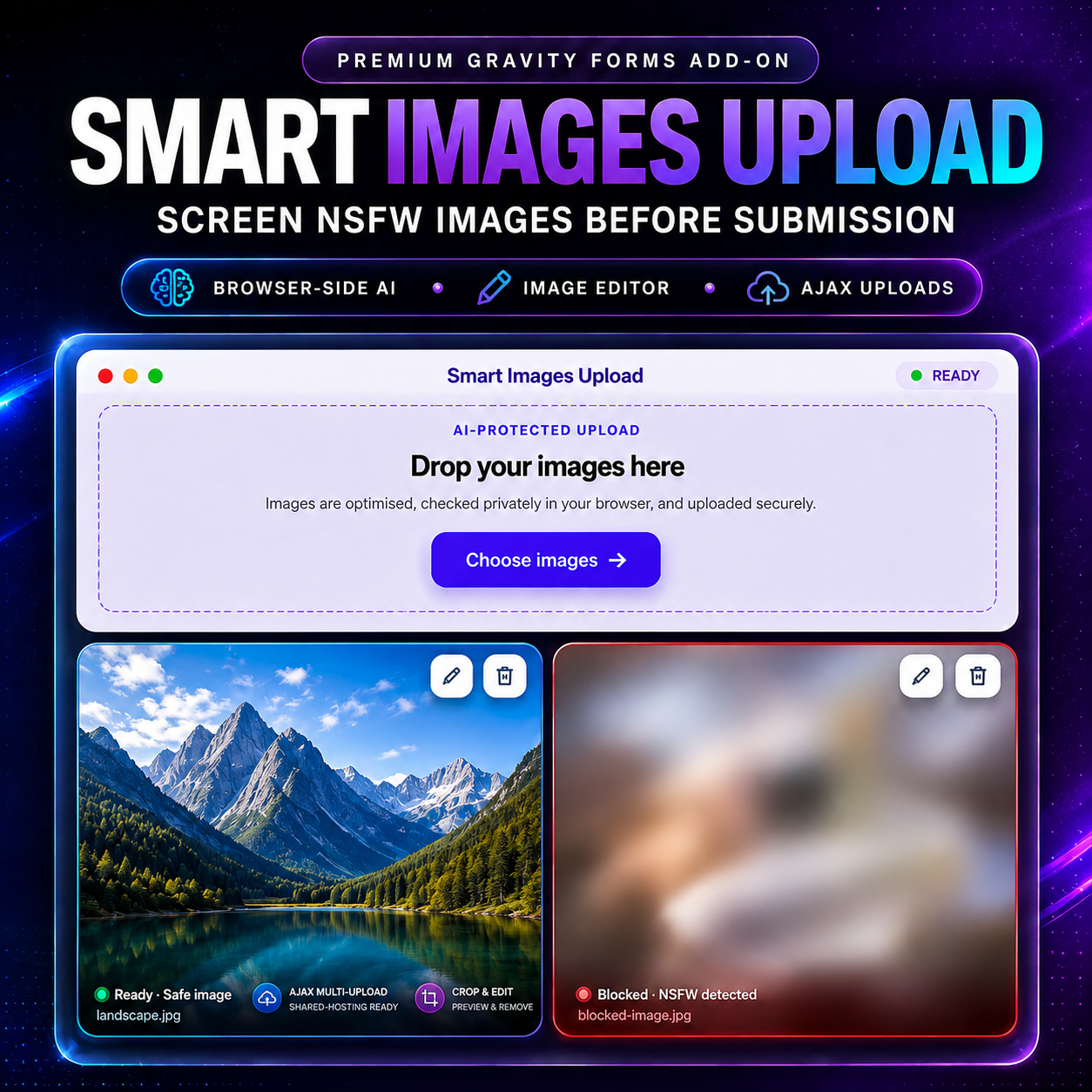
A SMARTER, SAFER IMAGE UPLOAD EXPERIENCE FOR GRAVITY FORMS
How Smart Images Upload for Gravity Forms combines browser-based AI moderation, reliable multi-image AJAX uploads, a premium image editor, and a better entry-review experience—without requiring an external moderation API.
If your Gravity Forms workflow accepts images, a standard file-upload field can quickly become the weakest part of the form.
Users may need to select several photos, confirm that they chose the right files, crop an image, adjust its orientation, or remove something before submitting. Site owners, meanwhile, need to reduce inappropriate submissions, avoid oversized requests, and review uploaded files without manually turning a list of URLs into a usable gallery.
That is the problem Smart Images Upload for Gravity Forms was built to solve.
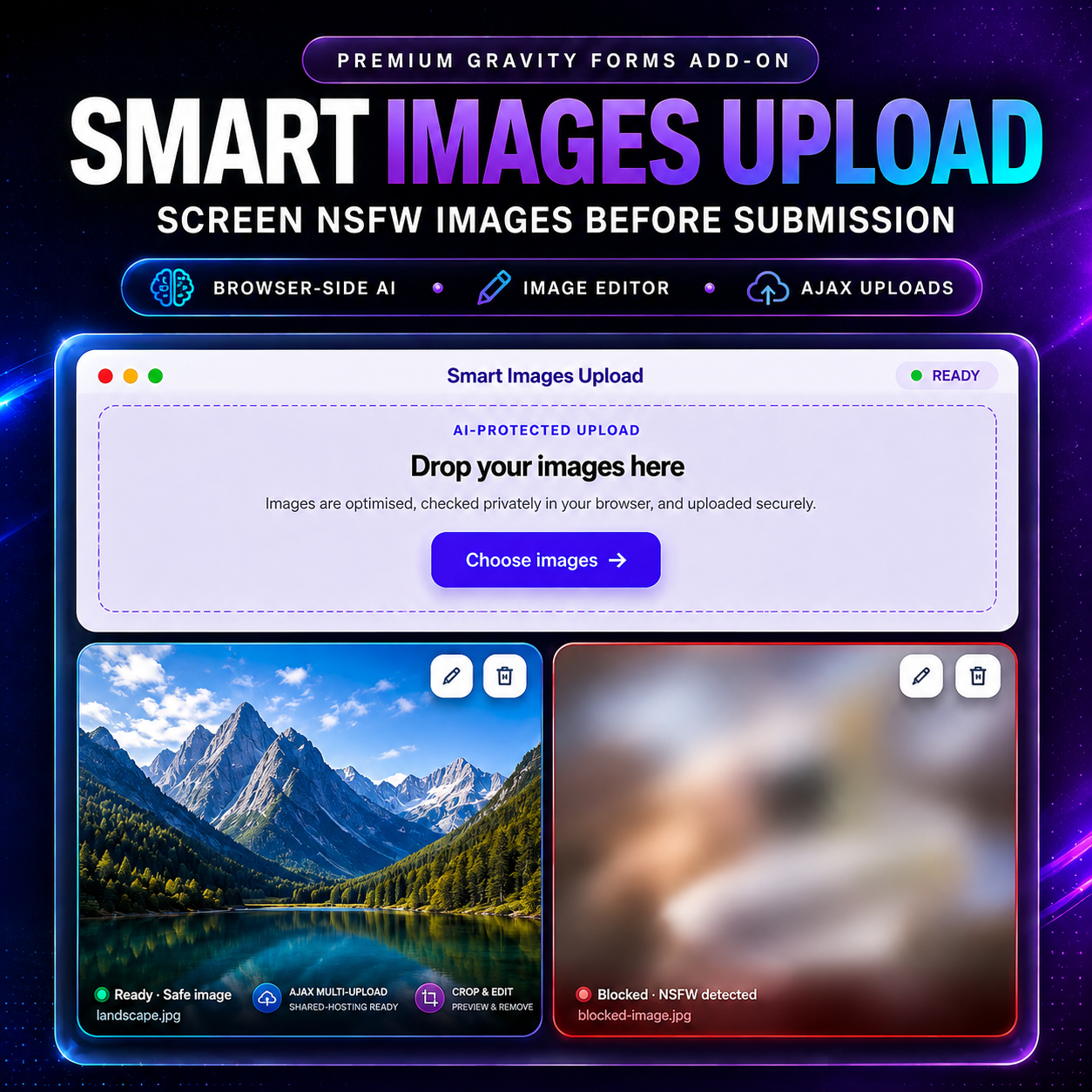
The add-on turns image submission into a complete workflow: visitors can drag and drop multiple images, review large previews, edit them on desktop or mobile, and submit through a more reliable upload process. At the same time, a TensorFlow.js-powered model helps detect and block images classified as Porn, Hentai, or Sexy before they are accepted through the normal form workflow.
The result is more than an upload field. It is a premium image collection and moderation experience designed specifically for Gravity Forms.
TRY THE LIVE DEMO
Open the live Smart Images Upload demo and test the multi-image uploader, editor, and browser-based moderation workflow yourself:
WHY AN ORDINARY FILE-UPLOAD FIELD IS NOT ENOUGH
A basic uploader may be acceptable when a form needs one small attachment. It becomes limiting when images are central to the workflow.
Consider forms used for:
• Property and directory listings
• Product or service submissions
• Profile and membership photos
• Support screenshots
• Project portfolios
• Community content
• Verification and documentation
• School, organization, or event submissions
In these situations, users often need more than a file picker. They need clear previews, editing controls, progress feedback, and confidence that every selected image is ready before the form is submitted.
Public forms create another challenge: content safety. An unprotected upload field can be used to submit explicit material, while many conventional moderation solutions require sending every image to a paid third-party service.
Smart Images Upload for Gravity Forms brings those needs together in one native Gravity Forms field.
BROWSER-BASED AI MODERATION WITH TENSORFLOW.JS
The add-on uses a deep-learning image classifier through TensorFlow.js. Classification takes place in the visitor’s browser, so image pixels are not sent to an external moderation service just to receive a verdict.
That means there is:
• No moderation API key to configure
• No usage-based image-scanning bill
• No dependency on an external moderation response for every upload
• Less privacy exposure during the classification step
The moderation policy helps detect content classified as Porn, Hentai, or Sexy. Ordinary drawings and neutral images are allowed rather than treating every illustration as adult content.
When an image is flagged, its frontend preview is blurred and clearly labeled as blocked. The user can still remove it or open the editor. This preserves privacy for anyone looking at the screen while giving the uploader a practical way to correct an image when appropriate.
As with any automated classifier, results can vary. The feature is designed as an additional moderation layer—not a claim of perfect detection or a replacement for sensible administrative review.
Because screening takes place in the browser, it should be treated as a practical frontend moderation layer rather than tamper-proof server-side enforcement. Workflows with strict safety or compliance requirements should combine it with administrator review or additional server-side controls.
WHAT HAPPENS WHEN A VISITOR CHOOSES IMAGES?
The entire workflow is designed to feel continuous:
1. The visitor selects or drops multiple browser-readable images into the field.
2. Each image is optimized for web upload and shown in a large preview card.
3. The TensorFlow.js model screens the image in the browser.
4. A safe image is uploaded individually to the WordPress site through AJAX.
5. A flagged image stays blocked, blurred, and clearly labeled while Edit and Remove remain available.
6. If the visitor crops a flagged image, the actual cropped pixels are screened again.
7. Gravity Forms submits compact accepted-image URLs after all pending uploads finish.
This is what makes the add-on different from an AI badge added to a file input: moderation, editing, upload delivery, and final entry review are part of one connected system.
A SAFER EDITING POLICY, NOT AN EASY FILTER BYPASS
Image editing and automated moderation can interact in unexpected ways. A simple implementation may flag a safe grayscale image, keep an image blocked after explicit content has been cropped away, or accidentally allow a visual filter to change a model verdict.
Smart Images Upload handles these cases deliberately.
• Crops are checked again. If a user removes the inappropriate part of a blocked image and the cropped result is classified as safe, that edited image can proceed.
• Appearance-only edits preserve the existing verdict. Filters and flips do not cause a previously safe image to be falsely flagged simply because its colors changed.
• A blocked image cannot become safe through a filter alone. Blurring, grayscale, color effects, or flips do not bypass the original blocked verdict.
This creates a useful balance: legitimate corrective cropping is supported, while cosmetic edits cannot be used as a shortcut around moderation.
A PREMIUM FRONTEND UPLOAD EXPERIENCE
The upload area is designed to feel like part of a polished product rather than a browser’s default file input.
Visitors get:
• Multi-image selection and drag-and-drop uploading
• Large, responsive preview cards
• Clear filename and upload-status information
• Checking, uploading, ready, safe, and blocked states
• Blurred previews for flagged content
• Accessible SVG controls with tooltips
• Simple Edit and Remove actions for every preview
The field also supports Gravity Forms conditional logic, so it can appear only when a user’s previous answers require image uploads.
Browser-readable images are prepared for web submission and normalized to an upload-friendly JPEG. Large images are resized and compressed—up to 1600 pixels with a target size of roughly 400 KB—helping improve upload speed and reduce unnecessary server load.
CROP, ZOOM, FLIP, UNDO, AND FILTERS
The built-in image editor gives users the tools they are likely to need without sending them to another application.
It includes:
• Crop with touch and pointer controls
• Zoom in, zoom out, and reset zoom
• Crop coordinates that stay aligned while zooming
• Horizontal and vertical flip
• Undo and redo
• Reset to the original image
• Eleven creative effects plus an Original preset
• Live filter previews using the current image
• Pixel-based filter processing designed for modern browsers, including Safari
Available effects include Mono, Sepia, Vivid, Warm, Cool, Contrast, Bright, Fade, Noir, Vintage, and Aqua.
The editor has also been refined for smaller screens. Its toolbar adapts between portrait and landscape layouts, rows and columns remain centered, filter controls stay clear of editing buttons, and the background form is locked while editing. When the editor closes, the page returns to its exact previous position and becomes scrollable again.
These details matter on phones and tablets—especially when a visitor is cropping an image with touch controls or working in iPad landscape mode.
MORE RELIABLE UPLOADS ON REAL HOSTING ENVIRONMENTS
Multi-image forms can fail even when PHP settings such as post_max_size and upload_max_filesize look generous. Some web servers reject an oversized request body with a 413 error before WordPress or PHP receives the form at all.
Smart Images Upload avoids placing every image into one enormous base64 form submission. Instead, approved images are uploaded individually through AJAX as they become ready. The final Gravity Forms submission contains compact URLs rather than a large bundle of image data.
This approach:
• Reduces failures caused by oversized form requests
• Avoids one large upload blocking the entire submission
• Gives each preview its own upload state
• Allows the form to wait for pending image uploads before submitting
• Scales more gracefully when a user selects several images
Hosting limits, network conditions, storage, and server configuration still matter, but one-by-one AJAX uploading removes a major source of multi-image submission failures—particularly on shared hosting and LiteSpeed environments.
Accepted files are stored on the WordPress site through the WordPress upload system. They are not sent to an external image-moderation service for classification.
A BETTER GRAVITY FORMS ENTRY EXPERIENCE
The improved experience continues after the form is submitted.
Instead of forcing administrators to search entry text, split URL strings with custom JavaScript, and manually create image elements, the add-on renders a structured image gallery in Gravity Forms entry screens.
Administrators can see:
• Responsive image thumbnails
• The number of accepted images
• Original filenames
• Direct links to open submitted files
• A premium overlay viewer for larger inspection
The entry viewer includes previous and next navigation, keyboard arrows, swipe gestures, a counter, thumbnail navigation, zoom controls, and responsive desktop and mobile layouts.
It also provides non-destructive crop, filter, flip, and download tools. These entry-side edits are intentionally local previews: they do not overwrite the original submission or silently change the Gravity Forms entry. An administrator can download the edited version when a separate copy is needed.
BUILT TO FEEL NATIVE TO GRAVITY FORMS
Smart Images Upload appears as its own field inside the Gravity Forms editor and works with the form-building workflow users already know.
Configuration is kept in familiar places:
• Add the Smart Images Upload field from the Gravity Forms editor
• Use Gravity Forms conditional logic when needed
• Access the license screen through Forms → Settings
• Open the same settings area from the Plugins screen shortcut
There is no separate moderation dashboard or external API account to maintain.
WHO IS SMART IMAGES UPLOAD FOR?
This add-on is especially useful for:
• WordPress agencies delivering premium client forms
• Gravity Forms developers who would otherwise need a custom TensorFlow.js integration
• Directories and listing sites collecting multiple photos
• Membership sites accepting profile or verification images
• Marketplaces collecting product or service imagery
• Support teams receiving screenshots and diagnostic photos
• Community platforms handling user-generated images
• Organizations that want browser-based image safety without a recurring moderation API
If image submission is an important part of the form—not merely an occasional attachment—the difference in usability is immediately visible.
ONE FIELD, A COMPLETE IMAGE WORKFLOW
Smart Images Upload for Gravity Forms combines four capabilities that are usually built separately:
1. A polished multi-image uploader
2. Browser-based AI content classification
3. A responsive crop and filter editor
4. A structured administrative gallery and viewer
It helps visitors submit better images, helps reduce inappropriate uploads, reduces the risk of oversized form requests, and gives administrators a more professional way to inspect the final entry.
Most importantly, it does all of this inside the Gravity Forms workflow you already use.
SEE IT IN ACTION
Try the live demo:
View Smart Images Upload for Gravity Forms for current pricing, licensing details, and product updates:
Comments ()