
Home Tasks & History: Google Sheets Tracker
Google account required; desktop Google Sheets tested.
Keep the next task and the last time you did it in one place.
Home Tasks & History is a Google Sheets template for your own recurring household tasks. Set your intervals in days or months, add each completion to the history, and the next due date updates from the latest valid completion. Earlier records stay in the history.
Prefer handwritten equipment, repair and warranty records? Explore the printable Home Maintenance Planner.
Your download includes:
- A blank template and a separate fictional example, accessed through links in the PDF guide
- Four spreadsheet tabs: Start Here, Tasks, Completion History, and Due List
- Space for 100 tasks total, including archived tasks, and 1,000 completion records
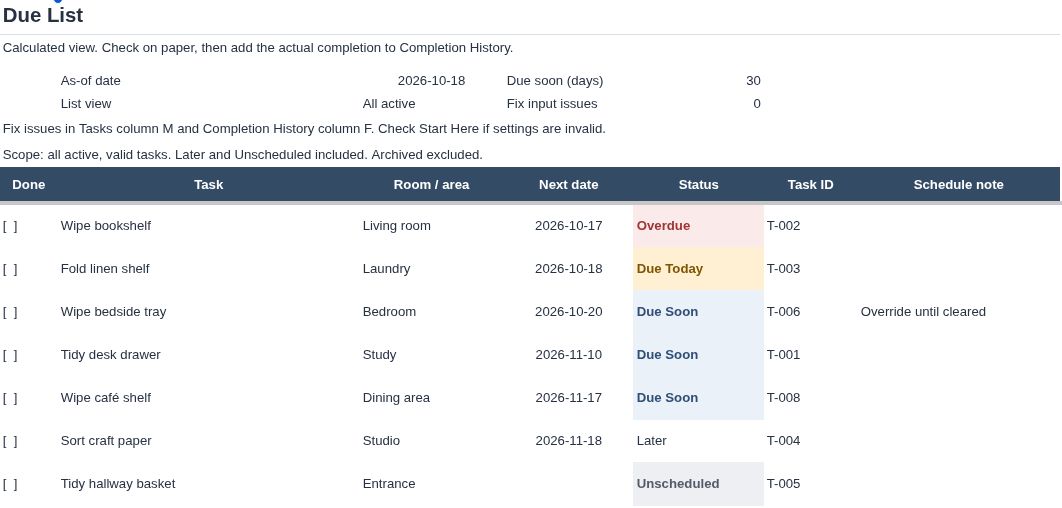
- A dated due list with Overdue, Due Today, Due Soon, Later, and Unscheduled statuses
- Optional next-date overrides and an adjustable due-soon window
- Three-page access and quick-start guides in US Letter and A4 sizes
- An actual screenshot of the fictional example
How it works
Open the clean template and choose File > Make a copy in Google Sheets. Enter your tasks in the amber input cells. Add a new history row whenever you complete a task. Review the Due List and any input-issue messages. The example has fictional tasks and a fixed planning date so you can explore the workflow before starting your own copy.
Please read before buying
- This is a native Google Sheets template. A Google account, internet connection, and a desktop browser are required. No paid add-on is required.
- In our signed-out cloud browser, both template links led to Google's Choose an account sign-in page. Anonymous viewing and completed different-account copying remain unverified.
- Desktop Google Sheets editing, recalculation, save/reopen, and copying within the same account were tested. A completed copy in a different Google account has not been tested. Native Excel, mobile, offline use, and downloaded or re-imported spreadsheet versions are untested.
- Formula-edit warning prompts help avoid accidental changes; owners can override them. They are not access security.
- You enter each completion manually. The template does not send notifications or automatically record completed tasks.
- Task names, dates, and recurring intervals are chosen by you. The fictional examples are not professional maintenance advice. Follow applicable manufacturer instructions and qualified advice for safety-critical work.
- The prepared capacity is 100 tasks and 1,000 completion records. Do not add rows beyond those prepared ranges.
For printing, the guide explains how to print a selected Due List range. The seven-row example was checked in Google Sheets' landscape Letter print preview. Actual printer output has not been tested.
License
For personal household use. You may use the files and make copies for your own household. You may not resell, redistribute or publicly upload the files, or use them for commercial property management. No additional edition or service is included.
Support
If an access link stops working, use the contact or support option on your purchase page. Never send passwords or sensitive household details.
Delivery
A ZIP download containing two access/quick-start PDFs, an example screenshot, a plain-text README and the embedded font license. The Google Sheets templates are opened through the PDF links and copied to your Google Drive. No Excel workbook is included in this native edition.