

Student Life OS Mini web app — All-in-One Student Workspace
Student Life OS 🌱
Aesthetic All-in-One Student Workspace
Explore the live demo of Student Life OS Mini web app:
🔗 See how it works: https://tinyurl.com/yfcrsb43
Your student life doesn't have to feel like 20 different things happening at once.
Assignments to submit. Exams to prepare for. Notes to organize. Habits to build. Goals to chase. Money to manage. A future to plan.
And somewhere between all of that, you're supposed to find time for yourself.
It's easy to feel busy all day and still wonder whether you're making progress.
Student Life OS is designed to help you bring the different parts of student life into one organized digital workspace.
Instead of constantly switching between scattered lists, forgotten deadlines, and disconnected plans, create a clearer picture of what needs your attention and what you're working toward.
🌿 One workspace. Your academics. Your personal growth. Your next chapter.
✨ Meet Your New Student Workspace
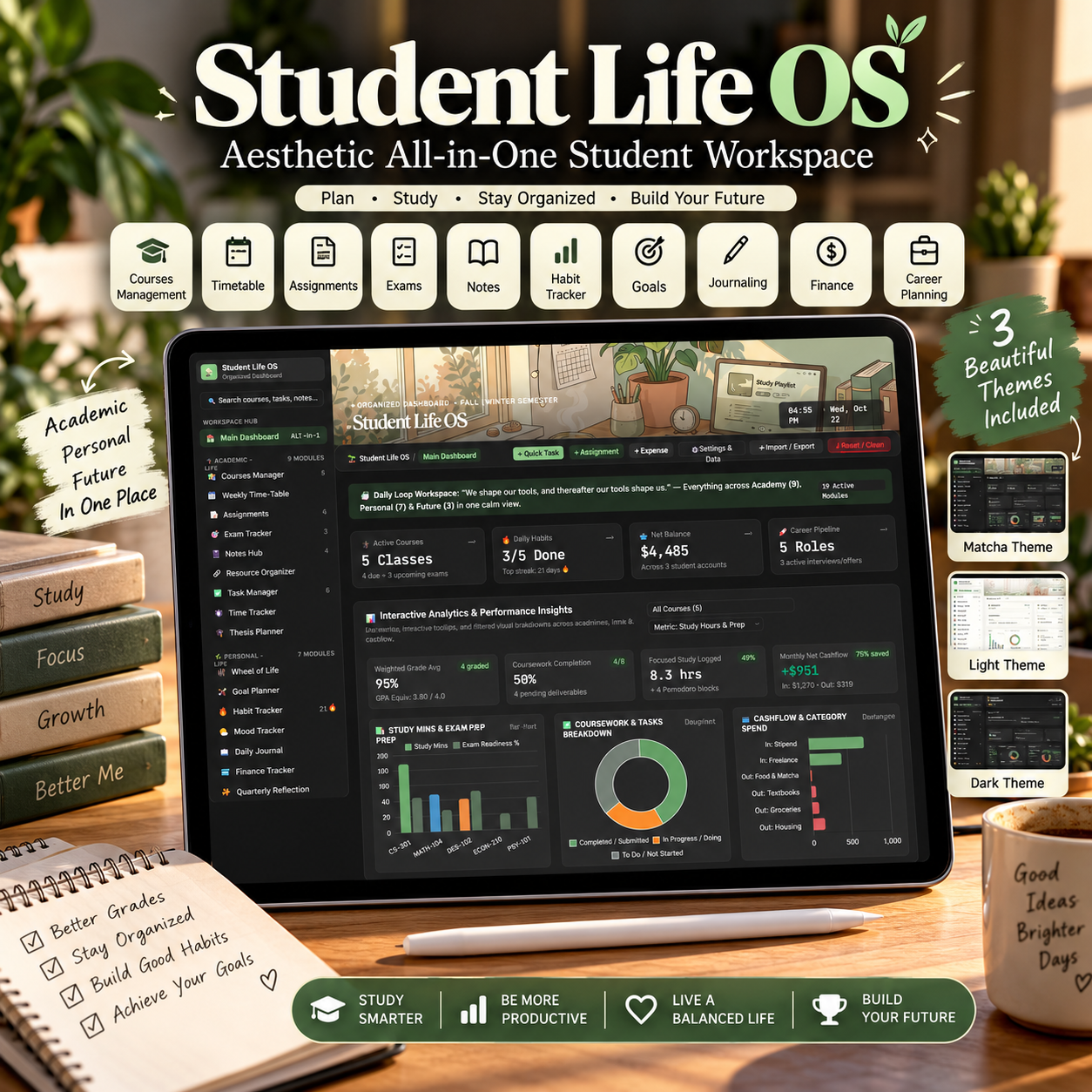
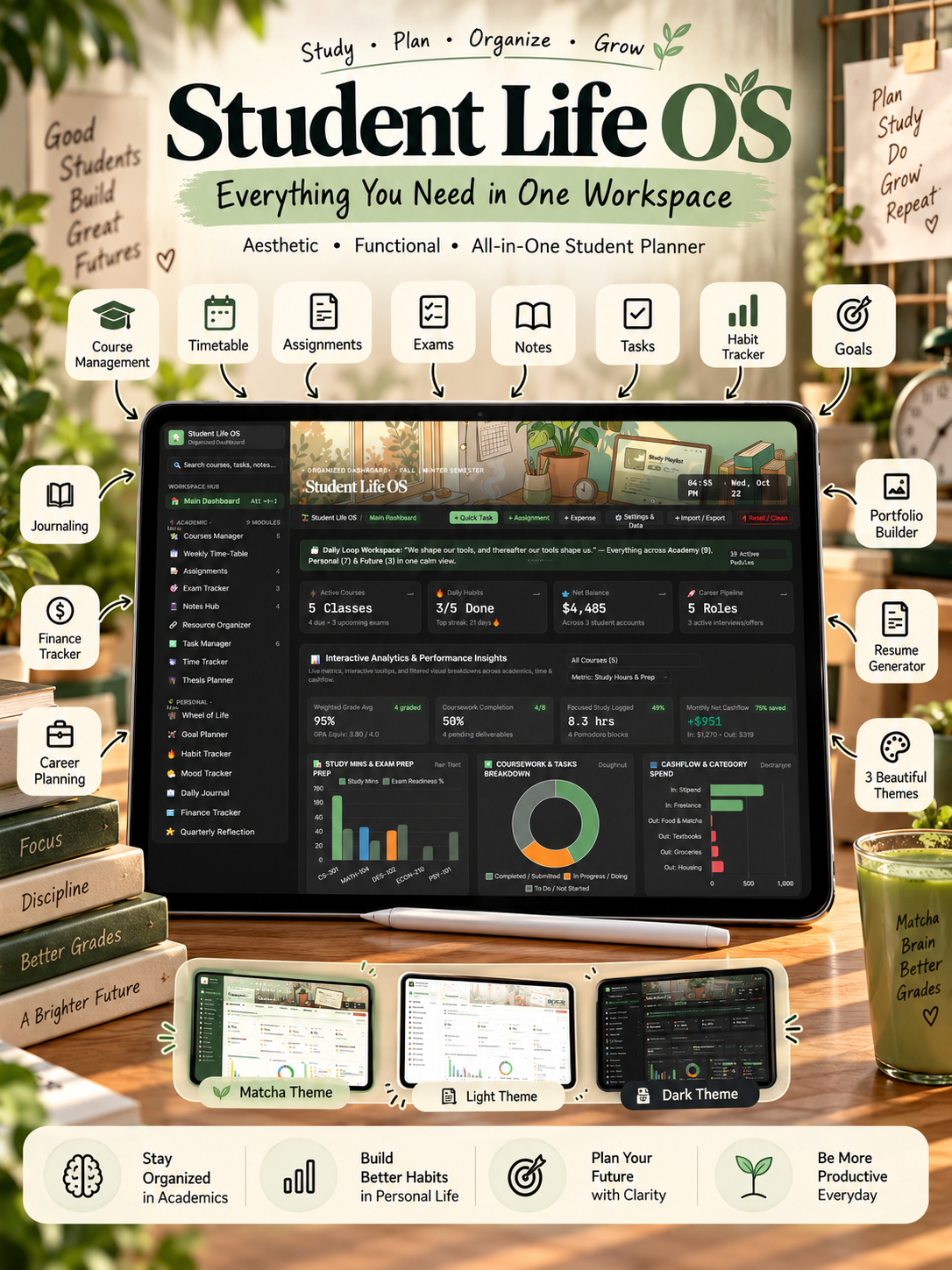
Student Life OS brings academic organization, personal development, and career preparation together in one aesthetic HTML-based dashboard.
Designed with a calming matcha-inspired interface, it combines practical organization tools with a clean, distraction-conscious visual experience.
Whether you're planning your semester, preparing for exams, tracking your habits, or figuring out your next career move, Student Life OS gives you a central place to organize your efforts.
📚 Academic-Life: Organize Your Studies
- Courses Manager — Keep your courses and academic information organized.
- Assignments — Manage coursework and keep track of submission progress.
- Exam Tracker — Organize your exam preparation.
- Notes Hub — Keep your study notes organized.
- Task Manager — Track tasks and your next actions.
- Time Tracker — Monitor time spent on focused work.
- Thesis Planner — Organize longer academic projects.
🌿 Personal-Life: Build Better Routines
- Wheel of Life — Reflect on different areas of your life.
- Goal Planner — Organize your goals and intended progress.
- Habit Tracker — Track routines you want to build consistently.
- Mood Tracker — Record and reflect on your mood.
- Daily Journal — Create space for daily thoughts and reflection.
- Finance Tracker — Organize your personal financial tracking.
🚀 Career-Life: Prepare for What's Next
- Career Tracker — Organize career-related activities.
- Resume — Manage your résumé-related information.
- Portfolio — Organize portfolio-related work and information.
📝 Additional Workspace Modules
The workspace also includes:
- Main Dashboard
- Timetable
- Goals
- Journal
- Mood tracking
- Resources
- Reflection
These sit alongside the academic and personal modules, creating a connected environment for managing different priorities.
The workspace includes 20 connected modules across three life pillars, with some modules serving as dedicated views for related areas.
🌱 Why Student Life OS?
Because being a student is about more than studying.
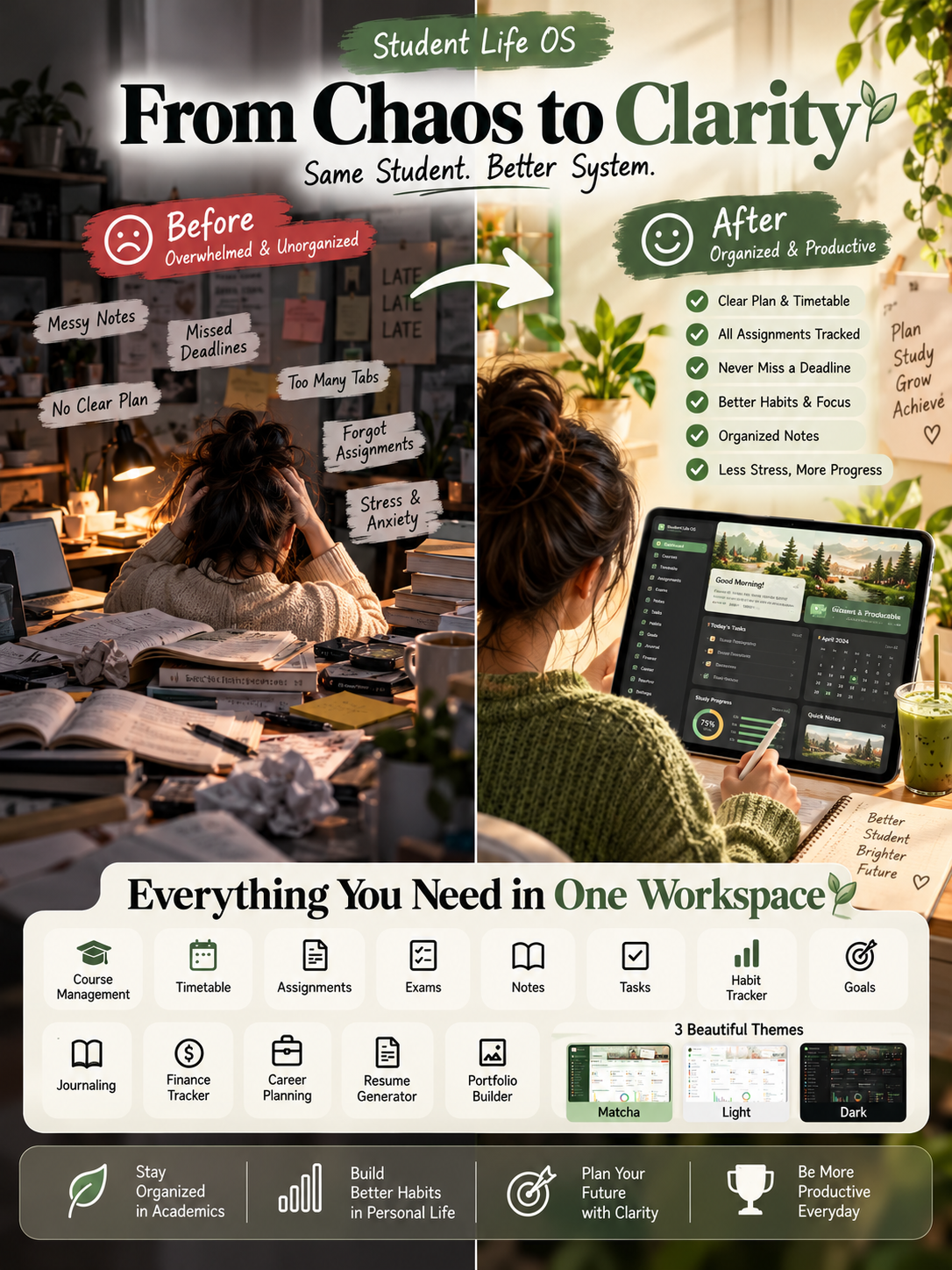
You might start Monday with a plan.
Then an assignment takes longer than expected. An exam comes closer. A habit slips. A personal task gets forgotten. Suddenly, your entire week feels reactive.
You spend more time remembering what you need to do than actually doing it.
And even when you work hard, it can be difficult to see how far you've come.
Student Life OS is built around a simpler approach: give your responsibilities a place, make your priorities easier to see, and create a routine you can return to.
You don't need to organize your entire life perfectly in one day.
Start with your courses. Add your upcoming tasks. Track a habit. Make a realistic plan for tomorrow.
One small step at a time, you can begin creating a more intentional student routine.
The goal isn't to become a perfect student. It's to make student life easier to navigate.
🎨 A Workspace You'll Want to Come Back To
Organization should feel inviting, not overwhelming.
Student Life OS features a thoughtfully styled interface with three visual themes:
- 🍵 Matcha — A calming sage-green and warm-neutral aesthetic.
- ☀️ Light — A clean, bright interface.
- 🌙 Dark — A darker interface for a different visual preference.
The design combines readable typography, structured cards, clear navigation, and a consistent visual system.
Spend less effort figuring out where things belong and more effort deciding what deserves your attention.
💚 What Makes It Different?
It's designed around your whole student life.
Many planning systems focus on just one part of the student experience. Student Life OS brings academic responsibilities, personal routines, financial tracking, reflection, and career preparation into one workspace.
Instead of treating every area as a separate project, you can build a more connected view of your priorities.
Your potential everyday workflow
- Open your dashboard and review your priorities.
- Check your coursework and upcoming responsibilities.
- Plan focused study time.
- Record habits and personal progress.
- Make space for reflection and longer-term goals.
- Review what needs attention next.
Adapt the workflow to your schedule, your course load, and your own way of studying.
📦 What You'll Receive
Your purchase includes:
- Student Life OS — The digital HTML student workspace.
- Academic organization tools for courses, assignments, exams, notes, tasks, and study time.
- Personal organization tools for goals, habits, journaling, mood, and finance tracking.
- Career organization tools for career activities, résumé information, and portfolio-related work.
- Three visual themes — Matcha, Light, and Dark.
- A central dashboard for navigating your workspace.
Format: HTML digital workspace
Product type: Digital download
Access: Open the HTML file in a compatible web browser.
This is a digital product, not a physical planner or a printed book.
🎯 Who Is Student Life OS For?
Student Life OS is for:
- College and university students juggling multiple courses.
- Students who want a more organized exam-preparation routine.
- Students who struggle to keep assignments and personal tasks in one place.
- Students building better study habits and daily routines.
- Students who enjoy clean, aesthetic productivity tools.
- Students balancing education, personal goals, and career preparation.
- Anyone looking for a central digital workspace for student life.
Who Should Not Buy?
This workspace may not be the right fit if you:
- Prefer a physical paper planner.
- Want a ready-made tutoring course or academic textbook.
- Need a cloud-based collaborative workspace with shared team access.
- Expect a productivity tool to automatically complete assignments or guarantee better grades.
- Need a native mobile app rather than a browser-based HTML workspace.
💡 A Small Reminder for Your Future Self
Imagine opening your workspace at the start of a busy week.
Your priorities have a place. Your upcoming assignments are easier to review. Your study sessions have a plan. Your personal goals haven't disappeared behind your academic workload.
You still have challenges. You still have difficult days.
But instead of carrying every responsibility around in your head, you have a place to return to and decide what comes next.
That is what Student Life OS is designed to help you work toward: less scattered planning, more intentional progress, and a student routine that feels more manageable.
You don't need to change everything overnight.
You just need a place to start.
❓ Frequently Asked Questions
1. What is Student Life OS?
Student Life OS is an aesthetic, all-in-one digital workspace built around academic organization, personal productivity, and career preparation.
2. Is this a physical planner?
No. It is a digital HTML workspace that you open in a compatible web browser.
3. How do I access it?
Download the supplied HTML file, save it to your device, and open it in a compatible browser such as Chrome, Edge, Firefox, Safari, or Brave.
4. Do I need to install a separate application?
The workspace is browser-based and is designed to open as an HTML file. You do not need to treat it as a conventional desktop application.
5. Which areas of student life does it cover?
It includes tools for academic planning, personal routines, goals, reflection, finance tracking, and career organization.
6. Can I change the appearance?
Yes. The interface includes Matcha, Light, and Dark themes.
7. Will it automatically improve my grades?
No tool can guarantee academic results. Student Life OS is intended to support organization and planning; your results depend on how you use it and other factors in your studies.
8. Is this a subscription?
This listing is for a digital product purchase. Check the purchase page for the exact price and applicable terms.
9. Is the product suitable for mobile?
It is an HTML workspace. Your experience will depend on your device, browser, and screen size. For the most comfortable experience with a multi-section dashboard, a laptop or desktop may be preferable.
10. Will I receive a physical item?
No. Your product is delivered digitally.
🌿 Start Building a More Organized Student Life
You have goals worth pursuing, subjects worth understanding, and a future worth preparing for.
Your planning system should help you move toward them—not become another responsibility to manage.
Bring your academic tasks, personal routines, and future plans into one digital workspace.
Get Student Life OS and create a student routine that works for you.
🌱 One workspace. Clearer priorities. Your next step starts here.