







Ultimate Finance OS Mini web app
Ultimate Finance OS Mini web app
Your Entire Financial Life. One Private Dashboard.
Your money deserves more than scattered spreadsheets, forgotten subscriptions, and disconnected financial trackers.
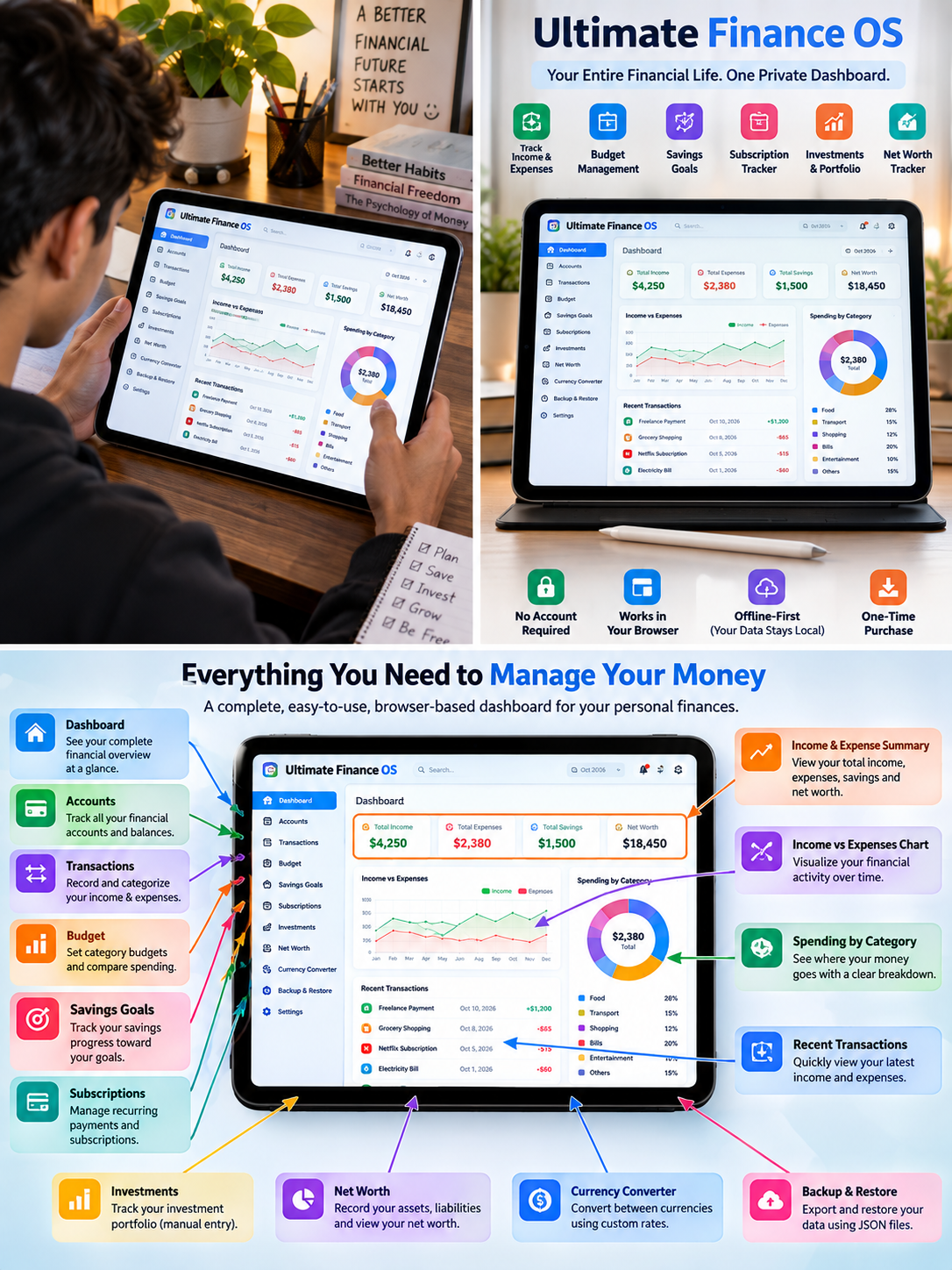
Ultimate Finance OS brings your personal finances together in one organized, browser-based dashboard. Track your income and expenses, plan budgets, monitor savings goals, manage subscriptions, record investments, and understand your overall net worth — all from one place.
No complicated installation. No account registration required. No monthly software subscription.
Just open the HTML file in a supported browser and start organizing your financial life.
💰 Take Control of Your Complete Financial Picture
1. Personal Finance Dashboard
Get a clearer overview of your financial activity with a centralized dashboard designed to help you review your money without jumping between multiple files.
- Review your recorded financial information in one place.
- Monitor income and expenses.
- Track budgets and savings goals.
- View your recorded assets, liabilities, and net worth.
- Build a consistent money-review routine.
2. Accounts & Balances
Keep track of the accounts and balances you choose to record.
- Organize financial accounts.
- Record account balances.
- Maintain a consolidated view of your recorded finances.
- Update your information whenever your circumstances change.
3. Income & Expense Tracking
Understand where your money comes from and where it goes.
- Record income and expenses.
- Organize transactions using categories.
- Review your spending patterns.
- Keep financial records organized for regular reviews.
4. Budget Management
Give your money a plan before the month gets busy.
- Set budgets for spending categories.
- Compare recorded spending against your planned amounts.
- Identify categories that need attention.
- Make more informed budgeting decisions.
5. Savings Goals
Turn financial intentions into trackable goals.
- Create savings goals.
- Record your progress.
- Monitor how much you have saved toward each goal.
- Stay focused on your next financial milestone.
6. Subscription Tracker
Keep a record of recurring payments so they are easier to review.
- Record subscriptions and recurring expenses.
- Track the payment details you enter.
- Review upcoming or ongoing commitments.
- Identify subscriptions you may want to reconsider.
Please note: Subscription records are for tracking and review. The app does not automatically charge payments or cancel subscriptions.
7. Assets, Liabilities & Net Worth
Build a more complete picture of your recorded financial position.
- Record assets.
- Track liabilities.
- Review your recorded net worth.
- Update figures as your financial situation changes.
Your dashboard reflects the information you enter. It does not independently verify account balances or financial data.
8. Investment Portfolio Tracker
Keep your manually recorded investment information organized.
- Record investments in your portfolio.
- Maintain your own investment records.
- Update prices or values manually when needed.
- Review your portfolio information alongside your broader finances.
Please note: This is a manual tracking tool, not a live market-data platform. Investment values are only as current as the information you enter.
9. Currency Converter
Use the currency conversion feature to help organize calculations involving different currencies.
- Work with custom exchange rates.
- Adjust rates when needed.
- Use the rates you enter for your own calculations.
Please note: Exchange rates are not guaranteed to update automatically. Verify rates independently before making financial decisions.
10. Backup & Restore
Keep a backup of your records and restore supported data when needed.
- Export your supported data to JSON.
- Save backups for future use.
- Restore data using a compatible backup file.
- Keep a separate copy of important financial records.
Best practice: Export backups regularly and store them somewhere safe.
🔒 Privacy-Conscious, Browser-Based Design
Ultimate Finance OS is designed to run locally in your browser without requiring a product account or cloud login.
Your records are stored using browser local storage, rather than being automatically synced to an online account by the app.
Keep in mind that browser local storage is not the same as encrypted storage. Other people who can access your browser profile or device may be able to access your records. Clearing browser data, using private browsing, or changing browsers can affect access to saved information.
For important records, maintain regular backups and protect access to your device.
⚡ Why Choose Ultimate Finance OS?
- One organized workspace: Bring multiple personal finance tracking tasks together.
- Simple access: Open the included HTML file in a supported browser.
- No required account: Start without registering for a separate app account.
- No monthly software subscription: Pay for the digital product rather than a recurring app plan.
- Flexible tracking: Enter and update the information relevant to your financial life.
- Manual control: You decide which information and values to record.
- Backup support: Export and restore supported data using JSON files.
- Made for regular reviews: Create a repeatable routine for checking your financial picture.
The goal is simple: make your financial information easier to organize, review, and understand.
📦 What's Included?
Your digital download includes:
- Ultimate-Finance-OS.html — The main browser-based finance dashboard.
- Quick-Setup-Guide.pdf — A guide to help you get started.
- README.md — Supporting product information and instructions.
- Sample-Data-Restore.json — Sample data for exploring the restore workflow.
Product version: 2.0
Product format: HTML application with PDF and supporting files
Delivery: Digital download
Physical product: Not included
🌐 Browser Support
The product is intended to work with current versions of the following browsers:
- Google Chrome
- Microsoft Edge
- Mozilla Firefox
- Safari
- Brave
- Mobile Chrome and Mobile Safari
For the best experience, use an up-to-date browser and keep a separate backup of your records.
Testing Completed
The following testing results are reported for this product build:
- All 16 pages tested
- Mobile viewport: 390px
- Tablet viewport: 768px
- Desktop viewport: 1280px
- Chromium/Chrome: Passed
- Firefox: Passed
- Horizontal overflow: Not detected
- JavaScript errors: 0 reported during testing
- Mobile responsive layout: Passed
- ZIP extraction and packaged HTML: Passed
These results describe the reported test scope and tested build. They do not guarantee that every browser, device, or future browser version will behave identically.
🚀 How to Get Started
- Download the product package.
- Extract the ZIP file, if your download is packaged as a ZIP.
- Open Ultimate-Finance-OS.html in a supported browser.
- Explore the dashboard and sample data, if provided.
- Review the setup guide and customize the available settings.
- Remove demonstration data before entering your own records, if applicable.
- Start recording your finances.
- Export backups regularly to protect your information.
No complicated software installation is required for the standard browser-based workflow.
👤 Who Is This For?
Ultimate Finance OS may be a good fit for:
- People who want a more organized personal budgeting routine.
- Freelancers and independent professionals tracking personal finances.
- Students and young professionals building money-management habits.
- Budget-conscious users who prefer a one-time digital purchase over another recurring software subscription.
- People who want to track savings goals and recurring expenses.
- Users who prefer manually managing their own financial records.
- Spreadsheet users looking for a centralized browser-based alternative.
🚫 Who Should Not Buy This?
This product may not be suitable if you need:
- Automatic bank connections or bank transaction imports.
- Live stock prices or automatically updated exchange rates.
- Automatic subscription payments, deductions, or cancellations.
- Built-in cloud synchronization across devices.
- A dedicated mobile banking application.
- Encrypted financial storage or enterprise-grade security guarantees.
- Professional tax, investment, accounting, or financial advice.
Please review these limitations before purchasing to make sure the product matches your needs.
❓ Frequently Asked Questions
Q. Do I need to install software?
No traditional application installation is required. Open the included HTML file in a supported browser.
Q. Do I need to create an account?
The standard local workflow does not require a separate product account or cloud login.
Q. Is there a monthly subscription?
There is no required monthly software subscription for using the included offline-first HTML tool.
Q. Does it connect to my bank automatically?
No. You manually enter and update your financial information.
Q. Does it update investment prices automatically?
No. Investment values are manually maintained by you.
Q. Are currency exchange rates live?
No live-rate guarantee is provided. Use custom rates and verify current rates independently when necessary.
Q. Can I use it on my phone?
The product has reported mobile responsive testing at a 390px viewport and is intended to support current mobile Chrome and Safari browsers. Your experience may vary by device and browser version.
Q. Will my data sync between my laptop and phone?
Not automatically. Browser local storage is generally specific to the browser and device profile. Use the supported export and restore workflow when transferring data.
Q. Is my data encrypted?
Do not treat browser local storage as encrypted storage. Protect your device and maintain secure backups.
Q. Can I back up my data?
Yes. The product includes JSON export and restore functionality for supported data. Keep backup files in a safe location.
Q. Is this professional financial advice?
No. Ultimate Finance OS is a personal tracking and organization tool. It does not provide personalized financial, tax, or investment advice.
Q. Is a physical product shipped?
No. This is a digital download.
Your Finances, More Organized
You do not need another complicated system to begin building better money habits. You need a clear place to record your information and a routine for reviewing it.
Get Ultimate Finance OS v2.0 and start building a more organized view of your financial life.
Download it, open it in your browser, and make it part of your regular money routine.
Digital product only. No physical item will be shipped. Results depend on the accuracy and consistency of the information you enter. This tool is for organization and tracking, not professional financial advice.