






Newsletter Canva Graphics for Flodesk
60 email graphics that make your newsletter look like a brand, so you can spend your time on the words.
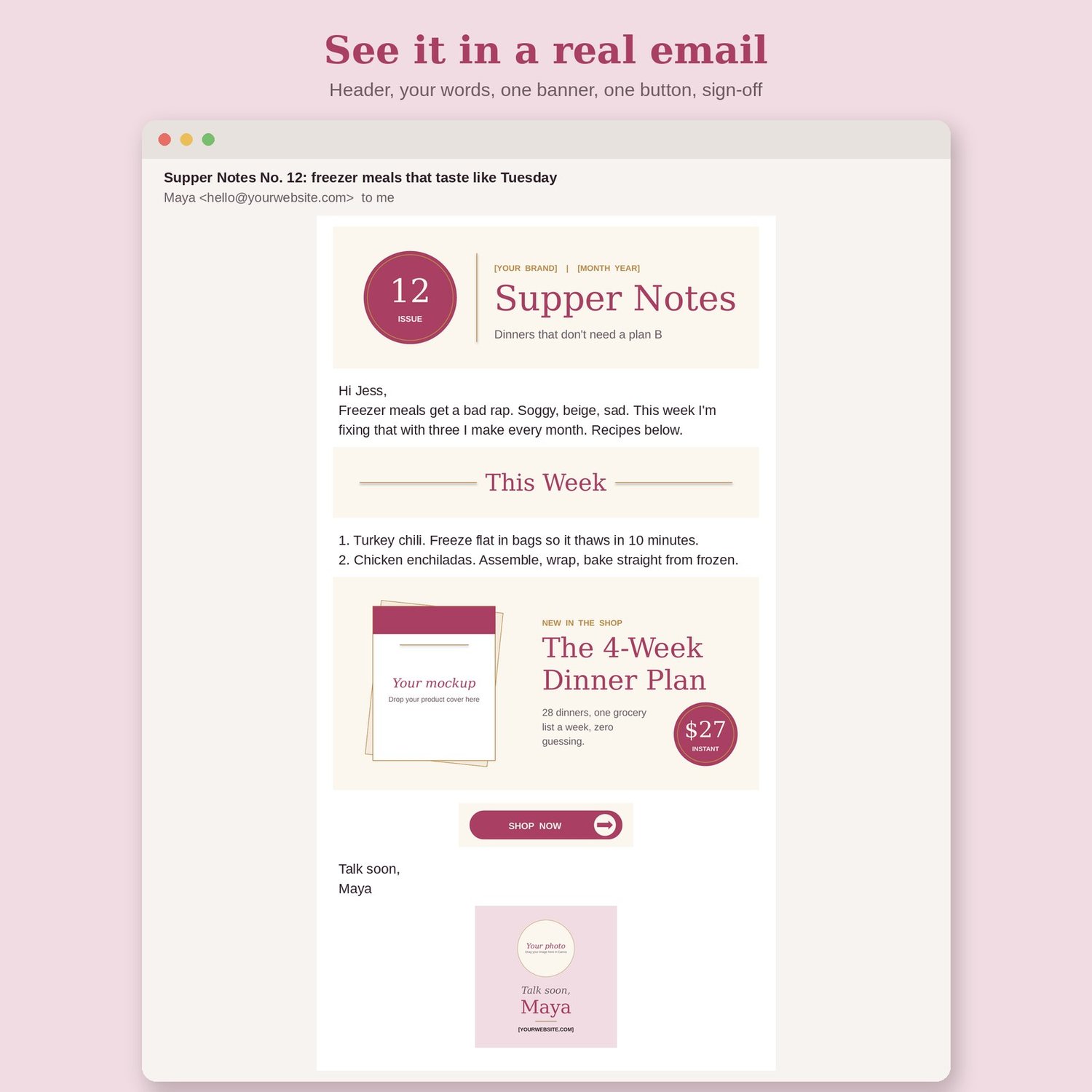
You open Flodesk, stare at a blank email, and either send plain text that looks like a ransom note or spend two hours in Canva making one banner. Neither one gets your newsletter sent. These 60 graphics are your whole email look, done: a header for the top, strips for each section, one banner for the thing you're selling, a sign-off card with your face on it. Pick your set once. Swap the words each week. Send.
What's inside
- 60 editable email graphics, built at 2x for a 600 px email, editable in free Canva
- 12 newsletter headers (1200 x 400): serif wordmark, script accent, issue number, seasonal, "Notes from [Name]," photo left, photo right, newspaper masthead, bold block, arch photo greeting, split color, special edition
- 8 offer banners (1200 x 600): price tag, "New," doors open, last call, free, workshop date, template mockup frame, testimonial
- 8 CTA blocks (1200 x 600): blog post feature, podcast episode, video with play button, event, freebie, quote, P.S. card, "Hit reply"
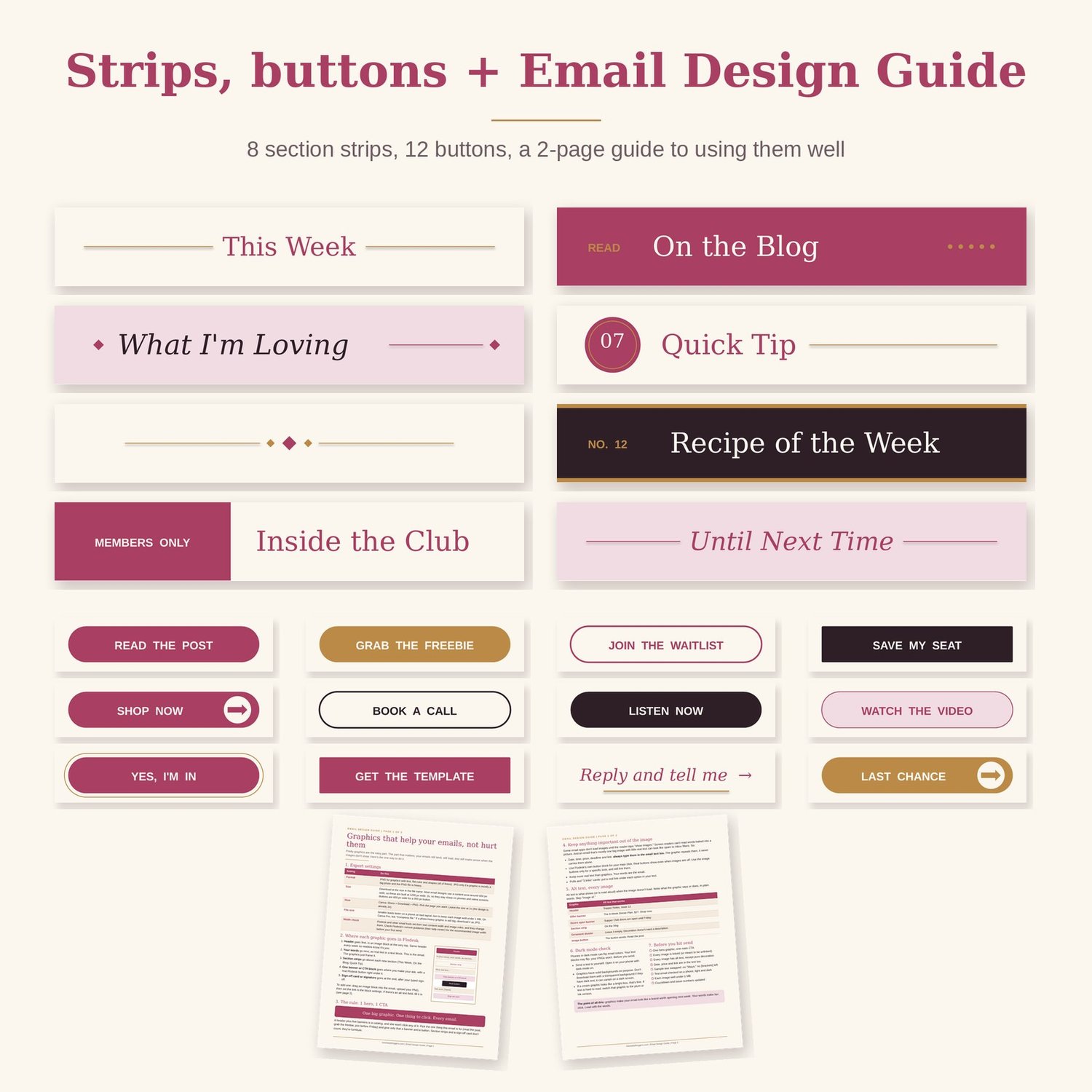
- 8 section strips (1200 x 200): This Week, On the Blog, What I'm Loving, Quick Tip, ornament divider, Recipe of the Week, Inside the Club, Until Next Time
- 12 square cards (1200 x 1200): 4 social proof cards, sign-off card with photo circle, signature block, "this week's 3 links," Q&A, poll, countdown, tip, "New here?" intro
- 12 buttons (600 x 150): solid, outline, square, arrow, double ring and text-link styles
- Every element is editable text and shapes. Photo spots are framed and labelled "Your photo"
- Sample copy for a meal-planning coach so you see a finished newsletter, not blank boxes
- Email Design Guide (2-page PDF): export settings, where each graphic goes in Flodesk, alt text examples, the 1 hero + 1 CTA rule, keeping key info out of images, dark mode check, file size, pre-send checklist
- Start Here guide with your Canva links and Brand Kit steps
Who it's for
- Bloggers and coaches who send a weekly or monthly newsletter and want it to look as good as their website
- Flodesk users who love the templates but want graphics that match their own brand
- Busy moms who have one hour to write and send, not one hour to design a banner
- Anyone launching something who needs "doors open," "last call" and countdown graphics that match
Not for you if you want a fully coded HTML email template. This is graphics you drop into the email tool you already use.
How to use it
- Open the template links in Canva and click "Use template." Apply your Brand Kit, or use "Change all" on free Canva, so every graphic is in your colors and fonts.
- Pick your weekly set once: one header, a few strips, one sign-off card. Each week, add one banner or CTA block for the one thing you want clicked.
- Download as PNG, drop them into Flodesk image blocks, link each one, add alt text, and send yourself a test.
FAQ
Do I need Flodesk?
No. They're PNG images, so they work in Flodesk, Kit (ConvertKit), MailerLite, Mailchimp or any email tool with an image block. The guide uses Flodesk as the example.
Do I need Canva Pro?
No. Everything opens and edits on free Canva. Brand Kit styles and transparent backgrounds are Pro features. On free Canva, "Change all" swaps a color across a whole design in one click.
Won't images hurt my deliverability?
Image-heavy emails with little text can. That's why the guide teaches the rule: real text carries the message, graphics frame it, one hero and one button per email, and every image gets alt text.
Can I use them for my clients?
No. The licence is for your own newsletter and business. If you design emails for clients, they need their own copy.


