



Debt Payoff Planner Spreadsheet: Snowball vs Avalanche (Excel, Sheets)
See your debt-free date, both ways.
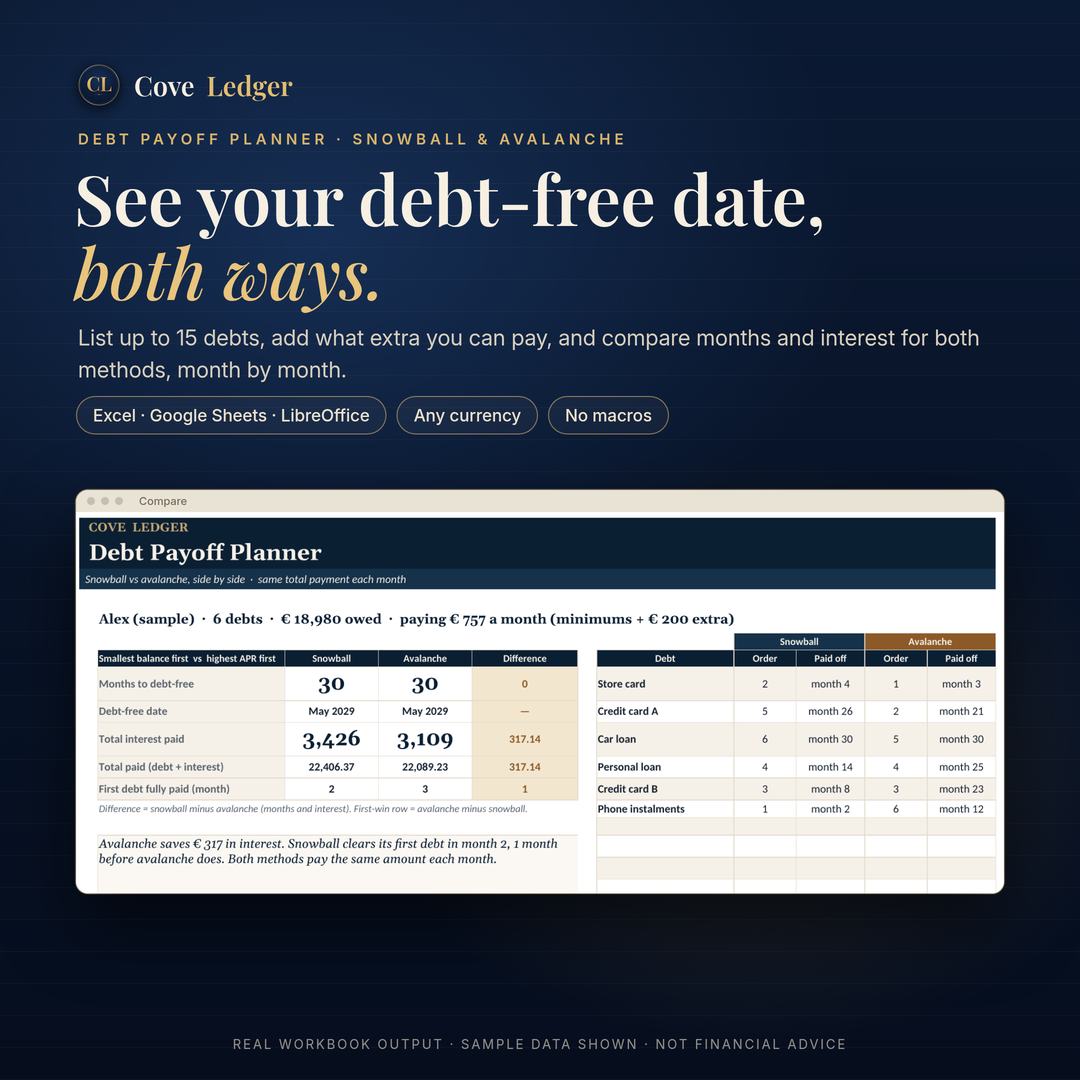
List your debts once, add what extra you can pay each month, and the planner works out every month until the last balance is zero, for both the snowball and the avalanche method. You see the months, the interest and the debt-free date side by side before you choose.
What's inside
- Debts: up to 15 debts (name, balance, APR, minimum payment), your extra monthly payment, the month you start, and your method. Each debt shows its place in both orders, the month it's paid off and the interest it costs.
- Compare: snowball and avalanche side by side. Months to debt-free, debt-free date, total interest, interest saved, and when your first debt is gone, plus a progress chart of total debt left.
- Schedule: your chosen method month by month (payment, interest, principal, debt left and each debt's balance), for up to 360 months.
- Start: a 4-step setup, currency setting (EUR by default) and plain-language notes.
- A 3-page PDF setup guide for Excel, LibreOffice and Google Sheets.
How it works
Your total monthly payment (all minimums plus your extra) stays the same. Each month every debt gets its minimum, and everything left over goes to the debt first in line. When a debt is cleared, its payment rolls into the next one. Snowball puts the smallest balance first. Avalanche puts the highest interest rate first.
Why it's easy to use
- You only type in cream cells with a gold edge. Everything else is formulas.
- It comes with a worked example ("Alex", made up), so you can see every number working first. Sample values are in italic copper, so you can clear them in one go.
- It warns you if a minimum doesn't cover its interest, or if the plan wouldn't finish within 30 years.
- There are no macros, add-ins or bank connection. Your numbers stay in your file.
Works with: Excel 2016 or later / Microsoft 365 (Windows and Mac), LibreOffice Calc, and Google Sheets (via File → Import). Any currency. Apple Numbers isn't supported.
What you get: an instant download (a ZIP with the .xlsx and the PDF guide). Nothing is shipped.
FAQ
Which method is better?
The planner shows you both, with your own numbers. Avalanche usually costs less interest. Snowball usually clears your first debt sooner. How big the gap is depends entirely on your balances and rates. With the included sample, avalanche saves about €317 and both finish in month 30.
Does it work in Google Sheets?
Yes, all the formulas work after File → Import. Charts made in Excel don't always carry over into Sheets. The numbers behind the chart are on the Compare sheet, so you can insert a Sheets chart in a few clicks.
Can I use a currency other than euros?
Yes. Set the currency code and symbol on the Start sheet.
Is this financial advice?
No. See below.
What if it doesn't work for me?
If the file won't open or doesn't work as described, email theoneandonlychief@mail.grokbot.com within 14 days and we'll help you fix it or refund you.
Licence
Personal use for one household, with backup copies. Please don't resell, share publicly or bundle the file.
What it is not
This planner is an arithmetic tool, not financial, tax or legal advice, and not a promise of results. Figures are estimates from the numbers you enter. It assumes monthly interest at APR ÷ 12, rates and minimums that don't change, no new charges, and on-time payments. Your lender's statement is always the true figure. The figures in the images are sample data.
Also from Cove Ledger: the Annual Budget & Net Worth workbook (https://payhip.com/b/K7ibM) is a full yearly system with a simpler Debts tab. This planner goes further, with true rollover, a month-by-month schedule and a side-by-side comparison.
Not sure yet? Try the free 1-Page Monthly Budget first: https://payhip.com/b/FA3GY