
Wedding Day Timeline & Vendor Schedule Workbook (Prototype)
Tested in LibreOffice Calc 26.8.1.1 on desktop. Microsoft Excel, Google Sheets and Numbers have not been verified.
Keep the wedding-day plan in one place. Enter each activity once, assign the people involved, then choose a role to see its schedule without retyping the times.
This small prototype includes:
• A clean, editable XLSX workbook
• A separate XLSX with a fictional worked example
• A two-page PDF quick guide
The workbook has room for 24 activities and 10 role slots with fixed IDs and editable names. Assign a lead and up to two supporting roles to each activity. Add locations, contact details and short shared notes. Choose one role or ALL for the vendor print view.
You enter each start date and time, duration and optional planning buffer. Formulas calculate the end and end-plus-buffer, including activities that finish after midnight. Changing one activity does not reschedule the others. Confirm your timings with your venue and vendors; buffers do not reserve anyone’s time.
Software and editing: tested in LibreOffice Calc 26.8.1.1 on desktop. Microsoft Excel, Google Sheets and Numbers have not been verified. Save a working copy and edit only the amber input cells. Formula cells are unprotected, so typing over them can break the workbook. Use the existing rows; do not insert, delete or sort them.
Printing and privacy: the vendor sheet is laid out for one Letter portrait page. Choose Print Active Sheet or the current-sheet option and check the preview. Exporting the whole workbook may include your full contact directory. Export a fresh PDF after edits; existing PDFs do not update.
Digital files only. No physical item, custom timeline setup, vendor communication or event-management service is included.
One purchase covers one personal wedding. You may share completed, event-specific PDFs or printed schedules with the couple, family, wedding party and participating vendors for that wedding. Reusable templates may not be resold or redistributed, and the license does not cover multiple clients’ weddings. See this store’s Product Support and Privacy page for the full usage, support and refund terms.
Product Support, Privacy & Usage Terms: https://payhip.com/MohamadZahwi/product-support-and-privacy
Preview shown
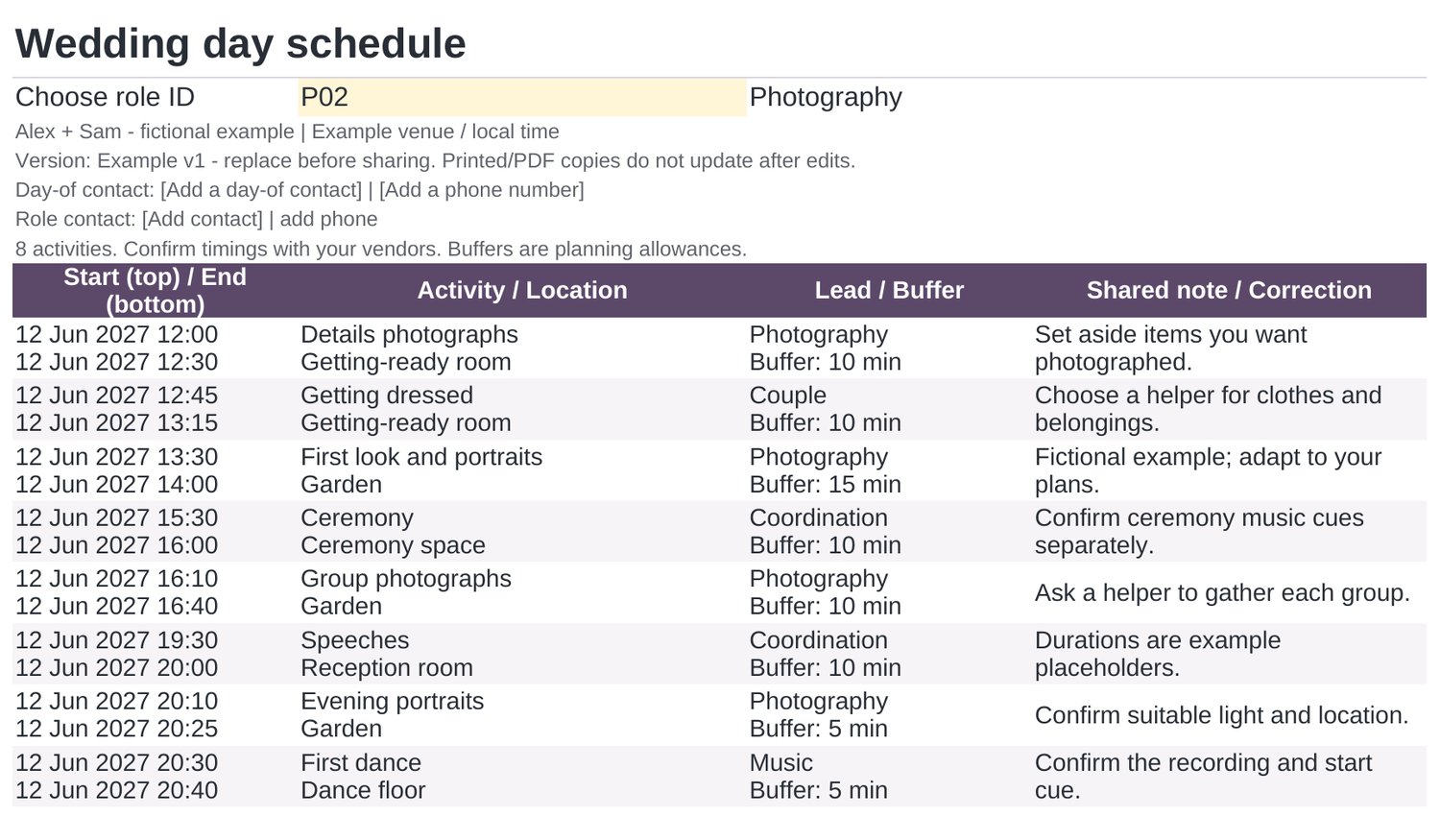
Fictional sample: the photography schedule from the included example workbook. Cropped detail of its vendor print view, exported with LibreOffice Calc 26.8.1.1. Print or export a fresh copy after edits.
Frequently asked questions
Will it automatically build or rearrange my timeline?
No. You choose the order and enter every start date and time. End times and the selected role’s view calculate from those inputs. There is no automatic rescheduling, clash checking, travel-time check or vendor availability check.
Can I use Excel, Google Sheets or Numbers?
Those apps have not been verified. The workbook has been tested in LibreOffice Calc 26.8.1.1 on desktop. Do not assume that the XLSX format guarantees the same behavior in another app.
Can I add more activities or rename the roles?
There are 24 activity rows and 10 role slots. Role names and contact details are editable; keep IDs P01–P10 unchanged. Do not add, remove or sort rows.
How much text fits on the printed schedule?
Keep activities to 30 characters, locations to 20, shared notes to 50 and lead-role names to 16. Longer entries are flagged, and the full text stays in the master. Correct warnings and preview before sharing; text can still clip.
What will each vendor see?
The selected role’s assigned activities, the lead and buffer, and any shared notes, plus the day-of contact and that role’s contact name and phone. Shared notes appear for every role assigned to the activity. Share the selected PDF when other contacts should stay private.
What happens if I change the plan later?
The role view updates from the master when the workbook recalculates. Update the version label, review the result and export a new PDF for each role. Printed pages and earlier PDFs remain unchanged.
Are the formulas protected? Are macros required?
Formula cells are unprotected. Save a backup, edit the amber cells and avoid typing over formulas. There are no macros or integrations. The download does not send schedules or coordinate vendors for you.