
You drag a binary into Ghidra, double-click main, and the screen fills with mov, lea, jmp and hex numbers that mean nothing. You scroll. You squint. You search "what does lea do" and an hour later you know one instruction and understand nothing.
That was basically me back when I first tried myself at reverse engineering. Reverse engineering for beginners feels impossible because nobody tells you what you need to know before you start. You get a tool and a pile of instructions and you're expected to figure out the picture yourself.
So here's the picture, the way I explain it. By the end you'll know how the stack works, how a function gets its arguments, why an if statement looks backwards in assembly, and what to do in your first five minutes with an unknown binary. Everything is x86-64 on Linux, since it's the setup most courses and CTFs start with.
What reverse engineering is :
Reverse engineering means taking a finished program and working backward to figure out what it does. In cybersecurity that usually means a compiled binary with no source code, no comments and no helpful names. It's how analysts figure out what a piece of malware does, where a vulnerability hides, or what a security patch quietly fixed.
Compiling throws information away. Comments vanish, variable names mostly vanish, and usually tidy if and for blocks become a web of jumps. That's why a decompiler like Ghidra's can show you C-like code (pseudo-code) but never the original code. It's making an educated guess from the assembly, and if you can't read the assembly, you won't be able to tell when the guess is wrong.
Why you're stuck
What actually blocks beginners is missing four main ideas:
- The stack: where local variables and return addresses live.
- Calling conventions: how a function gets its arguments.
- Compare and jump: how if statements and loops survive compilation.
- File and memory layout: what an ELF binary is and how it calls library code.
Let's take them one at a time.
In case you want these organized in one document: I did make these as a (free) 3 page pdf : Download it from here
1. The stack :
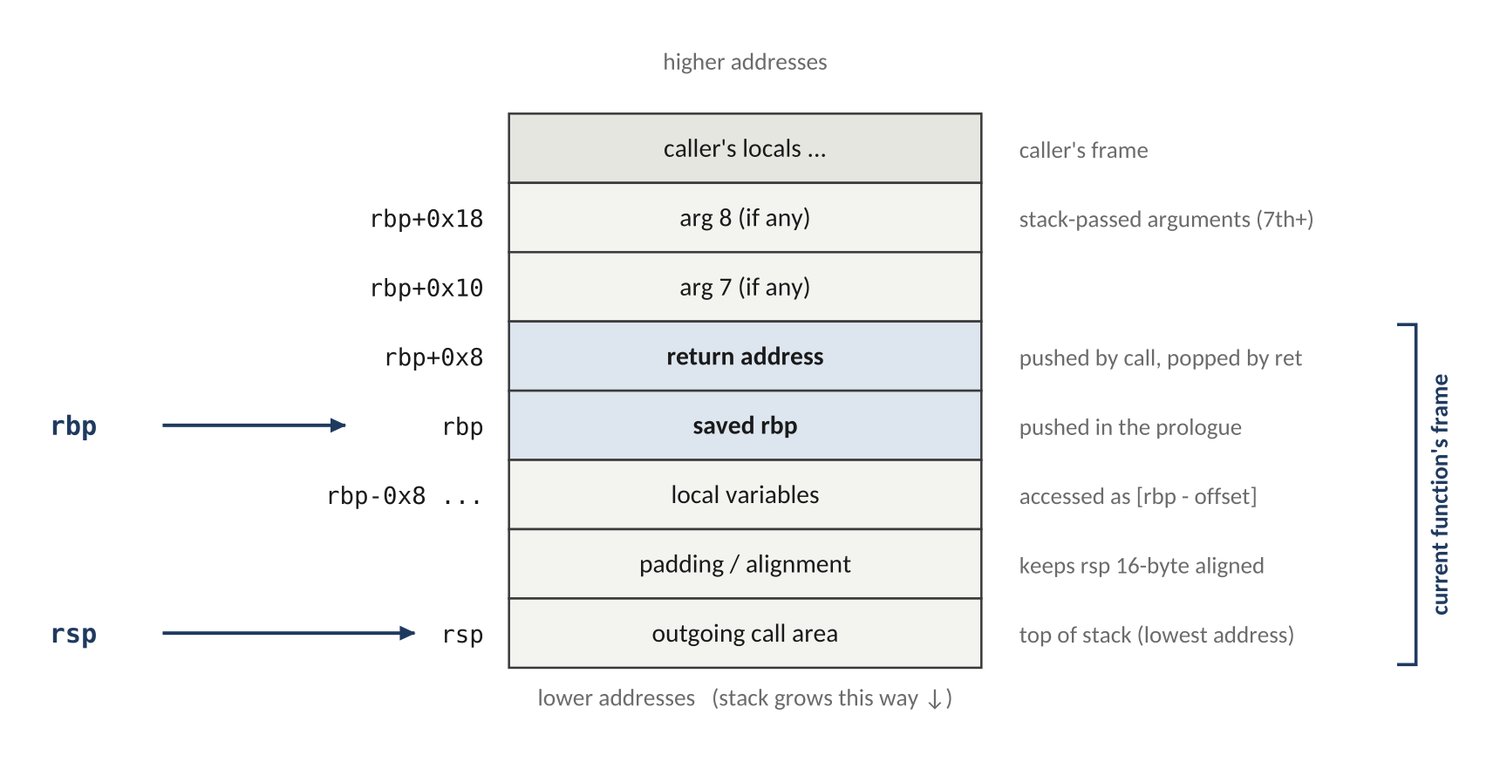
The stack is a pile of memory that functions use as scratch space. push adds a value to the top and pop removes it. The detail that trips everyone up is that the stack grows downward: newer data sits at lower addresses. So when you see sub rsp, 0x20 at the start of a function, that function is reserving 32 bytes for its local variables.
Every function call gets its own slice called a stack frame. The register rbp marks the base of the frame and rsp marks the top, so the compiler can reach any local variable as [rbp-0x8], [rbp-0x10] and so on.
At the very base of the frame sits the return address. When one function calls another, the call instruction pushes the address of the next instruction onto the stack. When the function finishes, ret pops that address back and execution continues where it left off.
Most functions open and close with the same moves, so they're easy to spot:
- push rbp saves the caller's base pointer
- mov rbp, rsp anchors this function's frame
- sub rsp, 0x20 reserves space for locals
- ...the function's actual work...
- leave tears the frame down
- ret returns to the caller
Once you can spot that opening and closing, function boundaries jump out at you. It's also why security people care about this spot: the return address sits right above the local variables, so a program that writes past the end of a buffer can overwrite it. That's the classic stack buffer overflow.
2. How functions get their arguments
A calling convention is the agreement between a caller and the function it calls: where do the inputs go, and where does the answer come back?
On 64-bit Linux, the first six arguments go into registers, in this fixed order: rdi, rsi, rdx, rcx, r8, r9. Anything beyond six goes on the stack, and the return value comes back in rax.
That gives you a great shortcut. Look at what gets loaded just before a call. If you see 0 going into edi, a buffer address going into rsi and 16 going into edx, followed by call read@plt, you're looking at read(0, buffer, 16). You decoded it without reading the function.
32-bit code works differently: every argument is pushed onto the stack, right to left. That's why you'll see [ebp+0x8] for the first argument in older code.
3. How if statements and loops hide in assembly
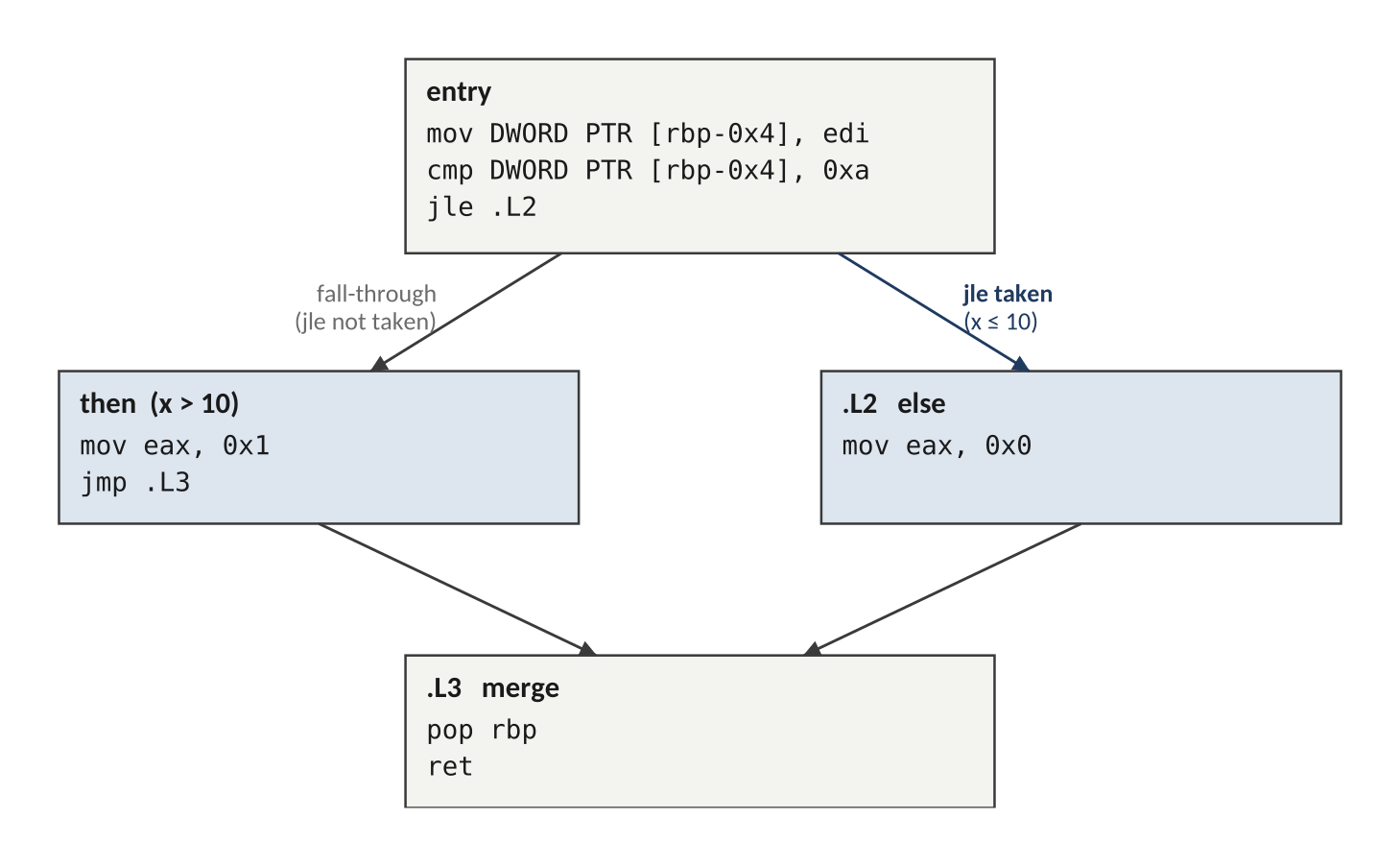
Every decision in compiled code is a pair of instructions. First, cmp or test compares two values and sets the CPU's flags (small status bits). Then a conditional jump like je or jle reads those flags and either jumps or carries on.
Here's the part that confuses everyone. Say your source code says if (x > 10). In the assembly you'll find cmp followed by jle, jump if less than or equal. That looks backwards, but it isn't a mistake. The compiler jumps when the condition is false so the true branch can simply run straight through. Expect the jump to be the opposite of your source condition.
Three quick tells:
- test rax, rax followed by je means "is this zero, or a null pointer?"
- xor eax, eax is the compiler's way of setting a register to zero.
- jg and jl are for signed numbers (like int), while ja and jb are for unsigned ones (like size_t). The jump quietly tells you the variable's type.
Loops use the same ingredients plus one giveaway: a jump backward to an earlier address. Scan an unfamiliar function for backward jumps first. Each one marks a loop, and the comparison guarding it is the loop condition.
4. ELF files, the PLT and the GOT
On Linux, every program you'll analyze is an ELF file (Executable and Linkable Format). For a long time I treated it as a black box I dragged into Ghidra. That was a mistake, because the structure of the file tells you where everything lives before you read a single instruction.
Start with the ELF header at the very beginning of the file. It opens with four magic bytes, 7F 45 4C 46 (that's .ELF in ASCII), which is how tools like file recognize it. The header also records whether the binary is 32-bit or 64-bit, whether it's little-endian, which architecture it targets, and the entry point: the address where execution begins. That's usually _start, not main. _start does some setup and then calls main, so don't panic when you don't land in your own code.
After the header come two tables that describe the rest of the file. The section headers are the linker's view and the program headers are the loader's view. This trips everyone up, so here's the short version:
- Sections are named chunks for analysis. .text holds the code you'll spend most of your time in. .rodata holds read-only data like string constants. .data holds initialized global variables. .bss holds uninitialized globals, which take no space in the file and are zeroed when the program loads. .plt and .got are the library-call machinery, covered below.
- Segments are what the OS actually maps into memory, grouped by permission: code is readable and executable, constants are read-only, and data is readable and writable. Several sections usually live inside one segment.
Why care? Strings in .rodata hint at what the program does. A segment that's both writable and executable is a red flag. And a stripped binary has lost its function and variable names but keeps this structure, which means the structure is what you navigate by.
Now the part that confuses almost everyone. Your program doesn't contain the code for functions like puts or printf. It borrows them from a shared library at runtime. Two structures make that work: the PLT (Procedure Linkage Table), a set of tiny stubs, one per imported function, and the GOT (Global Offset Table), a table holding the real addresses. This is called lazy binding. The first time the program calls puts, it jumps into the PLT stub, which asks the dynamic linker to find the real address, writes it into the GOT, and then jumps there. Every later call reads the address from the GOT and goes straight through.
Why this matters to you: when you see call system@plt or call recv@plt, you're reading a signpost. Internal function names are usually stripped, but import names survive, so they tell you what a function does at a glance.
Where to go from here
These are a large portion of the fundamentals you need to get started, if you want them packaged in a nice clean 3 pdf that condenses this post into three pages: the stack frame diagram, a 32-bit vs. 64-bit calling-convention table, the instructions you'll actually see, and a short self-check quiz. Download it here
If you wanna learn the whole picture. there is a 40-page full guide, Reverse Engineering Fundamentals, that goes further: data representation, the CPU and its flags, process memory, a full instruction reference and the protections you'll meet in real binaries (stack canaries, NX, ASLR and RELRO). It has 16 diagrams and a quiz after every chapter, with all 57 answers explained. Get Reverse Engineering Fundamentals here
If this helped, tell me in the comments which part of reverse engineering confuses you most. I read every one.