

Author: Galib Ahmed
Website: The Galib Groove
In today’s fast-moving real estate world, attention is currency. Every scroll, every tap, every second someone spends looking at your content matters. And when it comes to real estate announcements—new listings, open houses, price drops, sold updates—your post has to do more than inform. It has to stop the scroll, spark interest, and drive action.
But here’s the truth most realtors don’t like to admit:
Creating high-quality announcement posts consistently is hard.
Between managing clients, preparing listings, handling paperwork, and showing homes, most real estate agents simply don’t have the extra hours to design beautiful Instagram posts from scratch.
The good news?
You don’t need to.
Today, I’ll show you how to make standout real estate announcement posts for free, even if you’re not a designer… and at the end, I’ll share my full FREE Canva template pack created exclusively for realtors who want modern, polished posts in minutes.
Let’s dive in.
Why Real Estate Announcement Posts Matter More Than Ever
Real estate is a visual business. Your audience decides in seconds whether your brand looks trustworthy, knowledgeable, and worth following. Announcement posts are one of the strongest ways to build that trust.
Here’s what a strong announcement post does:
- Makes your listing look premium
- Strengthens your brand identity
- Keeps your feed active & professional
- Drives more inquiries
- Builds authority in your local market
Every announcement—whether it’s “New Listing”, “Open House”, “Just Sold”, or “Price Reduced”—adds credibility to your identity as a real estate expert.
But to stand out, your posts must do two things:
✔ Look professional
✔ Deliver the right information instantly
Now let’s break down the formula.
The Formula for High-Impact Real Estate Announcement Posts
1. Use a Clean, Scroll-Stopping Layout
Your design should highlight the property—not overwhelm it. Simple layouts with balanced spacing, bold headings, and clean fonts always perform better.
Effective announcement posts usually include:
- A clear headline (New Listing, Open House, Sold, etc.)
- One main photo as the hero image
- A secondary detail area
- Space for branding (name, logo, contact)
Avoid clutter. Minimal designs convert better because they look more premium.
2. Keep Your Fonts and Colors Consistent
Branding consistency builds trust.
Stick to:
- 1–2 main fonts
- 2–3 brand colors
- Repeated formatting styles
If every post looks different, your feed loses identity. But once your visuals become recognizable, your audience will instantly know it's your content without seeing your name.
(If you struggle with consistent branding—don’t worry. My free templates already use professionally paired fonts and balanced colors.)
3. Highlight the Most Important Property Details First
For announcements, your goal is to communicate value fast.
Use quick, skimmable details:
- Location
- Price
- Bedrooms & bathrooms
- Lot size
- Key amenities
- Open house times
- Status (Sold, Pending, Just Listed)
People don’t read long paragraphs on visuals—so keep it clean and minimal.
4. Use High-Quality Photos
A professional post deserves professional photos.
At minimum:
- Use bright, well-lit images
- Avoid blurry, grainy, or stretched photos
- Choose an angle that showcases the property, not just the room
If you're using a carousel, mix wide shots with detail shots so the presentation feels dynamic.
5. Add Strategic Branding Without Overdoing It
Brand touches should feel elegant, not overpowering.
Subtle places to add branding:
- Bottom bar
- Thin footer line
- Corner placement
- Light watermark
Branding must support the announcement—not distract from it.
6. Include a Simple Call-to-Action
Never post without direction.
Good CTAs include:
- Contact me for details
- Schedule a viewing
- DM for pricing
- Swipe for more photos
- Save this for open house times
Simple, clear calls prompt engagement and inquiries.
How to Make These Posts Completely Free
Now let’s talk tools.
If you're paying for expensive editors or hiring designers regularly… stop.
You can create beautiful real estate announcement posts with:
- Canva Free (perfect for beginners)
- Ready-made templates (even better when branded)
- Smart photo placeholders
- Drag-and-drop editing
But instead of starting from scratch, I’ve created something special for you.
Download These Free Realtor Instagram Templates (No Cost!)
To help realtors, coaches, and property pages create high-quality content easily, I designed a premium-quality template pack that you can download 100% FREE.
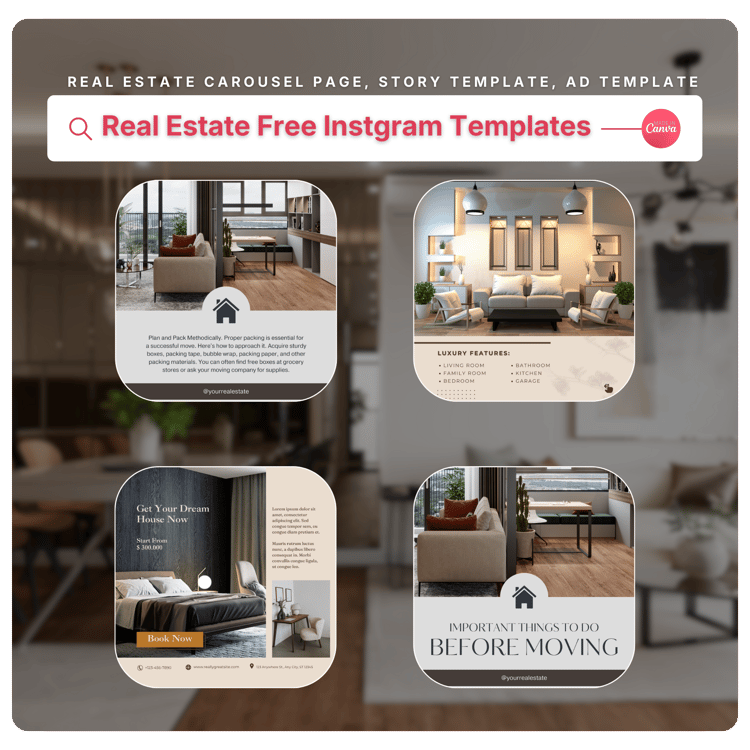
🔗 Get the Free Templates Here:
👉 Realtor Instagram Post Templates – Free Canva Download
These templates are ideal for:
- New Listings
- Open Houses
- Just Sold Announcements
- Testimonials
- Market Updates
- Realtor Branding Posts
- Property Spotlights
- Carousel storytelling
What’s Inside the Free Template Pack
This free download includes:
✔ 5-page Elegant Carousel Post
Perfect for showcasing new listings with modern typography.
✔ 9-page Brown Minimal Carousel
Ideal for storytelling, branding, and in-depth property features.
✔ 3-page Blue Real Estate Ad Carousel
Clean, bold ads suitable for promotion and high-engagement posts.
✔ 2 Instagram Story Templates
Optimized for realtors who want quick, stylish IG story announcements.
✔ Fully editable Canva files
Compatible with both Free & Pro Canva accounts.
Key Features You’ll Love
- 100% free to download
- Fully customizable (text, colors, layout)
- Smart drag-and-drop photo placeholders
- Modern, aesthetic, real estate-friendly designs
- Clean fonts: Pragmatica, Poppins, Helios, Dorid Sherif
- Perfectly sized for Instagram posts & stories
These templates are intentionally created to make your brand look premium—even if you’re just starting out.
Who These Templates Are Perfect For
These free templates are made for:
- Realtors & real estate agents
- Real estate teams and coaches
- New agents building their brand
- Property marketing pages
- Agencies sharing listings daily
- Anyone who wants aesthetic, pro-level real estate visuals
They’re especially great if you want to post consistently but don’t have time to design.
Benefits of Using These Free Templates
Here’s what you’ll experience immediately:
1. Save Hours of Design Time
No more blank screens or complicated layouts.
2. Instantly Elevate Your Instagram Feed
Your content becomes recognizable and professional.
3. Boost Engagement & Inquiries
Well-designed posts always perform better.
4. Keep Your Branding Consistent
Just edit the text, drop in your photos, and post.
Want More Real Estate Marketing Templates?
You can explore my entire collection here:
👉 Browse More Canva Templates & Digital Tools
From carousels to storytelling layouts to branded ads—you’ll find tools that help you grow faster with less effort.
Frequently Asked Questions (FAQ)
1. Are the templates really free?
Yes! You can download the full pack completely free with no hidden fees.
2. Do I need Canva Pro to use them?
No. All templates work perfectly with Canva Free and Canva Pro.
3. Can I change the colors and fonts?
Absolutely. Every element is customizable—colors, text, layout, images, branding.
4. Are these templates good for new agents?
Yes. They’re designed to help new and experienced agents build a polished online presence.
5. Can I use them for my real estate team or agency?
Yes! You can use them for branding, listings, open houses, sold updates, and more.
6. Will these templates help my engagement grow?
Definitely. Strong visuals improve reach, saves, shares, and click-through rates—boosting your chances of getting more clients.
Final Thoughts
If you want to stand out in today’s crowded real estate market, your content must be both consistent and professional. Announcement posts are one of the easiest ways to build authority, and with the right templates, you can create high-impact designs in minutes without spending a dollar.
Start today by downloading your free real estate Instagram pack:
👉 Download Realtor Instagram Post Templates – Free Canva Pack
Your brand deserves to look premium—without paying premium prices.
Comments ()