
Practical Change Pilot
Practical Change Pilot: Organisational Change Management Toolkit for Excel
Make your next change stick, and be able to prove it.
Most projects that miss their benefits don’t fail on the technology. They fail on people: managers who never really bought in, staff who weren’t trained in time, and resistance nobody saw coming until go-live. By then, it’s expensive to fix.
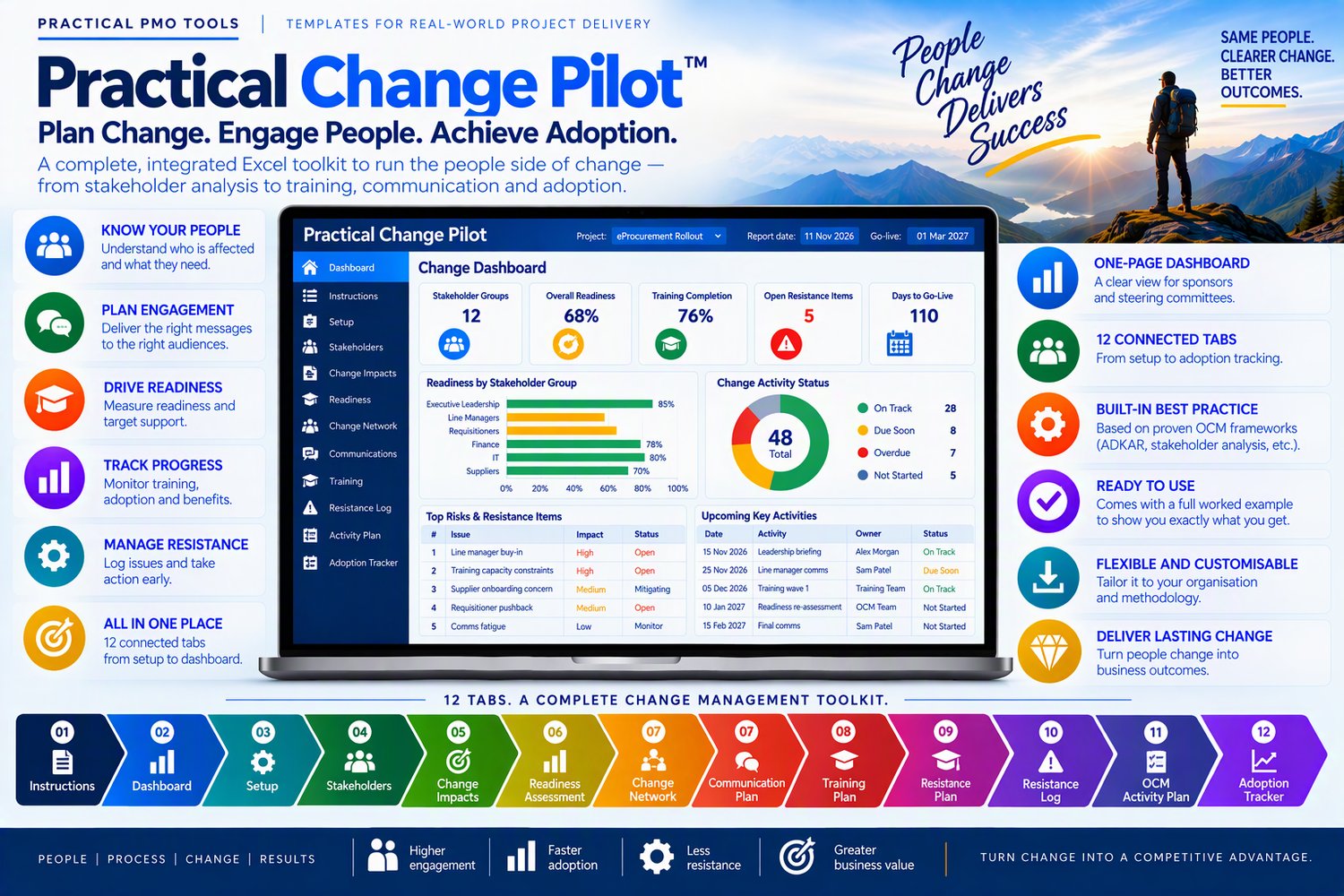
Practical Change Pilot gives you one place to manage the people side of change from the first stakeholder conversation to the 30-day adoption review. You can see who is affected, how ready they are, where they’re stuck and what to do about it, all in a single Excel workbook that does the calculations for you.
Know exactly where to focus
Score your stakeholders on influence and impact, and the workbook tells you whom to manage closely, keep satisfied, keep informed or simply monitor. It also shows the gap between where each person’s support is today and where it needs to be, so you can see at a glance who needs your attention.
Find the real barrier, not the symptom
The Readiness Assessment scores each group from 1 to 5 on the five ADKAR® elements: Awareness, Desire, Knowledge, Ability and Reinforcement. It then highlights the barrier point, the first element holding each group back. If line managers are stuck at Desire, you’ll know that more training won’t help yet; they first need a reason to want the change.
Never miss a message or a deadline
Plan every communication by audience, channel and sender. Anything past its planned date turns red as Overdue, and anything due within 7 days is flagged as Due Soon. The OCM Activity Plan and Resistance Log flag overdue items the same way.
Track training and adoption with real numbers
Training completion and a green, amber or red rating update as people are trained. After go-live, the Adoption Tracker measures progress from your starting figure towards your target. It works whether the number should go up, like system usage, or down, like approval time. You’ll be able to show your sponsor whether the change actually worked.
Walk into every steering committee prepared
The Dashboard pulls everything together on one page: 12 headline figures, summary tables and 4 charts, ready to present. You don’t type anything into it. It updates from the other tabs.
What’s inside: 12 connected tabs
- Setup: project details, go-live date, phases and thresholds you can change
- Stakeholders: influence, impact, support gap and engagement approach
- Change Impacts: today versus after go-live, with priority calculated automatically
- Readiness Assessment: ADKAR scores, barrier point and a readiness rating
- Change Network: the sponsor, sponsor group, change champions and super users
- Communication Plan: who hears what, from whom, and when
- Training Plan: courses, completion % and a status rating by audience
- Resistance Log: root cause, response, owner and days open
- OCM Activity Plan: your change schedule by phase, stage gate (G0–G4) and workstream
- Adoption Tracker: starting point, target and actual result after go-live
- Dashboard: your one-page status report
- Instructions: the recommended order of use, with tips
Built to save you time and avoid mistakes
- Drop-down lists throughout. Every owner, sender and trainer is picked from your own stakeholder list, so nothing is typed twice.
- Formulas are locked so they can’t be overwritten by accident. No password is needed if you want to make changes.
- Clear colour coding: white cells are for your input and blue cells calculate for you.
- Thresholds you can change on one Setup tab to match how your organisation scores.
- Plain Excel with no macros, no subscription and nothing to install.
- Designed by an experienced PMO practitioner who has delivered strategic system and process changes.
Who it’s for
- Change managers and change leads who want their whole change plan in one place
- Project managers and PMOs who need to add the people side to a system, process or restructure project
- Consultants who want a professional, ready-to-use toolkit for client work
- Sponsors and steering committees who want a clear, honest view of readiness
Compatibility
• Works in Microsoft Excel 2016 or later / Microsoft 365 on Windows and Mac
• Word and PowerPoint files open in Microsoft Office 2016 or later / Microsoft 365
• Not designed for Google Sheets or Apple Numbers: protected formulas and some features may not work there
Licence
One purchase licenses one named user / one organisation to use and adapt the files for internal use. Consultants may use the files to deliver work for their clients / with one client per licence. You may not resell, share or redistribute the files, in original or modified form.
Refunds
Because these are instant digital downloads, all sales are final / refunds are available within 14 days if a file is faulty and we can't fix it. If anything doesn't work as described, contact us through the Contact page and we'll help
.
Frequently asked questions
Can I edit the files? Yes. Excel formulas are protected so they can't break by accident; you fill in the white input cells. Word and PowerPoint files are fully editable, so you can add your own logo and terminology.
Will it work in my currency? Yes. All templates are currency-neutral and work anywhere in the world.
Do I get updates? Yes, free updates to this version are sent to your download link / Updates are released as new versions.
How do I get my files? You get a download link by email straight after purchase.