
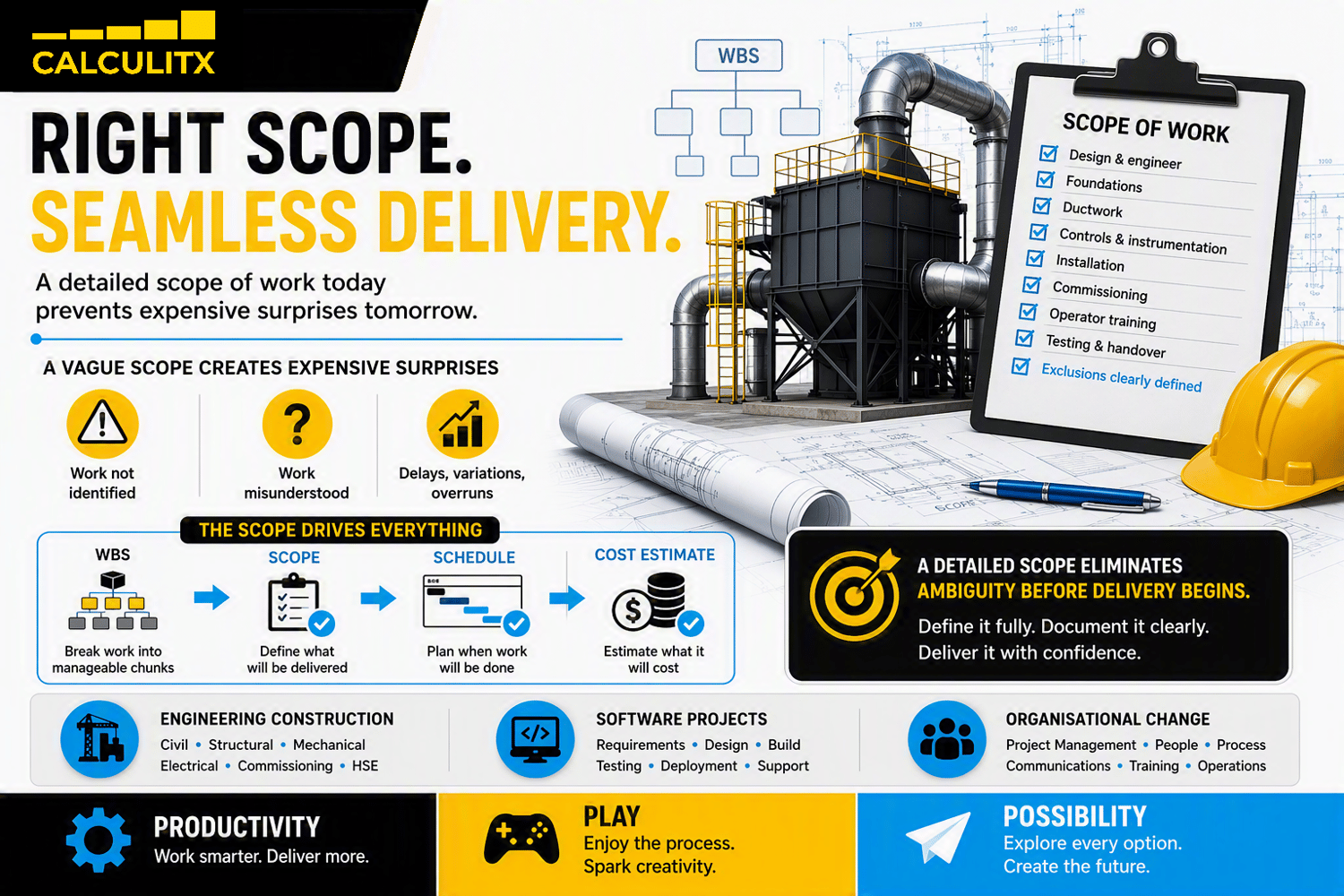
One of the biggest mistakes in project management is writing a shallow scope. Perhaps your customer has asked you to install a dust collector. You write your scope of work as:
- Design and size the dust collector
- Install the dust collector
- Commission the dust collector
On the surface, the project seems simple and the scope obvious. But are you using existing footings or pouring new footings? Are you fabricating new ductwork or tying into existing? What control system is required? Is operator training included?
"Ambiguous scope delivers expensive surprises."
Most project delays, variations, disputes or budget overruns can be traced back to one of two things:
- Work that wasn't identified
- Work that was misunderstood or misinterpreted
Element Purpose
The purpose of the Scope of Work is to remove ambiguity. It defines exactly what will be delivered, what will not be delivered, and provides the foundation for accurate scheduling, estimating, procurement and execution.
The scope in the 3 bullet points above is perfect for an elevator speech but woefully inadequate for an end-of-feasibility phase Project Definition document. At the time of requesting formal funding approval, the scope must be sufficiently detailed that stakeholders clearly understand what is included, excluded and being costed.
Developing the Scope of Work
As with the WBS, there is no "right" way to detail the scope of work. My recommendation is to use the same tool in which you created your WBS. The fastest way to do it is with a Mind Map. Expand the WBS workshop to also consider scope. This allows multiple stakeholders to contribute their requirements in real time.
The objective is to progressively break each work package into increasingly specific deliverables and activities until ambiguity is removed. Challenge attendees to think deeply about what each work package requires and record thoughts as ideas surface.
How Detailed Must the Scope of Work Be?
I've been asked this question many times. My answer is pragmatic: "Just keep adding scope until no-one has any further ideas." AI trivialises the task of summarising. Thus, never stress about receiving too much detail.
In most cases, it will take you longer to argue with a stakeholder that their idea is "too much detail" than it will to write it down. The process of arguing your case will also demotivate them and could cause them to stop suggesting ideas, which is a productivity killer.
"Just write it down! Summarise it later!"
Additionally, I use the detailed scope of work (e.g. directly from the mind map) to draft the detailed Scope of Work documents for my tenders. Tender scopes must be even more detailed than your project scope. So having a few areas that are highly detailed will simplify the task of creating these downstream documents as the project develops.
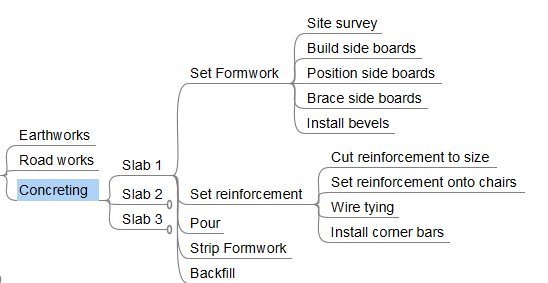
For example, consider the diagram below which is an excerpt from a Civil Works Package. In this instance the package is made up of earthworks, road works and concreting. It might be sufficient to stop at this level for a small project. As project complexity increases, scope detail must increase accordingly. If a team member wanted to add the extra detail in the workshop, "just do it!". It'll save you time later on when writing tender scopes.
Scope of Work Format
Some organisations prefer the scope to be in a Word Document (or similar) format. When this is the case, I brainstorm the scope in a mind map and export it to Word as a bulleted list or a table. It comes together much quicker, particularly if you employ AI to do the "wordsmithing". Following are 2 options to consider.
Option 1: Presenting the Civil Works Package as a bulleted list:
- Earthworks
- Road works
- Concreting
- Slab 1
- Set Formwork
- Site survey
- Build side boards
- Position side boards
- Brace side boards
- Install bevels
- Set reinforcement
- Cut reinforcement to size
- Set reinforcement onto chairs
- Wire tying
- Install corner bars
- Pour
- Strip Formwork
- Backfill
- Slab 2
- Slab 3
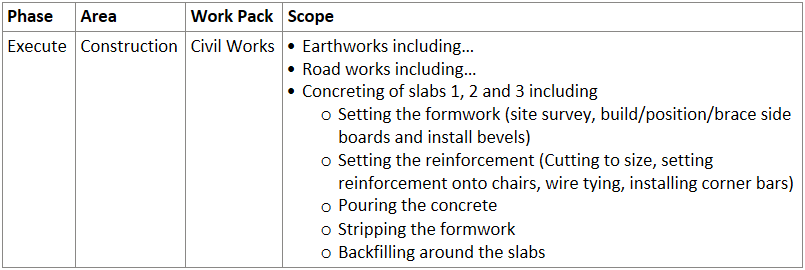
Option 2: Presenting the Civil Works Package as a table (in Word or Excel):
What About Exclusions?
Stakeholders often focus more on the exclusions than the inclusions. That's because exclusions surface assumptions before they become variations or disputes.
"A robust scope thoroughly defines what is excluded."
Element Alignment
The methodology above demonstrates a one-to-one alignment of the scope of work with the WBS. It also demonstrates a practical method of using the WBS to "flesh-out" the scope of work. This enhances the scope detail, drastically reduces the likelihood of scope omissions and ensures no ambiguity with stakeholders about what is included and excluded from the project scope.
Impact on or by Element
It follows that a change to the scope of work has the potential to impact the WBS. For example, if there is a reason to complete the earthworks early then the project team may elect to break the "Civil Works" package into 2 packages; "Earthworks Package" and "Roadworks and Concreting Package". The creation of a new work package is a direct impact on the WBS and has flow-on effects to the structure of the schedule and cost estimate.
"Remember: A change in any one of the 6 core elements likely changes all others!"
A detailed scope is not bureaucracy. It is a risk-reduction tool. Every clarification made before execution is one less dispute, variation or delay during execution. Invest the time upfront and your future self, your stakeholders and your project budget will thank you.
What's Next?
In the next blog we learn to align the project schedule with the WBS, and why it matters.
...and don't forget to download our free WBS template. It's free and fully editable (in FreePlane format).
#ProjectManagement #ScopeOfWork #ProjectPlanning #ProjectDelivery #WBS #CostEstimating #RiskManagement #ChangeManagement #ProjectSuccess #ProjectControls #CalculitX
Comments ()