
Wind Shift Tracker
Wind Shift Tracker & Wind Shift Profile Viewer
Version 1.0
1. INTRODUCTION
The Wind Tracker App and the Wind Shift Profile Viewer work together to give VSK5 (Virtual Skipper 5) sailors deeper tactical insight similar to real-world yacht racing analytics.
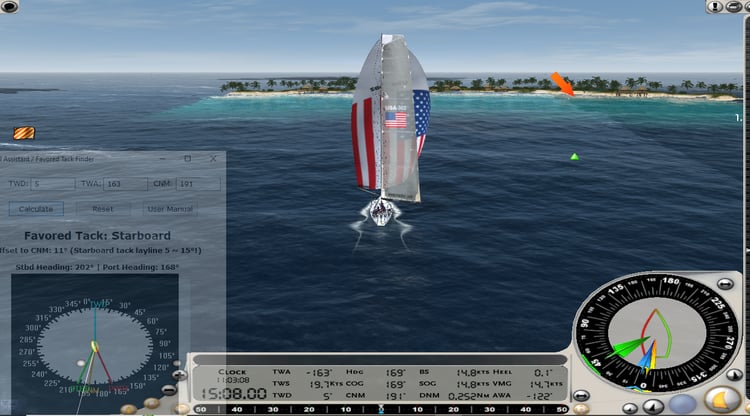
VSK5’s in-game wind instrument is fast, subtle, and easy to miss — especially during maneuvers. These tools capture the wind data you normally lose and visualize how the shifts behave over time.
This gives you a competitive edge by allowing you to:
- Understand the oscillation rhythm of the map
- Recognize lifts and headers clearly
- Know where you are in the wind cycle
- Make better tactical decisions
- Review your wind patterns after racing
These tools operate completely outside VSK5, require no plugins, and do not modify game files.
2. SYSTEM OVERVIEW
Wind Tracker (AHK Application)
A lightweight external tool that records:
- TWD (True Wind Direction)
- Wind speed
- Delta time between readings
- Timestamp
It logs every entry to a CSV file stored directly in the same folder as the application.
Wind Shift Profile Viewer (Web App)
An interactive visualization tool that turns your saved CSV file into an intuitive graphical wind profile.
This provides a true “wind story” of the race or practice session.
Together, the tools form a complete wind analysis system.
3. WIND TRACKER APPLICATION
3.1 What It Does
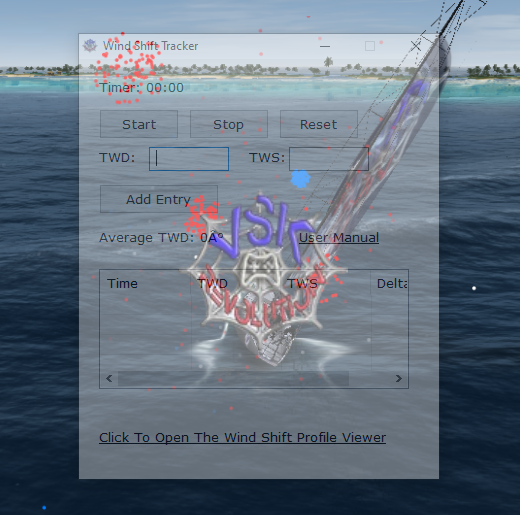
The Wind Tracker lets you record the TWD, TWS and the Delta Time between wind shifts.
It provides:
- Tactical trend awareness
- Automatic data logging
- Direct access to the Viewer
3.2 Key Features
- One-tap wind recording
- Delta time automatically computed
- Optimized for rapid mid-race logging
- Live display of average wind, shift size, and cycle information
- CSV auto-saving (no prompts, no configuration)
- Link to Wind Shift Profile Viewer for immediate post-race analysis
3.3 Installation
- Place the Wind Tracker .exe (or .ahk) anywhere you like
- Run the application before you launch VSK5
- Keep it on-screen or taskbar-accessible
- No administrator rights needed
- No setup or calibration required
3.4 Interface & Controls
Display Fields:
- Wind Direction (TWD)
- Wind Speed
- Delta Time
- Average Wind
- Predicted Shift (Magnitude & Timing) (optional, if enabled)
- Status Messages
- Link to Wind Shift Profile Viewer
Buttons:
- Record Wind – captures the current sample
- Clear Data – wipes all collected samples
- Open Wind Shift Profile Viewer – launches your web app in a browser
3.5 Recording Wind Data
During racing:
- Start the timer and watch for a new wind shift in VSK5
- Enter the TWD and TWS
- Click the ADD Entry button
- The Wind Tracker records the new TWD, TWS and Delta Time between entries
- Delta Time updates automatically based on previous entries
- The log grows as you record more samples
The more entries you collect, the more detailed your wind profile becomes.
3.6 CSV File Saving
The CSV is saved automatically:
- No "Save As" dialog
- No user intervention
- File name is auto-generated
Location
The CSV is placed in the exact same folder as the Wind Tracker application.
This ensures easy access and predictable file management.
3.7 Opening the Viewer
At the bottom of the Wind Tracker window is a link labeled:
“Open Wind Shift Profile Viewer”
Clicking it automatically opens the Wind Shift Profile Viewer web app in your default internet browser.
This allows you to immediately upload your freshly saved CSV and view the wind cycle.
4 - Wind Shift Profile Viewer (Web App)
4.1 Purpose
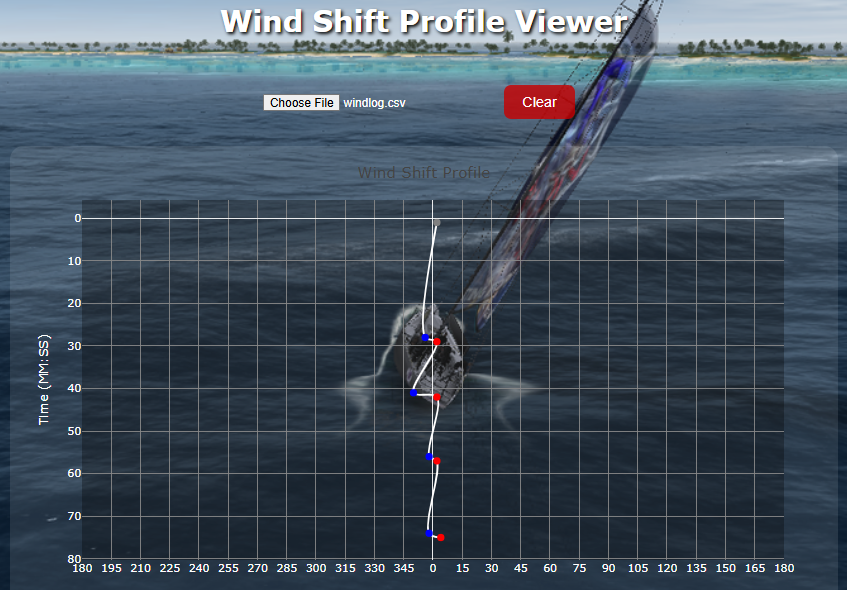
The Viewer transforms your CSV into a visual map of wind behavior, showing:
- Every TWD reading
- How the wind shifted over time
- The oscillation pattern
- Lifts and headers
- The overall “shape” of the breeze
4.2 Features
- Smooth spline line chart
- Circular compass correction (359→0→1)
- Split-scale compass visualization
- Time displayed in minutes/seconds
- Hover tooltips with accurate TWD (not negative values)
- Data clearing/reset options
4.3 Uploading Data
- Click “Upload CSV”
- Select the file saved by the Wind Tracker
- The chart loads instantly
- You can zoom, pan, hover, and explore the wind cycle
No format conversion required — your CSV is already compatible.
4.4 How to Read the Chart
The chart is designed for sailors:
- TWD on the X-axis:
- Represented as a circular-linear hybrid:
- 0° in the center
- Values increase upward (1,2,3,…)
- Values decrease downward (359, 358, 357, …)
- Time (Delta) on the Y-axis:
- Shown as minutes and seconds
- Allows you to identify cycle lengths easily
- Spline Curve:
- Shows smooth transitions between shifts
- Hover Tooltip:
- Displays true compass TWD (not the transformed internal number)
The visual layout mimics the feel of a compass while still presenting a clean linear graph.
5. TACTICAL USE FOR VSK5 RACING
Key Benefits:
1. Identify Lifts & Headers Easily
The graph shows whether each shift is left or right.
2. Track Oscillation Cycles
Most VSK5 maps have rhythmic wind oscillations (like a real beat pattern).
The Viewer helps you learn the cycle timing.
3. Make Better Tack Decisions
Knowing if you’re on the lifted or headed side tells you:
- When to tack
- When to cross
- When to stay patient
4. Review Races & Training
Upload the CSV after sailing to see the entire wind story.
5. Map Knowledge = Tactical Advantage
Every map behaves differently.
Now you can discover each map’s "personality."
6. WORKFLOW SUMMARY (QUICK GUIDE)
During a Race
- Start Wind Tracker
- Sail normally
- Keep logging throughout the race
After the Race
- Click the link to open the Wind Shift Profile Viewer
- Upload the CSV (in the app’s folder)
- View the wind cycle
- Analyze strategic decisions
7. CSV FORMAT
Each row contains:
- Timestamp
- TWD (Compass-corrected to 0–360)
- Wind Speed
- Delta Time between samples
No editing is required for the Viewer.
8. TROUBLESHOOTING
Problem: CSV isn’t saving
- Ensure the app has write permission in the folder
- Don’t run from Program Files (Windows blocks write access)
Problem: Viewer won’t load the CSV
- Verify the CSV is generated by the Wind Tracker
- Make sure the file isn’t open in Excel or another editor
Problem: TWD looks strange
- Remember: the chart uses the split-compass layout intentionally
- Hover tooltips show true compass values
Problem: Time seems wrong
- Delta Time measures time between your key presses, not absolute clock time
- This is correct — that’s how wind shifts are evaluated
9. GLOSSARY
TWD — True Wind Direction
Wind direction relative to the map, 0°–360°.
Lift / Header
A shift that allows the boat to point higher (lift) or forces it lower (header).
Oscillation
Repeating left/right wind pattern.
Delta Time
Time between wind samples.
Wind Shift Profile
A graphical depiction of wind behavior over time.