
PrintPack Studio — Print-Size Checks & Buyer-Ready Packages
PrintPack Studio 0.3.1 — prepare artwork sets, buyer files and listing graphics together.
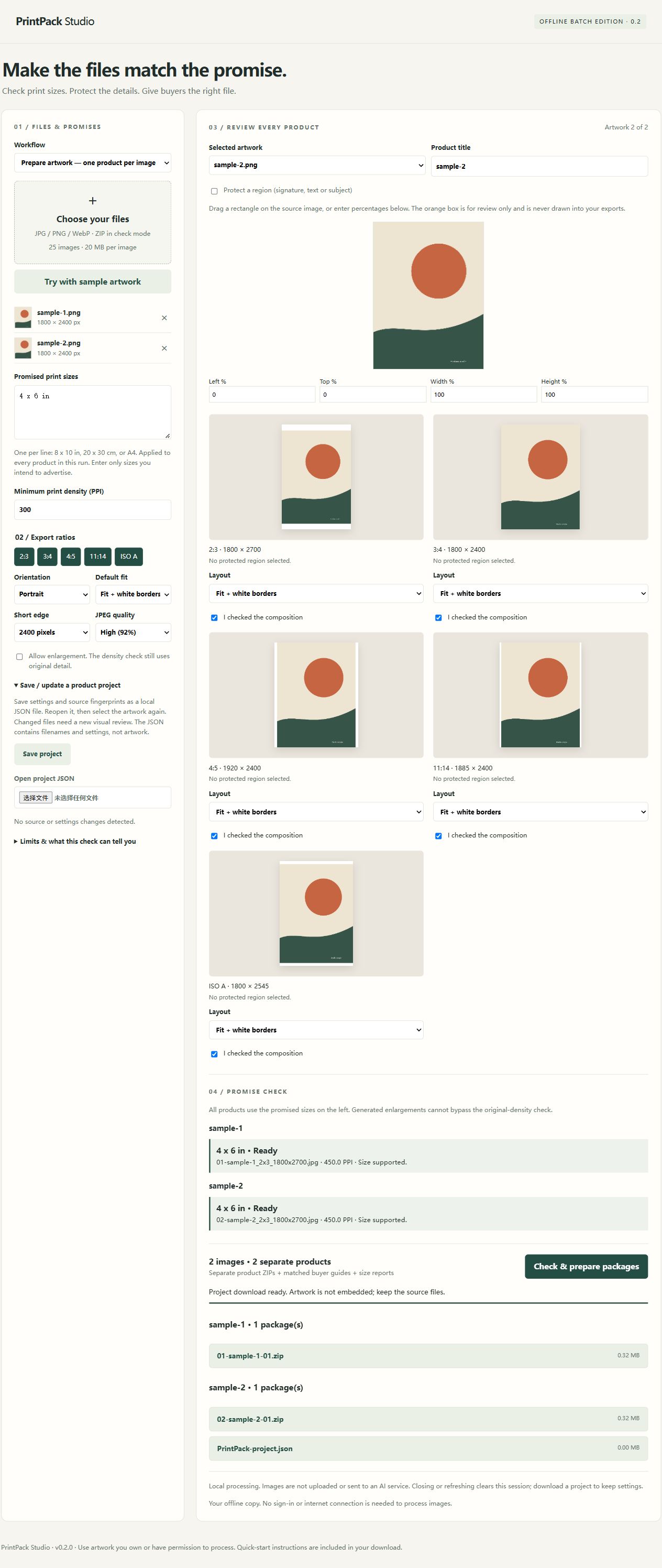
Group your originals into products, choose sizes for each set, review every crop, then generate coordinated buyer packages and seller graphics locally.
TRY BEFORE BUYING
https://printpack-local-studio.zzou7332.chatgpt.site/tool/
The free preview supports one image and one output format, including a branded PDF guide and listing graphics. No signup or artwork upload required.
Inspect the original sample delivery and 18-second crop walkthrough:
https://printpack-local-studio.zzou7332.chatgpt.site/?utm_source=payhip&utm_medium=product_description&utm_campaign=delivery_proof#example
That walkthrough shows 0.2; the interactive preview contains the current release.
NEW IN 0.3.1
• See the current print-size limit at your PPI target and choose smaller sizes checked across every artwork in a set. Applying a suggestion changes your advertised sizes, never the PPI or JPEG quality.
• Jump to the next size or composition issue. Download a seller diagnostic CSV even when checks fail.
• Free guided example: a 12 x 18 inch promise fails at 150 PPI; select 6 x 9 inches to meet 300 PPI, review and export.
ARTWORK SETS AND DELIVERY
• Group originals into single-art products, diptychs, triptychs or custom sets. Each product has its own sizes, ratios, orientation and layout. Every artwork must independently support every promised size.
• Seven ratio families: 2:3, 3:4, 4:5, 11:14, approximate ISO A, square 1:1 and 5:7. Or export your exact inch, cm, mm or A-series dimensions at the chosen PPI target.
• Branded PDF and HTML buyer guides with your shop name, logo, color, support address and usage terms. Each artwork and checked size points to its actual image and ZIP.
• Separate 2000 x 2000 JPEG seller graphics: product cover/gallery, checked-size card and contents card. Choose one of three original illustrative gallery templates. Large sets use extra gallery pages.
• Optional device project library with originals and settings: up to three projects / 150 MB total. Reusable shop and size template, settings backup, batch product naming and source replacement.
• Export the selected product or all products. A problem with one product does not prevent valid products from finishing. Changed source content resets affected crop settings and review confirmations.
WHAT YOU RECEIVE
Self-contained HTML application, quick-start instructions, changelog and single-purchaser license. Extract the purchased ZIP and open PrintPack-Studio.html in a desktop Chromium browser.
The full edition handles up to 25 source images, within memory limits. Prepare mode outputs JPEGs. Each buyer product must fit at most five ZIPs, each <=19,000,000 bytes including PDF, HTML, reports and ZIP overhead. Seller listing assets are separate. Oversized products stop without silently reducing quality.
Existing JPG/PNG/WebP files and ordinary unencrypted stored/deflated ZIPs can be checked as variants of ONE artwork. Original image bytes are retained with organized filenames. Other ZIP documents are reported as unverified and are not repackaged.
REVIEW AND ACCURACY
Enter up to 12 promised sizes per product. Review each artwork and output, mark a protected region when needed, and position crops or use Fit. Cropped protected regions, missing file shapes and insufficient effective PPI block that product.
PPI is calculated from pixels and print dimensions, not DPI metadata. Enlarging pixels cannot restore detail. Existing imported files may already be upscaled; this cannot be inferred. Fit can add white borders. Prepare flattens transparency to white and does not promise source metadata/profile retention. No AI subject detection, sharpness guarantee or CMYK proofing. Inspect final files and request a print proof.
Listing scenes are illustrations, not photos or physical-scale proofs. Text and counts come from actual checked outputs; review the graphics and add your own license terms before publishing. No automatic marketplace publishing, arbitrary-listing interpretation or sales guarantee.
PRIVACY AND REQUIREMENTS
Processing is local. No account, paid API or AI subscription is required by the tool. Optional device saves stay in this browser and can be lost when browser data is cleared. Keep originals and a settings backup. Storage can be unavailable in private mode or some offline-file contexts. Reopened projects need a fresh composition review.
0.3.1 has been tested in a Chromium browser through local HTTP preview, including actual generated ZIP/PDF downloads. Purchased-file delivery followed by direct offline-file opening and Edge have not received a separate 0.3.1 end-to-end verification; large mobile batches are not verified. The HTML has no required external scripts, fonts or API calls.
Limits: 20 MB / 32 MP per source, 80 MP total decoded input, 150 MB source bytes and 150 MB encoded image data per run. Outputs: <=32 MP / 16,000 pixels per edge. ZIP input: <=95 MB / 200 entries; no encryption or ZIP64. PDF pages are rasterized for Unicode/logo compatibility; the HTML guide provides selectable text.
LICENSE AND DELIVERY
$19 USD, one-time purchase for your own personal or business image-preparation work. You may sell artwork you have rights to; you may not redistribute or resell the software. Payhip delivers the software ZIP after checkout.
14-DAY REFUNDS
Request a full refund within 14 calendar days, including after downloading, without giving a reason. Provide checkout email and order reference. After verification, refunds use the original payment method and total refunds never exceed the amount paid. Statutory rights remain unaffected.
Refund policy: https://payhip.com/PrintPackStudio/refunds
Help & privacy: https://payhip.com/PrintPackStudio/help-privacy
Contact / Refund request: https://payhip.com/PrintPackStudio/contact
Support: zhoukan388@gmail.com