
First Baseline Offset 1.1
First Baseline Offset 1.1
Previously "Ascent to Cap Height 1.0"
Change first baseline in text frame, tables and default
The First Baseline Offset setting decides where the first line of text sits in a text frame or a table cell. InDesign's default, Ascent, places the top of the font's ascenders on the top inset. That height comes from the font's ascender metrics, which are often taller than its capitals, so the gap above the first line changes from one font to the next and capitals rarely line up with the top of neighbouring images, rules or grid lines.
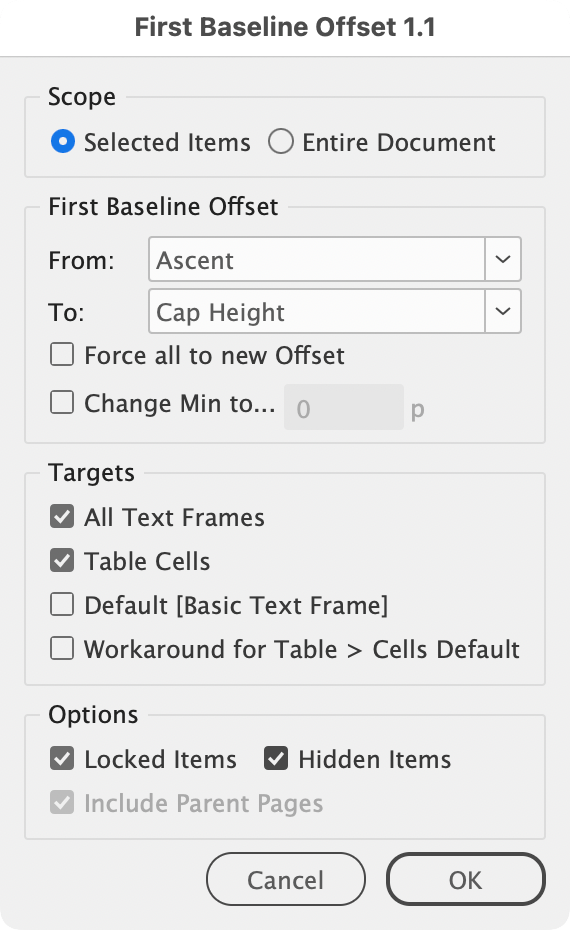
Fixing that frame by frame, and cell by cell, takes a long time in a real document. First Baseline Offset does it in one pass: pick the setting to find (From) and the one to apply (To), choose what to target, and click OK. It handles text frames, table cells (nested tables included) and parent pages, and it can update the document defaults so new frames and tables start out right.
Changed in First Baseline Offset:
- Any to any: From/To menus with all 6 settings, not just Ascent to Cap Height.
- Force all: sets everything to the new offset, whatever it was.
- Selection scope: Selected Items or Entire Document, auto-detected.
- Custom Min value: any value in document units, picas/ciceros notation included.
- Table Cells Default workaround: new “FBO None” cell style applied to [Basic Table].
- Simpler options: Locked Items and Hidden Items replace 4 checkboxes.
- Faster tables: cells processed in bulk.
Update in 1.1 : Fix for crash with anchored tables in overset text.
Ascent to Cap Height 1.0 is still included!
Compatible 2026-2023 (working in CS6 too)
Contact me for bugs/feature requests.
Scripts provided without warranty - backup data and use at your own risk.
Jean-Claude Tremblay – Services Proficiografik