



Hotel Rooms Renovation Displacement & Payback Model: Phased hotel renovation displacement, payback, NPV and IRR in Excel
Full description
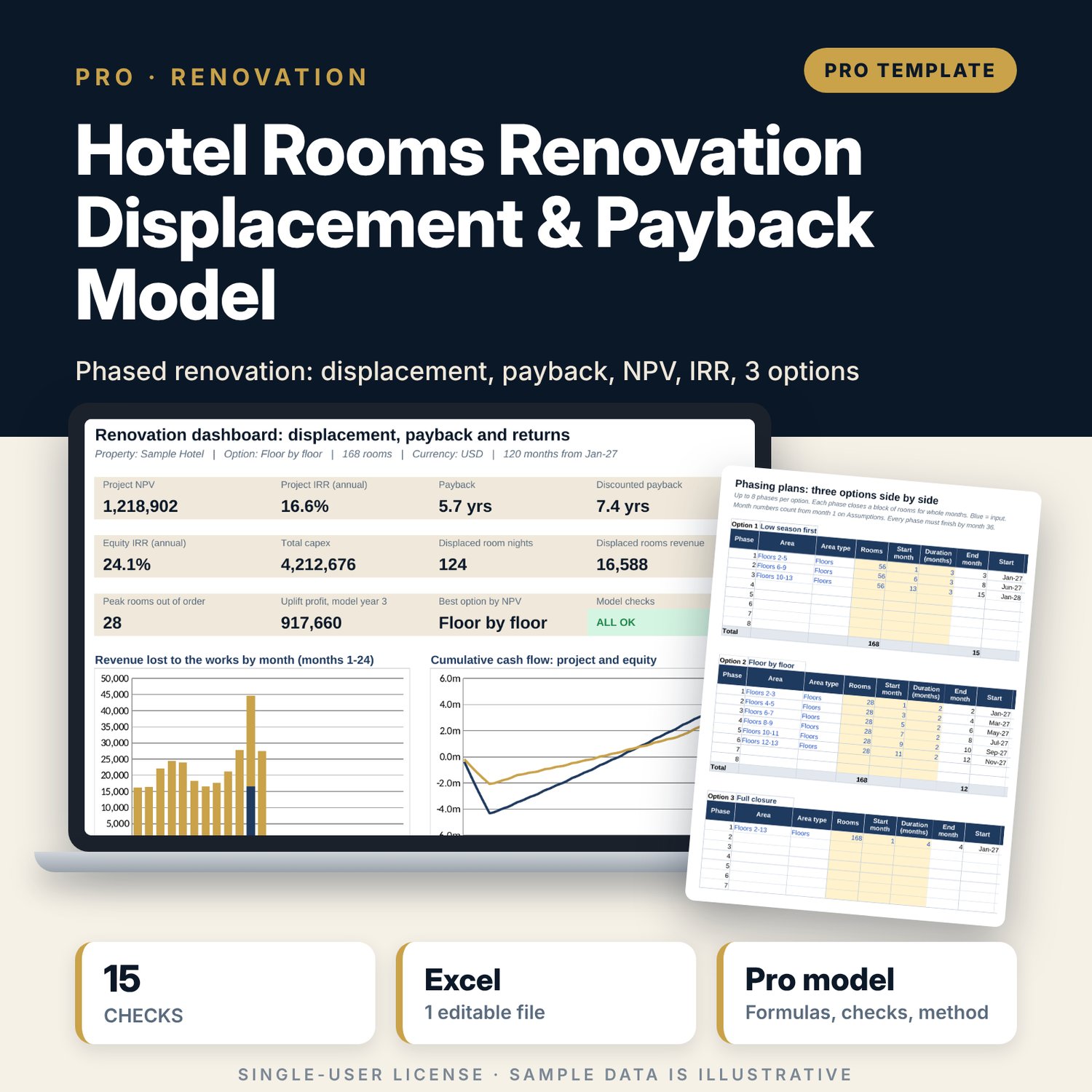
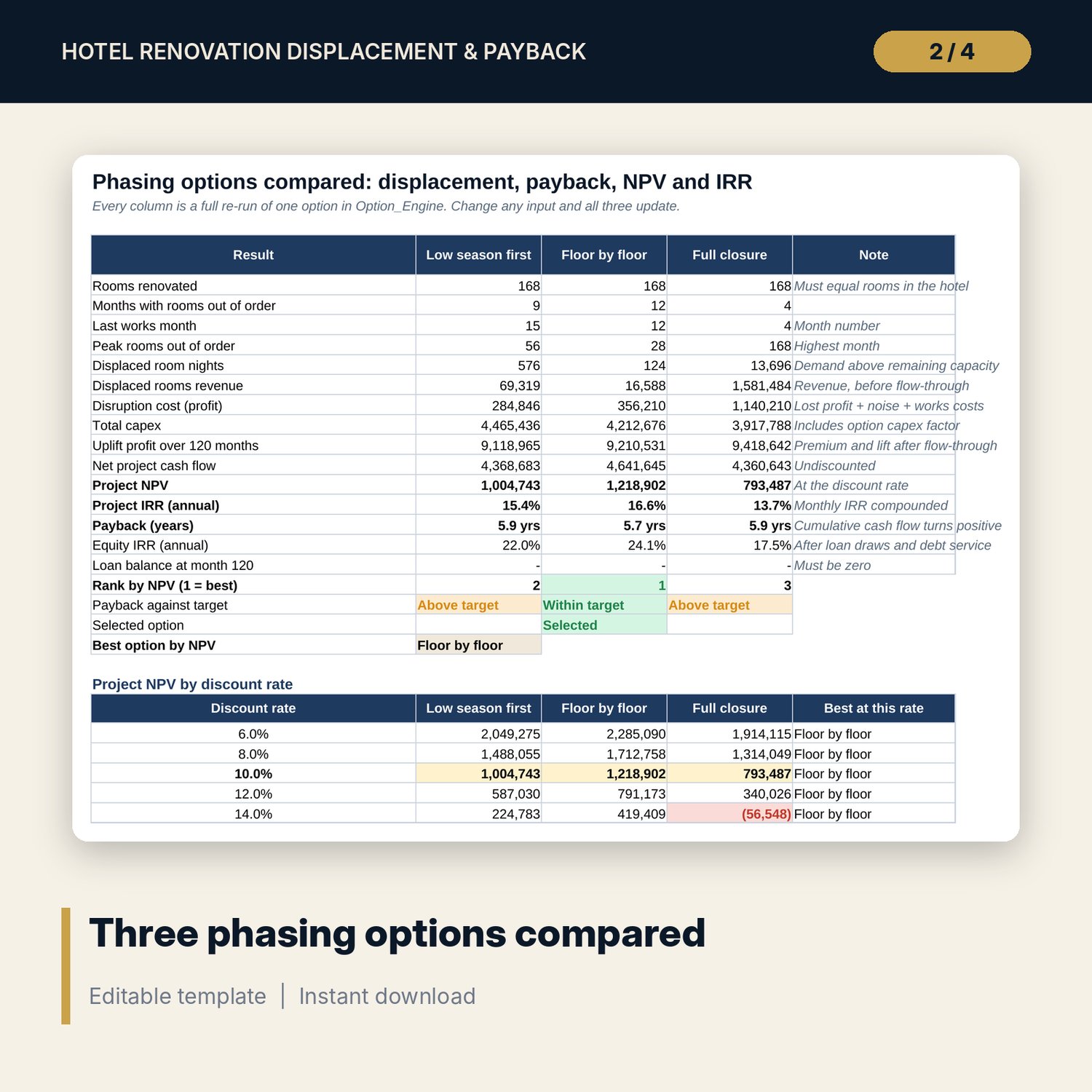
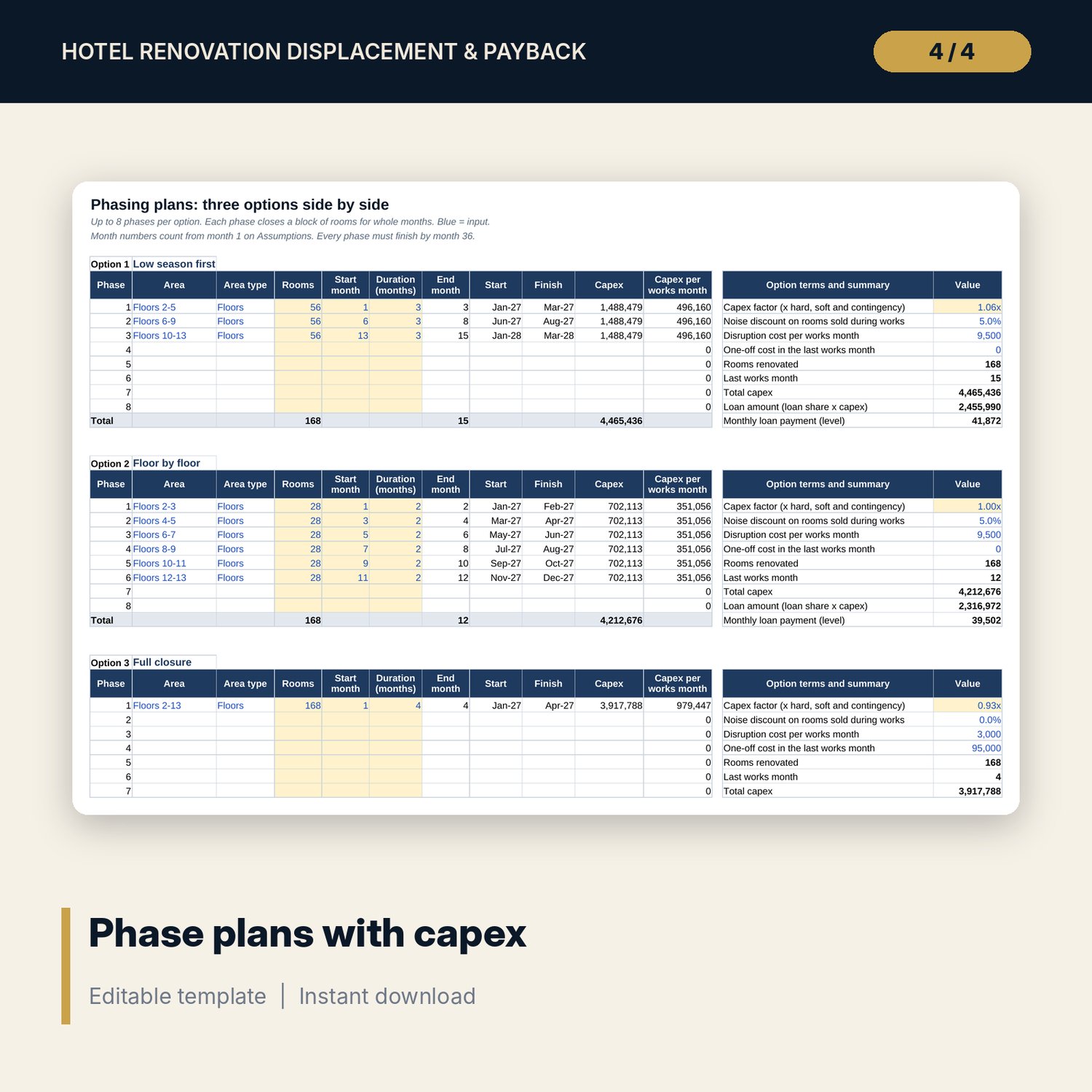
For general managers, asset managers, owners' representatives and financial controllers who must choose how to phase a rooms renovation and show the owner when it pays back. You set each phase (floors or a wing): rooms, start month and duration. The model takes those rooms out of order month by month, compares the rooms left with a 120-month demand forecast and counts only the demand above the remaining capacity as lost. It prices that loss at rooms and ancillary flow-through, adds a noise discount and works costs, credits fixed costs saved when the whole hotel is closed, then builds the ADR premium and occupancy lift that ramp up after each phase returns. Capex is spread over each phase's works months, with an optional loan. Results: monthly impact tables, cumulative cash payback, discounted payback, NPV, project and equity IRR, and three phasing options (low season first, floor by floor, full closure) re-run side by side in an independent engine.
Save with a bundle: this workbook is also in the Hotel Finance & Investment Pro Bundle, 25 workbooks for $59 instead of $329. All 100 Pro workbooks are in the Pro Library for $119, and all 241 templates and workbooks are in the Ultimate Hospitality Library for $149.
What is inside
- Hotel_Renovation_Displacement_Payback_Model.xlsx: 12 tabs, 14,827 formulas, 3 native charts, 14 drop-down and input rules, 15 integrity checks, a Method tab with 17 calculation notes.
- Sample hotel (illustrative): 168 rooms, a 120-month forecast and three phasing options with 10 phases in use and 14 spare phase rows.
- Phase_Calendar: rooms out of order for each phase and month, capex by month, renovated rooms weighted by the ramp.
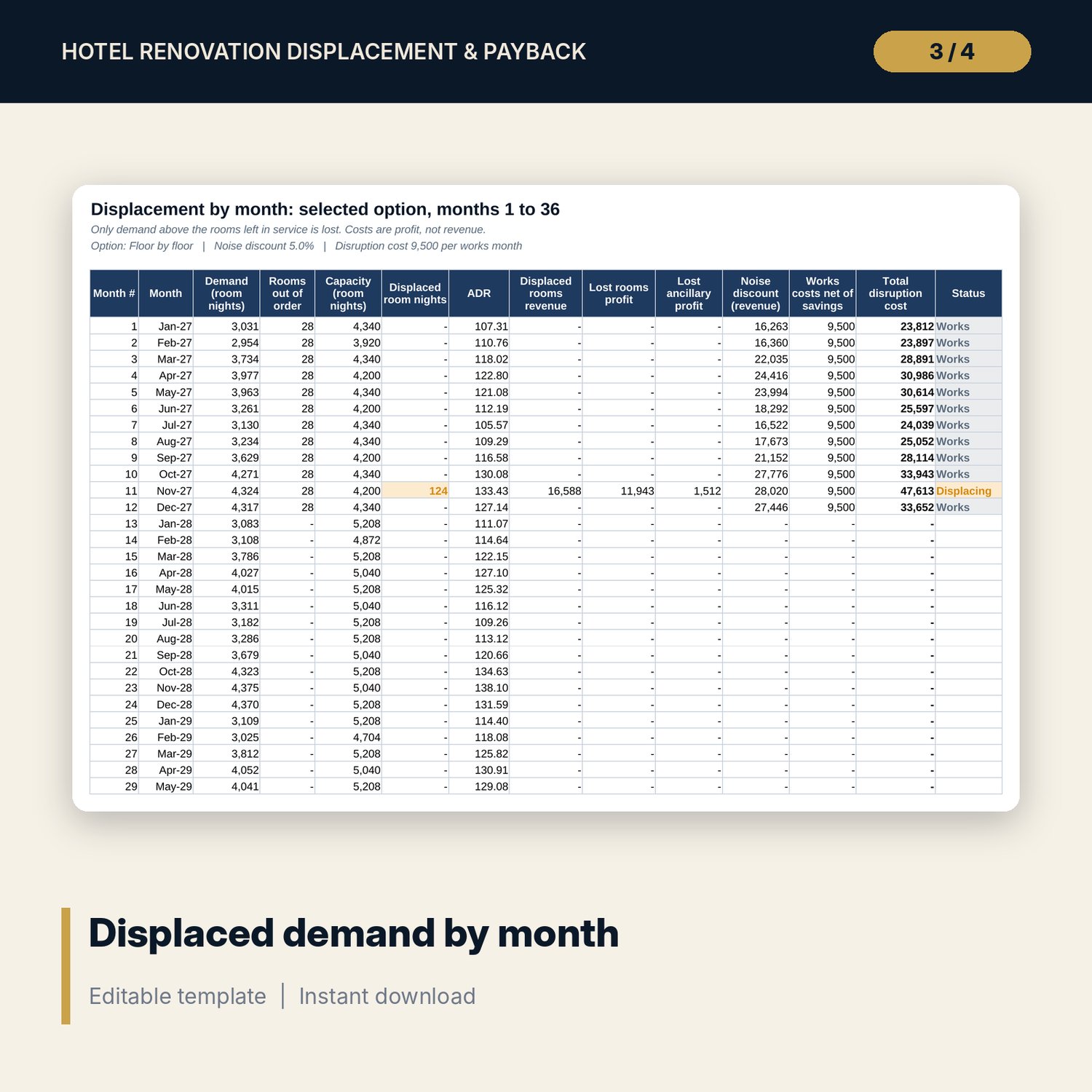
- Displacement: months 1 to 36 with capacity, displaced room nights, lost rooms and ancillary profit, noise discount and works costs.
- Cash_Flow: 120 months of uplift profit, capex, cumulative cash, present values, loan draws, interest, principal and equity cash flow.
- Option_Engine and Options: all three options re-run month by month, ranked by NPV, NPV at five discount rates and a 5 x 5 grid of NPV by ADR premium and capex per room.
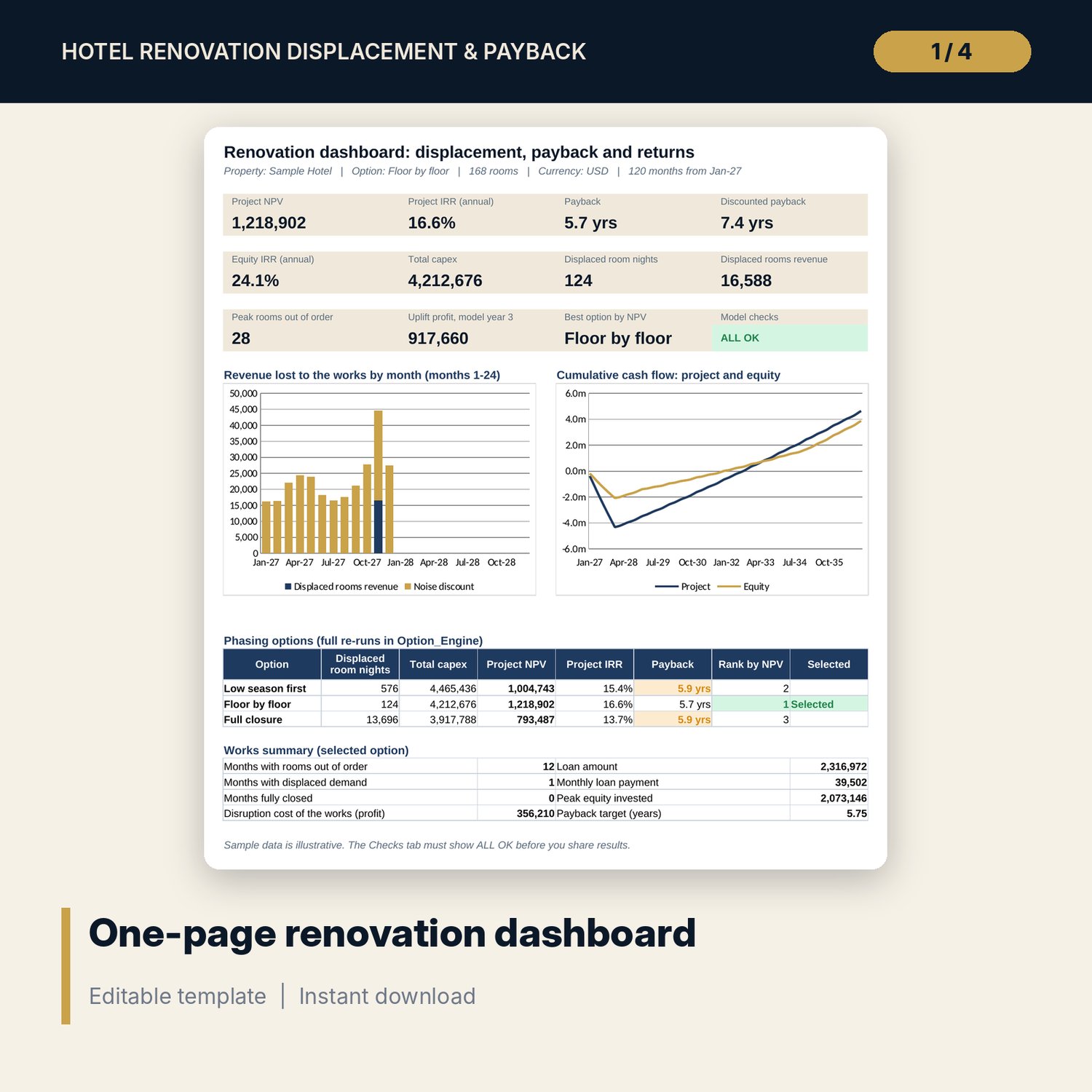
- Dashboard: 11 KPI tiles, a check tile, displaced revenue by month and cumulative cash flow charts, an option table, printable on one page.
- README.txt and LICENSE-and-Terms.txt.
How it works
- Enter rooms, flow-through, capex per room, ADR premium, occupancy lift, ramp, closure savings and the loan on Assumptions.
- Enter occupancy and ADR by calendar month and the yearly growth paths on Forecast.
- Lay out the phases of each option on Phase_Plan: rooms, start month, duration, capex factor and works costs.
- Pick an option and read displacement by month, payback, NPV and IRR on Displacement, Cash_Flow and the Dashboard.
- Compare all three options on Options and confirm the Checks tab shows ALL OK.
Details
- Format: one .xlsx workbook, English.
- Software: Excel 2016 or later, or LibreOffice Calc 7 or later.
- No macros, no data tables, no array formulas, no add-ins.
- Monthly model over 120 months in any currency.
- Delivery: instant download.
Good to know
- Sample data is illustrative and does not describe any market. Replace it with your own figures.
- Not financial, engineering or investment advice. Get contractor quotes and verify local requirements for permits, works hours and taxes.
- Displacement uses monthly averages. Peak nights inside a month can lose more than the model shows.
- Single-user license.
FAQ
Does it count all rooms out of order as lost revenue?
No. Each month it compares demand with the rooms left in service. Only demand above that capacity is lost, so a phase in a quiet month can cost nothing in displaced rooms.
Can I compare more than one phasing plan?
Yes. Three options with up to 8 phases each run side by side, ranked by NPV, with payback and IRR for each. Rename them as you like.
How is the post-renovation gain built?
Renovated rooms earn an ADR premium and an occupancy lift that ramp up in a straight line over the months you set, starting the month each phase returns.
Does it include financing?
Yes. A loan share of capex is drawn as works are paid, with interest-only months and level repayments. You get project IRR and equity IRR.
How do I know the formulas are right?
The Checks tab runs 15 tests, including an independent re-run of the selected option in Option_Engine that must match the main NPV. The Method tab shows how each result is built.