




Invoice Tracker & Client Manager | Freelance Billing Tool | Payment Tracking
Unpaid invoices hurt more than a missed deadline ever will. Stop losing track.
The Client & Invoice Tracker holds all your client information and invoices in one place. Add clients with contact details and status tracking (Active, Inactive, At-Risk). Create invoices with line items—describe the work, add the amount, watch the total calculate instantly. Every invoice gets a status: Outstanding (not paid yet), Paid, or Overdue (past due date). The tool shows you at a glance which invoices are waiting for payment and which clients are current. A client stat card dashboard gives you a quick view of your entire client base. Dark mode, light mode, whatever you prefer. Your data saves automatically and never leaves your device. No Google account. No Notion subscription. No app.
◈ KEY FEATURES
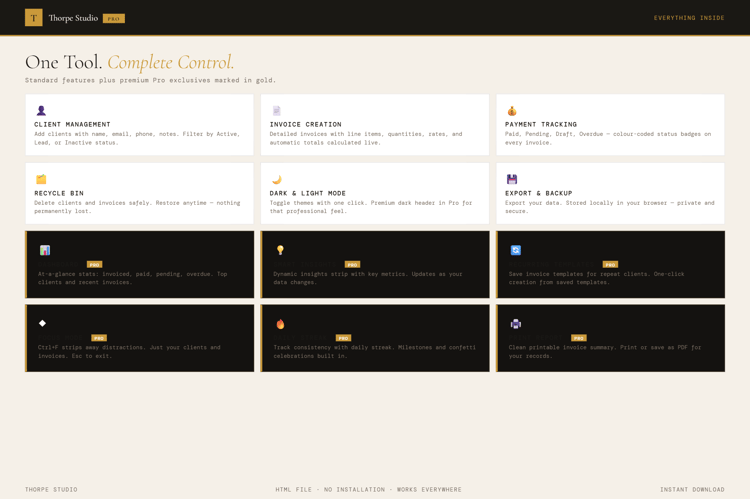
★ Client Management with Status Tracking Add clients with contact details. Mark them as Active, Inactive, or At-Risk. See your entire client base at once.
★ Invoice Creation with Line Items Build invoices directly in the tool. Add line items (e.g., "Website redesign", "3 weeks consulting"). Amounts calculate automatically.
★ Payment Status Monitoring Every invoice gets a status: Outstanding (waiting), Paid, or Overdue (past due date). See which invoices need chasing.
★ Client Stat Card Dashboard Your entire client base summarised: total clients, active clients, outstanding payment value, total paid to date. Numbers at a glance.
★ Sidebar Client Navigation Click any client name to view all their invoices. Quick access to client history and payment status.
★ Due Date Tracking Set due dates on invoices. The tool warns you when a payment is overdue. Never leave money on the table.
★ Multi-View Interface View all clients at once. View all invoices across all clients. View your dashboard. Switch views instantly.
★ Invoice Status Indicators Visual indicators show which invoices are outstanding (red), paid (green), overdue (orange). Spot problem invoices instantly.
★ Dark & Light Mode Switch reading modes instantly.
★ Complete Export & Import Back up your entire client and invoice data as JSON. Portable forever. Keep it safe.
◈ YOUR DATA — HOW IT WORKS
Your client and invoice data live locally on your device using browser storage (localStorage). Nothing is sent to servers. Nothing is shared with banks or payment processors (unless you explicitly export). When you close the tool, your data stays on your device. When you open it next week, it's all there. Need a backup? Export your complete client and invoice database as a JSON file and keep it somewhere safe.
◈ WHO IS THIS FOR
→ Freelancers and contractors billing multiple clients → Small agency owners managing client relationships and invoicing → Solopreneurs who need to track payment status and follow up on outstanding invoices → Consultants with recurring client relationships → Anyone tired of spreadsheets for client and payment tracking
◈ WHAT YOU RECEIVE
- 1 × HTML file — Client & Invoice Tracker
- Works in any modern browser: Chrome, Edge, Firefox, Safari
- No installation. No account. No internet connection required after download
- Built-in welcome guide on first open
- Lifetime use. No subscription. No expiry
- Designed for desktop use — best experienced on a laptop or computer
◈ HOW TO USE IT
- Download the file and save it on your Desktop
- Double-click to open in your browser
- The welcome guide walks you through setup
- Add your first client: name, email, phone, status (Active/Inactive/At-Risk)
- Click on the client to create an invoice
- Add line items to the invoice (describe the work, add the price)
- The tool calculates the total automatically
- Set a due date and save the invoice
- Mark the status: Outstanding, Paid, or Overdue as time passes
- Check your dashboard to see unpaid invoice totals and client stats
- Use client views to track all invoices from one client
◈ IMPORTANT — PLEASE READ BEFORE PURCHASING
This is a digital HTML file—not accounting software, not an invoicing platform like Stripe Invoices or FreshBooks. You download it once and it lives on your device. Your client and invoice data are stored locally using browser storage (localStorage)—completely private, on your computer only. This tool is for tracking and organisation; it does not automatically send invoices or process payments. Always keep exported backups of your client and invoice data. If you clear your browser storage, data is lost—use the export function to back up regularly. There are no refunds on digital products. For technical help, contact us and we'll assist.
◈ ABOUT THORPE STUDIO
Thorpe Studio builds premium browser-based productivity tools for freelancers and solopreneurs. Every tool opens instantly in your browser, works offline, requires no account, and keeps your data private on your device. No subscriptions. No cloud. No friction. Just you, your ideas, and the tools you need to move forward.
£10.99