Vsk5 Tide Tracker
Vsk5 Tide Tracker
User Manual
1. Purpose of the App
The Vsk5 Tide Tracker is a real-time tide phase calculator designed specifically for Virtual Skipper 5.
It allows sailors to determine the exact in-game tide phase at any moment and displays:
- The current tide phase
- The minutes remaining until the next phase change
- The next phase name and time
Accuracy: Within 60 seconds of the game engine, making it suitable for live tactical decisions.
Unlike the static in-game weather bulletin, this tool follows the continuous 24-hour tidal cycle used internally by Vsk5, ensuring correct tide information throughout the race — not just at the start.
This allows you to plan:
- Race strategy
- Current usage
- Mark roundings
- Laylines
using the same timing logic the game itself uses.
2. Why the In-Game Race Menu Weather Bulletin Is Often Wrong
When a race starts, Vsk5 generates a Weather Bulletin in the race menu displaying the tide phase at the exact start time.
However:
- The bulletin is static
- It does not update after the race begins
- The tide itself continues to progress in real time
This can cause the displayed tide phase to become incorrect minutes after the start.
Example:
- High tide is set to the default 18:00
- Race starts at 17:30 → Bulletin shows Flood
- One minute later at 17:31 → Actual tide changes to High
- Bulletin still shows Flood
From this point onward, the bulletin is outdated.
The Tide Tracker solves this by calculating the real tide phase at any moment using the game’s internal timeline.
3. How the Game’s Tide System Works
Each Vsk5 track uses a fixed daily tide schedule made of eight phases per day, forming a continuous 24-hour cycle.
Phases:
- Low – 1 hour duration
- Flood – 5 hour duration
- High – 1 hour duration
- Ebb – 5 hour duration
- Low – 1 hour duration (second low tide)
- Flood – 5 hour duration (second flood tide)
- High – 1 hour duration (second high tide)
- Ebb – 5 hour duration (second ebb tide)
Full tidal sequence - 24 hours
There is a smooth transition between tide phases, and the stream strength gradually increases from the minimum strength to the maximum strength throughout the duration of each tide phase. The minimum and maximum strengths are set by the author in the Track Editor when the track was created.
Notes:
- Phases occur at precise in-game times
- Each phase has a fixed duration
- The cycle repeats every 24 hours
- The Tide Tracker uses these exact internal values to calculate the current phase and remaining time
4. Default High Tide Time in Vsk5
By default, Vsk5 sets High Tide at 18:00, unless the track author changes it in the track editor.
Why this matters:
- The entire tide cycle is anchored to high tide
- If high tide is moved, all phases shift accordingly
- Both the Tide Tracker and Vsk5 Tide Table automatically adjust to match
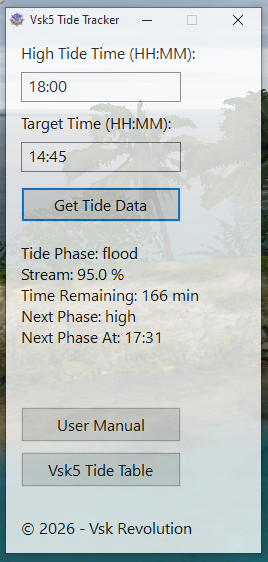
5. High Tide Time Field
High Tide Time (HH:MM)
Enter the high tide time used by the track:
- Default tracks: 18:00
- Custom tracks: use the time specified in the in-game Race Information
When the default high tide time is changed, the Vsk5 Tide Tracker:
- Calculates the offset from 18:00
- Shifts the entire tidal schedule forward or backward
- Keeps all phase lengths intact
Example:
- High Tide = 19:00 → All phases shift +60 minutes
6. Target Time Field
Target Time (HH:MM)
Enter any in-game clock time:
- Race start time
- Estimated mark rounding time
- Current in-race time
The tracker can be used at any moment during a race, not just before the start.
This allows players to confirm whether the tide phase has changed since the race began.
7. The 24-Hour Vsk5 Tide Cycle (Default 18:00 High Tide)
Vsk5 uses four distinct tide maps that rotate in a predictable loop.
Default cycle (High Tide 18:00):
- Low: 23:31 – 00:30
- Flood: 00:31 – 05:30
- High: 05:31 – 06:30
- Ebb: 06:31 – 11:29
- Low: 11:30 – 12:30
- Flood: 12:31 – 17:30
- High: 17:31 – 18:30
- Ebb: 18:31 – 23:30
These times shift automatically when a custom high tide time is used.
8. How the Calculation Works (Internally)
The tracker:
- Shifts all phase start times by the high-tide offset
- Builds a continuous absolute timeline
- Places the target time into that timeline
- Locates the active phase
- Calculates remaining minutes and the next phase change
9. Tide Phase Output
After clicking Get Tide Phase, the display shows:
- Tide Phase: Flood
- Time Remaining: 127 min
- Next Phase: High
- Next Phase At: 17:31
Meaning:
- Current phase = Flood
- 127 in-game minutes remain until next phase change
- Tide will switch to High at 17:31
10. User Manual Button
User Manual
Opens this documentation in the user’s browser.
11. Vsk5 Tide Table Button
Vsk5 Tide Table
Opens the Vsk5 Tide Table.
Both apps use the same Vsk5 timing engine
12. Why This Tool Is Accurate
- Uses absolute minute timelines
- Avoids bulletin desynchronization
- Matches the game server’s internal logic
For more information: Vsk5 Tide Table / Wind Wave & Stream Atlas.