

Multi Image Cam for Gravity Forms
ANNUAL LICENSE OPTION
Prefer annual billing? Choose your site tier:
MULTI IMAGE CAM FOR GRAVITY FORMS
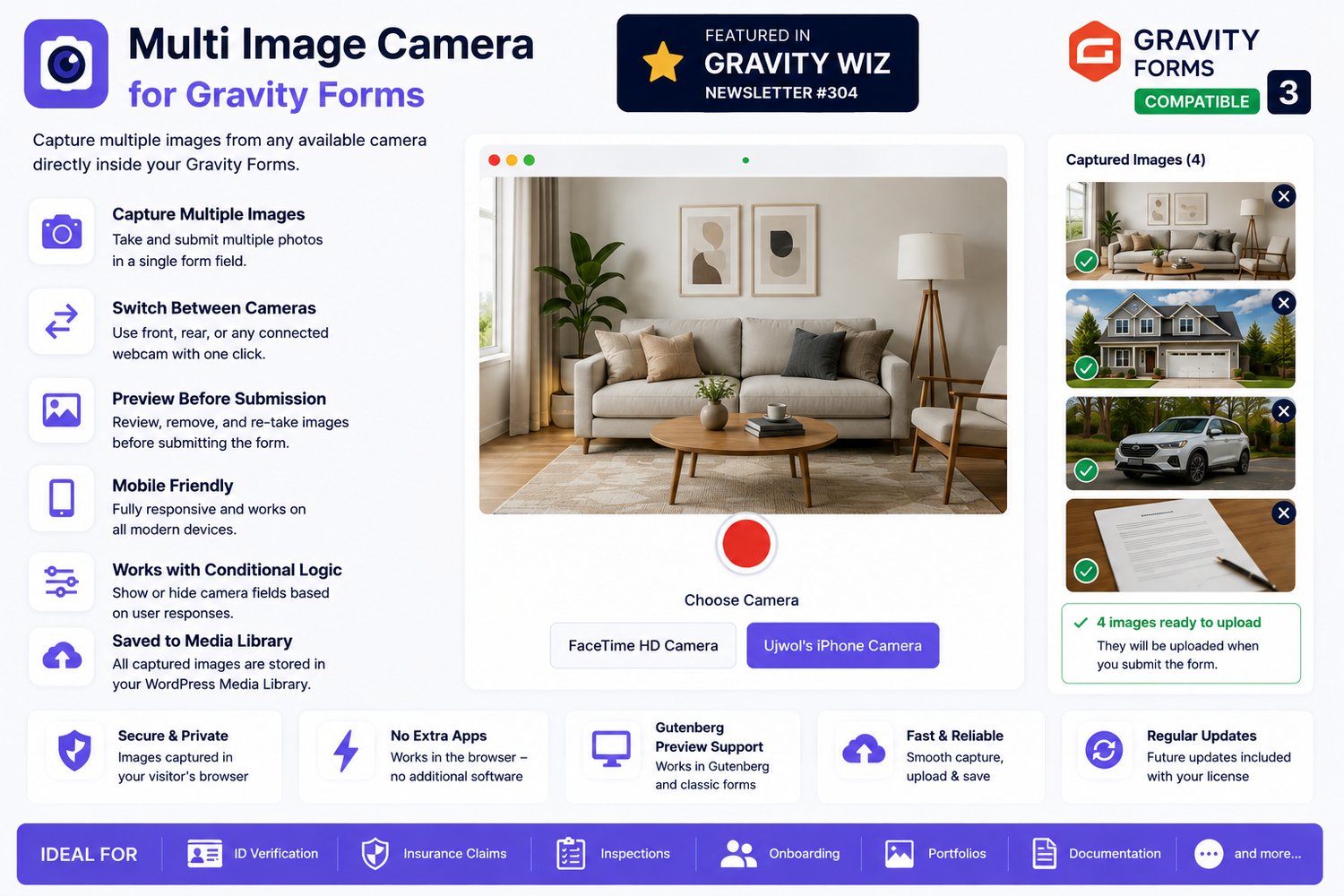
Capture multiple photos from any available camera—directly inside your Gravity Forms.
Give visitors a faster, easier way to submit visual documentation without leaving the form, opening a separate camera app, searching through their photo gallery, or uploading images one by one.
Multi Image Camera for Gravity Forms adds a dedicated camera field that lets users:
✓ Select from available cameras
✓ Capture multiple images
✓ Preview every photo
✓ Remove unwanted images
✓ Submit everything with the form
Captured images are saved to your WordPress Media Library for convenient access and management.
FEATURED IN GRAVITY WIZ WEEKLY #304
Multi Image Camera for Gravity Forms was featured in the Magical Mentions section of Gravity Wiz Weekly #304—a strong recognition from one of the most respected names in the Gravity Forms ecosystem.
Read the feature:
A PROFESSIONAL CAMERA WORKFLOW—WITHOUT CUSTOM DEVELOPMENT
An ordinary file-upload field forces visitors to:
1. Leave the form
2. Open their camera application
3. Take several photos
4. Find the images in their gallery
5. Return to the browser
6. Upload each image manually
Multi Image Camera for Gravity Forms removes those extra steps.
Visitors capture, review, remove, and submit multiple images directly inside your Gravity Form.
The result is a smoother user experience, fewer abandoned forms, and a more professional workflow for your business.
IDEAL FOR
✓ ID and identity verification
✓ Insurance claims and damage documentation
✓ Property and building inspections
✓ Vehicle condition reports
✓ Employee and customer onboarding
✓ Delivery confirmation
✓ Maintenance and repair reports
✓ Before-and-after documentation
✓ Product condition reports
✓ Portfolio and project submissions
✓ Field-service documentation
✓ Supporting evidence and attachments
POWERFUL MULTI-IMAGE CAPTURE
Capture several photos from one camera field.
Visitors do not need to use a separate upload field for every image. They can take multiple photos in sequence and review them before submitting the form.
SWITCH BETWEEN AVAILABLE CAMERAS
The addon detects cameras made available by the visitor’s browser.
Depending on the device, users may be able to switch between:
• Front-facing phone cameras
• Rear-facing phone cameras
• Built-in laptop webcams
• Connected USB webcams
• Compatible phone cameras connected to a computer
This makes the addon useful for both mobile and desktop workflows.
PREVIEW BEFORE SUBMISSION
Every captured photo appears in a dedicated preview panel.
Visitors can review all images before submitting the form, helping prevent incomplete, blurry, duplicated, or incorrect submissions.
REMOVE UNWANTED PHOTOS
Each image preview includes a clear cross button.
Visitors can remove an image instantly and capture a replacement without restarting the form.
CLEAR READY STATUS
Captured images display a visual confirmation when they are ready to be submitted.
This gives visitors confidence that their photos have been successfully prepared for upload.
MOBILE-FRIENDLY AND RESPONSIVE
The camera interface automatically adapts to desktop, tablet, and mobile screen sizes.
On smaller screens, the camera and image-preview sections reorganize into a touch-friendly mobile layout.
USE MULTIPLE CAMERA FIELDS
Add one camera field or several separate camera fields to the same Gravity Form.
For example:
• Front of ID
• Back of ID
• Property exterior
• Property interior
• Damaged item
• Supporting evidence
This makes it easy to create structured photo-documentation workflows.
WORKS WITH GRAVITY FORMS CONDITIONAL LOGIC
Show or hide camera fields based on a visitor’s previous answers.
Example:
“Was any damage found?”
When the visitor selects “Yes,” the camera field can appear and request supporting photographs.
This keeps your forms clean, relevant, and easier to complete.
SAVED TO THE WORDPRESS MEDIA LIBRARY
Submitted images are saved to the WordPress Media Library.
You can access and manage captured images directly from your WordPress dashboard.
NO SEPARATE APP REQUIRED
Visitors do not need to install a mobile application, desktop program, or browser extension.
The camera experience works directly inside the browser using supported camera functionality.
UPDATED FOR GRAVITY FORMS 3
The addon includes compatibility improvements for Gravity Forms 3, including:
✓ Correct field placement in the form editor
✓ Updated Gravity Forms editor icon
✓ Improved frontend field detection
✓ Support for dynamically rendered forms
✓ Improved Gutenberg camera preview
✓ Responsive camera sizing
✓ Better camera-stream cleanup
✓ Captured-image gallery alignment
✓ Support for multiple camera fields
IMPROVED CAMERA INTERFACE
The latest interface includes:
• Large live camera preview
• Capture button positioned below the camera
• Camera-selection controls
• Dedicated captured-image panel
• Centered image previews
• Cross buttons inside each image preview
• Uploading and ready indicators
• Responsive desktop and mobile layouts
• Automatic preview-panel height adjustment
• Improved support for dynamically loaded forms
HOW IT WORKS
1. The visitor opens your Gravity Form on an HTTPS-secured page.
2. The browser requests camera permission.
3. The visitor grants permission.
4. Available cameras are displayed.
5. The visitor chooses a camera.
6. They capture one or more images.
7. Captured images appear in the preview panel.
8. The visitor reviews or removes images.
9. The form is submitted.
10. The images are uploaded and saved to WordPress.
TRY THE LIVE DEMO
Experience the addon before purchasing:
DEMO VIDEO
For the demo to work:
• Use a device with a camera
• Open the page in a modern browser
• Allow camera access when prompted
• Make sure browser or device privacy settings are not blocking the camera
WHY THIS ADDON IS DIFFERENT
Multi-camera capture inside Gravity Forms is a highly specialized workflow.
Without a ready-made solution, a business may need to hire a developer to build and maintain:
• A custom Gravity Forms field
• Browser camera access
• Multiple-camera detection
• Camera-switching controls
• Multi-image capture
• Image previews
• Image removal
• Responsive mobile layouts
• Upload processing
• WordPress Media Library integration
• Gravity Forms compatibility
• Browser-specific fixes
• Future updates and maintenance
Multi Image Camera for Gravity Forms gives you a ready-to-install solution without the cost, delay, testing, and maintenance burden of building everything from scratch.
REQUIREMENTS
Please confirm the following before purchasing:
• Gravity Forms must be installed and active
• Your website must use HTTPS/SSL
• The visitor must have a camera or compatible connected webcam
• The visitor must grant camera permission
• The visitor must use a browser that supports camera access
• Camera access must not be blocked by browser, device, or operating-system privacy settings
Browsers generally do not allow camera access on unsecured HTTP pages.
BROWSER COMPATIBILITY
Designed for modern versions of browsers that support camera access, including:
• Google Chrome
• Mozilla Firefox
• Microsoft Edge
• Apple Safari
Camera names, camera switching, and available devices may vary depending on the browser, operating system, and hardware.
COMPATIBILITY: Tested upto
WordPress: Version 7
Gravity Forms: 3
Connection: HTTPS/SSL required
Devices: Desktop, tablet, and supported mobile devices
INSTALLATION
1. Purchase and download the addon ZIP file.
2. Sign in to your WordPress dashboard.
3. Go to Plugins → Add New Plugin.
4. Select Upload Plugin.
5. Upload the addon ZIP file.
6. Install and activate the addon (add license key in setting).
7. Confirm that Gravity Forms is installed and active.
8. Open an existing form or create a new form.
9. Add the Multi Image Camera field.
10. Configure the field and conditional logic.
11. Save the form.
12. Place the form on an HTTPS-secured page.
13. Test camera access before publishing.
LIFETIME LICENSE
Choose the license option that matches the number of websites where you will use the addon.
Each option is a one-time lifetime license for the selected number of websites.
There is no recurring annual subscription for the selected license.
Future addon updates are included while download access remains available through your purchase account.
REFUND POLICY
A 7-day refund period is available for qualifying product-related issues.
Change-of-mind purchases are not eligible for a refund.
Please review the live demo, product requirements, HTTPS requirements, browser compatibility, camera-permission requirements, and license options before purchasing.
Camera access blocked by a visitor’s browser, device, privacy settings, operating system, or security software is not considered a product defect.
RELATED ADDONS
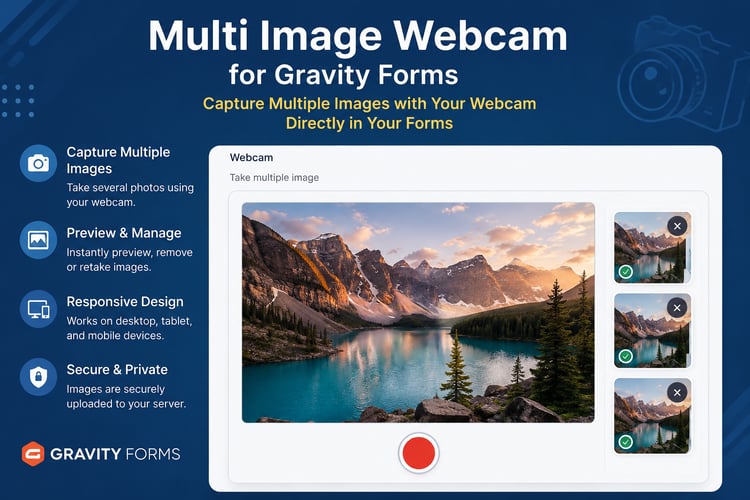
MULTI IMAGE WEBCAM FOR GRAVITY FORMS
Capture multiple images using a webcam-focused Gravity Forms field.
https://payhip.com/b/YnPdG
WEBCAM FOR GRAVITY FORMS
Capture and submit a single webcam image directly through Gravity Forms.
https://payhip.com/b/RudID
ADD PROFESSIONAL MULTI-IMAGE CAPTURE TO GRAVITY FORMS
Turn a standard Gravity Form into a complete visual-documentation workflow.
Let visitors capture multiple photos, switch cameras, review images, remove unwanted shots, and submit everything without leaving the form.
Whether you are building an insurance claim form, inspection system, identity-verification process, onboarding workflow, property report, portfolio submission, or documentation portal, Multi Image Camera for Gravity Forms gives you a specialized ready-made solution without the cost and complexity of custom development.