


AskEntries for Gravity Forms
ANNUAL LICENSE OPTION
Annual subscription plans are available for this product, with 1-site, 3-site, 10-site, and Agency options.Prefer annual billing? Choose your site tier:
AskEntries for Gravity Forms
Stop manually digging through Gravity Forms entries. Ask a question instead.
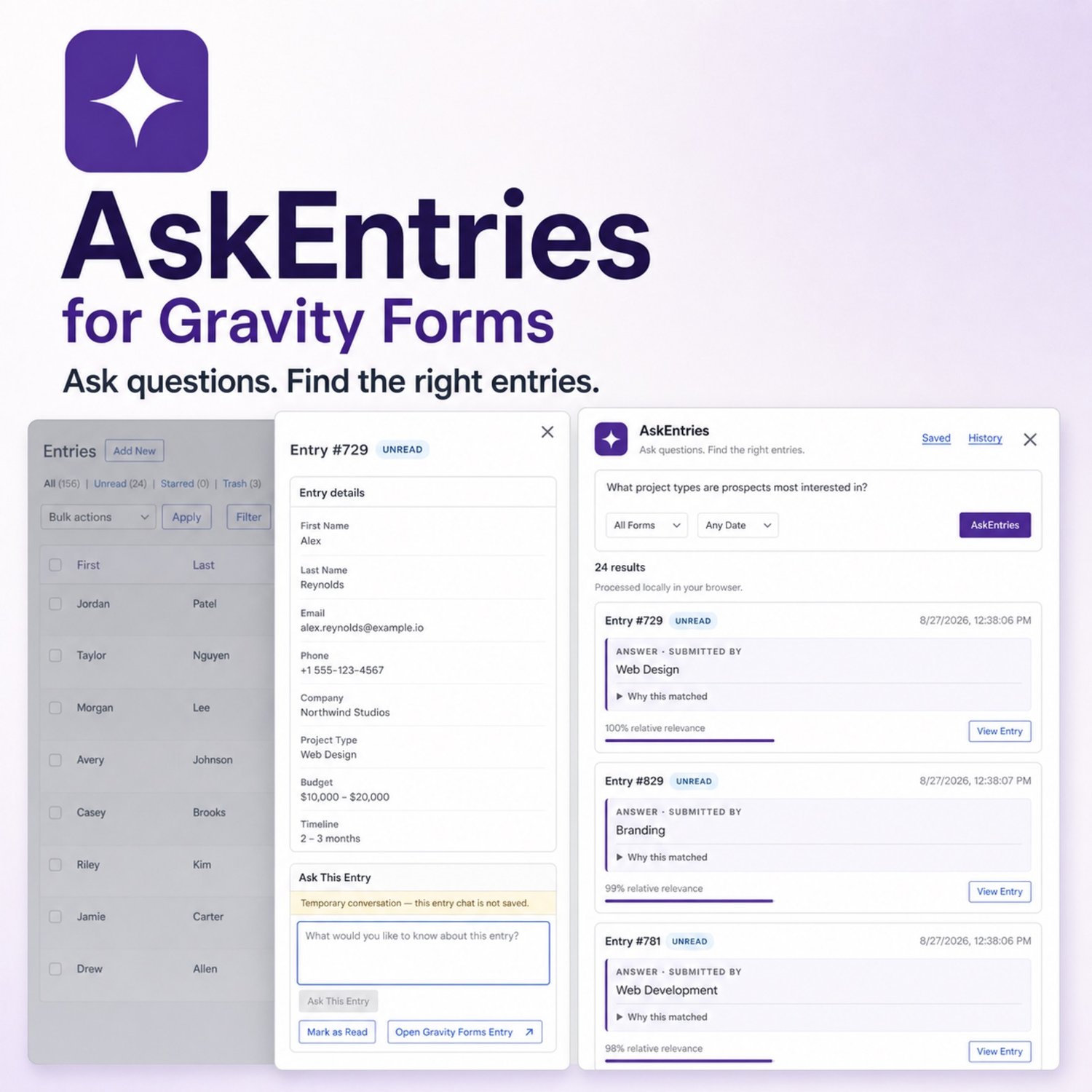
AskEntries for Gravity Forms adds private, browser-powered semantic search and AI-assisted answer extraction directly to your Gravity Forms admin. For single form entries or all of the forms entries at once
Ask questions like:
- “Who asked for a refund?”
- “Which applicants have nonprofit experience?”
- “Who mentioned needing help with installation?”
- “Which customers are interested in upgrading?”
- “Who submitted a request about billing?”
AskEntries searches by meaning, not just exact keywords, ranks the most relevant entries, extracts useful answer-focused snippets, and links every result directly back to the original Gravity Forms entry.
And because the AI processing happens inside your authenticated WordPress administrator’s browser, your Gravity Forms entry content is not sent to OpenAI, Gemini, Anthropic, or another external LLM API.
FIND THE RIGHT ENTRIES FASTER
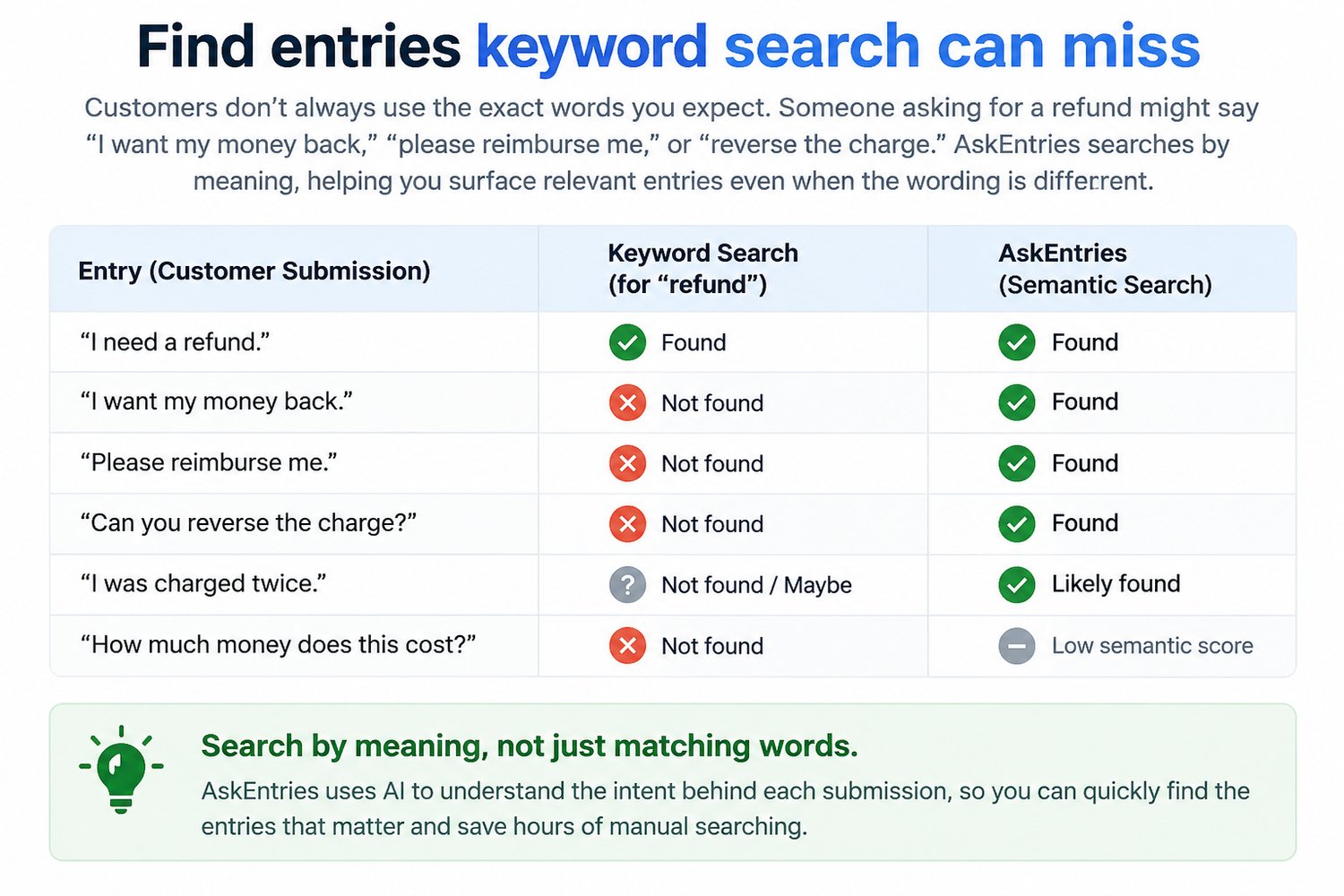
Traditional Gravity Forms search works well when you already know the exact words you're looking for.
AskEntries goes further.
It uses semantic search to identify entries that express the same idea even when visitors use different wording.
For example, a search for:
“Who wants a refund?”
may surface entries containing phrases such as:
- “I would like my payment returned.”
- “Can you cancel my purchase?”
- “I need my money back.”
- “Please reverse this charge.”
Instead of manually reading dozens or hundreds of submissions, AskEntries helps surface the entries that are most likely to matter.
BUILT DIRECTLY INTO GRAVITY FORMS
AskEntries works where you already manage submissions.
Open the floating AskEntries assistant directly from a Gravity Forms:
- Entries list
- Individual Entry page
There is no separate dashboard to learn and no external AI service to manage.
You can:
- Ask natural-language questions about your entries
- Search unread, read, or all entries
- Filter by common date ranges
- Review ranked results with relevance indicators
- See answer-focused snippets
- Preview entries without losing your current results
- Open the original Gravity Forms entry
- Ask temporary follow-up questions about a specific entry
- Mark entries read or unread
- Star or unstar entries
- Add notes
- Send reviewed custom emails
- Perform actions across multiple qualifying results
BULK ACTIONS BASED ON RELEVANCE
AskEntries is not limited to finding information.
Once you've identified the right entries, you can act on them.
Set a Minimum Relevance threshold and select:
- Individual entries
- Matching entries on the current page
- All qualifying entries across the result set
Then apply supported bulk actions including:
Add Notes
Add a Gravity Forms note to multiple selected entries at once.
Send Custom Email
Compose and review a message before sending it to selected entries that contain a valid Gravity Forms Email field.
Email supports native Gravity Forms merge tags plus convenient shortcuts for common information such as:
- Name
- Phone
- Message
Recipients are validated server-side and masked in review and audit information.
Mark Read / Unread
Quickly update the read status of matching entries.
Star / Unstar
Organize important submissions directly from your AskEntries results.
Bulk operations use bounded batches, progress reporting and partial-failure summaries so you can see exactly what happened.
ADJUST RESULTS WITH MINIMUM RELEVANCE
Not every semantic match is equally useful.
AskEntries lets you adjust the Minimum Relevance threshold after a search without rerunning the semantic analysis.
Increase the threshold when you want only stronger matches.
Lower it when you want to inspect broader possibilities.
This makes it especially useful for workflows where you want to find a group of similar entries and then take action only on sufficiently relevant results.
PRIVATE, BROWSER-SIDE AI PROCESSING
AskEntries is designed for administrators who want AI-assisted entry analysis without sending their form submissions to a third-party LLM API.
Entry passages and questions are processed inside the authenticated administrator's browser using:
- TensorFlow.js
- Universal Sentence Encoder QnA
- MobileBERT answer extraction
Entry text is not sent to OpenAI, Gemini, Anthropic, or another external LLM vendor.
The underlying model files and vocabularies may be downloaded from TensorFlow Hub or Google-hosted model storage when required. Entry content is not included in those model download requests.
After the models are cached by the browser, later initialization is generally faster.
There are also no per-question AI API fees from AskEntries.
SAVE YOUR MOST USEFUL QUESTIONS
If you regularly ask the same questions, save them.
For example:
- “Who wants a refund?”
- “Which leads mentioned a budget above $5,000?”
- “Who needs a follow-up?”
- “Which applicants have WordPress experience?”
- “Who reported a technical problem?”
Saved questions can be:
- Added
- Edited
- Removed
- Reordered
- Run again instantly
Saved questions are isolated by both WordPress user and Gravity Form, allowing different administrators to maintain their own workflows.
DEVICE-LOCAL SEARCH HISTORY
AskEntries keeps compact form-level history on the current device for up to 25 questions per form.
History can remember:
- Previous questions
- Compact result information
- The last viewed results page
- Viewed-entry markers
Use Resume Last View to continue where you left off.
Individual history items can be deleted at any time.
Full entry payloads are not stored in AskEntries history.
Entry-specific follow-up conversations are temporary and disappear when the assistant is closed.
DESIGNED FOR REAL ENTRY VOLUMES
AskEntries loads Gravity Forms entries in pages of 200 and can safely analyze up to the newest:
1,000 matching entries
and up to:
6,000 searchable passages
for a query.
Every distinct entry meeting the semantic confidence floor can appear in your results.
There is no artificial 24-result limit.
If the available dataset must be truncated for browser safety, AskEntries clearly reports it.
MobileBERT answer refinement runs progressively in small batches so results can remain usable while answer snippets are improved.
SECURE GRAVITY FORMS INTEGRATION
AskEntries respects WordPress and Gravity Forms permissions.
Reading entries requires the appropriate Gravity Forms entry-view capability.
Actions that modify entries require the corresponding entry-edit capability.
Bulk requests verify:
- WordPress authentication
- REST nonce
- Active AskEntries license
- Gravity Form
- Entry status
- Action-specific Gravity Forms capabilities
Email recipients are obtained from server-validated Gravity Forms Email fields rather than trusting browser-provided addresses.
GREAT FOR
AskEntries can help with many Gravity Forms workflows, including:
Customer Support
Find customers describing refunds, cancellations, technical issues or specific problems.
Lead Qualification
Find prospects mentioning particular budgets, requirements, services or purchase intent.
Applications & Recruiting
Search applicants for experience, skills, qualifications or interests without opening every submission.
Surveys & Feedback
Discover submissions discussing recurring themes even when respondents use different wording.
Registrations
Find attendees with specific requirements, preferences or requests.
Internal Forms
Search employee requests, approvals, reports and other operational submissions.
Sales Follow-Up
Identify groups of relevant leads, set a relevance threshold, select them and send a reviewed follow-up email.
NO EXTERNAL LLM API REQUIRED
AskEntries does not require:
- OpenAI API keys
- ChatGPT API access
- Gemini API keys
- Anthropic API keys
- Per-token billing
- A separate cloud AI subscription
The semantic search and answer extraction models run in the administrator's browser.
REQUIREMENTS
- WordPress 6.4 or newer
- Gravity Forms 3.0 or newer
- PHP 8.0 or newer
- Modern desktop browser
- Valid AskEntries license
INSTALLATION
- Download the AskEntries ZIP file.
- In WordPress, go to Plugins → Add New → Upload Plugin.
- Upload and activate AskEntries for Gravity Forms.
- Go to Forms → Settings → AskEntries.
- Enter your Plugins By Ujwol AskEntries license key beginning with GFL-.
- Open the Entries screen for any Gravity Form.
- Click the purple AskEntries launcher in the lower-right corner.
- Start asking questions.
LICENSING
AskEntries supports:
- Annual licenses
- Lifetime licenses
- Eligible Plugins By Ujwol bundle licenses
Site allowances and bundle entitlements are managed through the Plugins By Ujwol licensing server.
Localhost activations do not consume production site seats.
License verification sends only licensing-related information such as the license key, product identifier, installation ID and site URL.
Gravity Forms entry content is never sent to the licensing server.
If an annual license expires, updates, downloads, new activations and support may no longer be available. Existing authorized installations can continue operating according to the license server's authorization rules.
AskEntries licensing does not disable your Gravity Forms production forms.
WHY ASKENTRIES?
Gravity Forms already gives you powerful tools for collecting and storing submissions.
AskEntries helps you understand those submissions faster.
Instead of:
Search → open entry → read → go back → search again → repeat
you can:
Ask → review relevant entries → set your confidence threshold → select → act.
Turn your Gravity Forms Entries screen into a private AI-assisted workspace for finding, understanding and managing submissions.
Ask your entries. Find what matters. Take action.
Watch Live Demo