Text Splitter
Text Splitter creates, reads and updates all your text layers in bulk.
Made for subtitles, lyric videos, kinetic typography and any text-heavy project.
Text Splitter creates, reads and updates all your text layers in bulk.
Made for subtitles, lyric videos, kinetic typography and any text-heavy project.
Creating dozens of text layers one by one, then trimming and offsetting each on the timeline, is one of the most repetitive tasks in After Effects. With Text Splitter, you instantly generate all the text layers of your script.
Need changes later? Read the layers back, edit them like a document and update them all at once, without losing styling or animation.
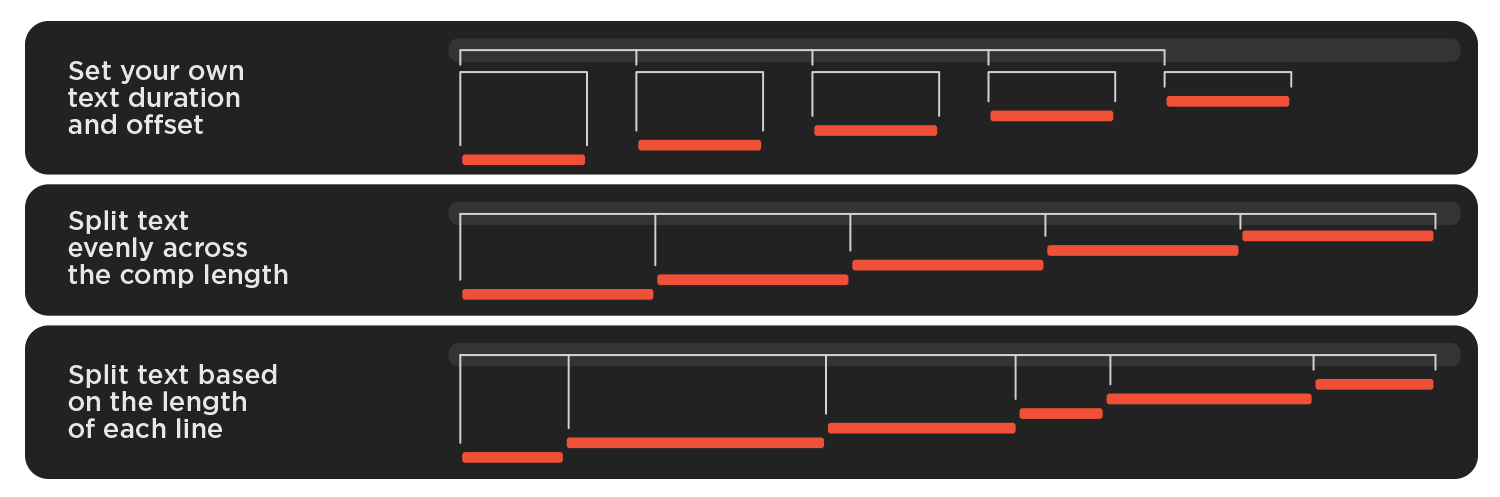
The generated layers can follow three different structures:
In the Text Lines box, write or paste your text.
Each line becomes a separate text layer, and empty lines are ignored.
In the Timing section, Duration sets how long each layer stays on screen. Offset sets the time between the start of one layer and the start of the next. You can set both in seconds or frames.
The checkbox “Split along timeline” divides the comp duration equally between all lines. When it’s active, “Weight by text length” gives longer lines more screen time.
By clicking “Write” you generate new text layers in the active composition, using the settings you gave.
By clicking “Read” you load all the text layers of the active composition into the text box.
By clicking “Update” you apply your edits to the existing layers, keeping their timing, styling and animation.
New tools to craft more advanced animations.