

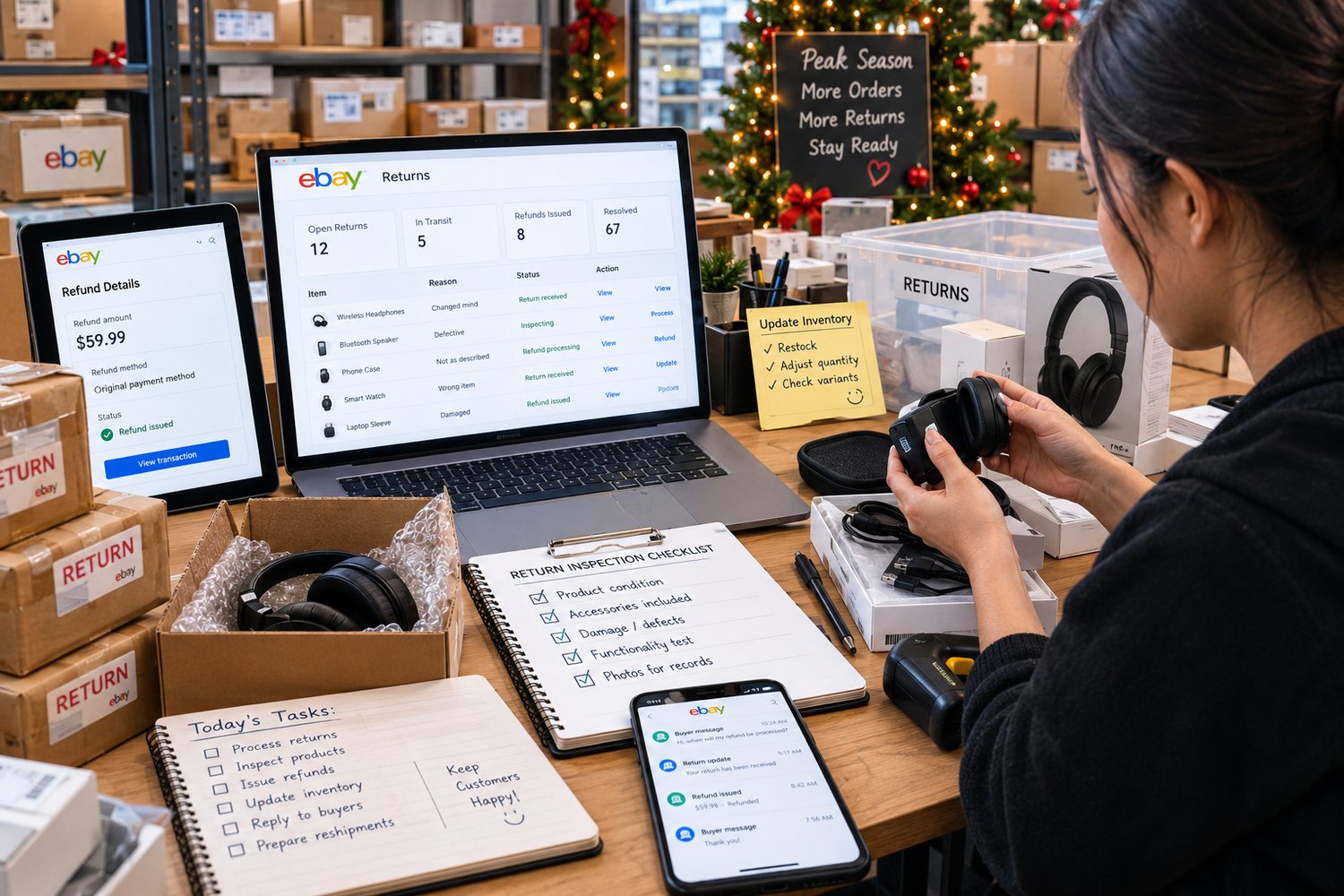
Learn why eBay returns management goes beyond refunds. Build a return workflow for inspection, damaged items, inventory, restocking, and peak-season volume.
The return arrived. The work didn’t end.
The package finally came back.
For a moment, it looks like the problem is over.
The buyer has returned the item.
The return can be closed.
The refund can be issued.
Done.
Except it isn't.
The returned package now needs to be:
- Received and identified
- Matched to the correct order
- Inspected
- Checked for missing parts or damage
- Evaluated for resale
- Refunded appropriately
- Returned to inventory—or isolated
- Documented
- Potentially relisted
And during peak season, there may be several more returns arriving while you're still processing the previous ones.
That is why eBay returns management is not simply about approving returns and issuing refunds.
It is a reverse-fulfillment process.
And if the workflow is weak, the return can create almost as much operational work as the original order.
The Return Is the Start of Another Workflow
Most sellers think about fulfillment as a forward process:
Order → Pick → Pack → Ship → Deliver
Returns move in the opposite direction:
Return Request → Approval → Shipment Back → Receipt → Inspection → Decision → Refund → Inventory Action
Every arrow is another potential handoff.
And every handoff creates an opportunity for something to be missed.
The return may arrive but nobody records it.
The refund may be delayed because the item hasn't been inspected.
The item may be inspected but never returned to available inventory.
A damaged item may accidentally be restocked.
A perfectly resellable item may sit in a returns box for weeks.
The result?
The return is technically complete—but operationally unresolved.
1. Inspection Delays Turn Returns Into Inventory Problems
A returned item sitting on a shelf isn't automatically inventory.
It is unverified inventory.
Until someone confirms its condition, you don't really know whether it can be:
- Restocked as new
- Restocked as used
- Relisted with a different condition
- Repaired
- Sold for reduced value
- Returned to a supplier
- Written off
- Disposed of
This becomes especially important when sellers have limited stock.
Imagine you have:
5 units available
A buyer returns one.
The physical item is sitting in your warehouse.
Your spreadsheet still shows 4 available.
Your listing still effectively represents 4 sellable units.
But the returned item could potentially bring that number back to 5.
Until it is inspected and classified, however, you don't know whether that is actually true.
This creates a dangerous gap between:
Physical inventory
and
Sellable inventory.
A good return workflow closes that gap quickly.
2. Refund Timing Is an Operational Decision
Refunds are not just financial transactions.
They are also workflow deadlines.
eBay provides sellers with tools for managing returns and refunds, and its current guidance says that once a returned item is delivered, sellers have two business days to inspect and refund or ask eBay for help.
eBay may also automatically issue a refund after two business days when tracking confirms delivery and a refund hasn't been issued.
That means a seller shouldn't treat returned packages as something to inspect whenever there is spare time.
They need a process for identifying:
“This return has arrived and requires action.”
Without that visibility, returns can quietly accumulate.
And the problem becomes worse during high-volume periods.
Holiday sales create today's orders.
Those orders can create tomorrow's returns.
So the operational workload can continue increasing even after the original sales rush begins to slow.
3. The Holiday Season Can Create a Return Backlog
This is where return management becomes a seasonal operations issue.
eBay is already preparing sellers for peak shopping season, emphasizing the need to get ready before holiday demand increases.
The common mistake is preparing only for outbound volume.
Sellers ask:
“Can we handle more orders?”
But the better question is:
“Can we handle the work those orders create after delivery?”
More orders can eventually mean more:
- Buyer questions
- Delivery issues
- Refund requests
- Return requests
- Returned packages
- Inspections
- Inventory adjustments
- Restocking decisions
- Refund processing
- Customer communication
This creates a second operational wave.
Sales volume comes first.
Return workload follows later.
If your operation only has capacity for the first wave, the second wave can overwhelm it.
4. A Returned Item Needs a Condition Decision
One of the most important steps in eBay returns management is deciding what happens to the physical product.
A returned item isn't automatically equivalent to the item you originally shipped.
It may have:
- Missing accessories
- Damaged packaging
- Signs of use
- Scratches
- Broken components
- Missing tags
- Different serial numbers
- Incorrect parts
- Damage caused during return shipping
eBay's condition-of-returned-items policy says returned items should generally be in the same condition in which they were received and include the items from the original package. Used, damaged, incomplete, or improperly packaged returns can affect the item's value.
That means inspection shouldn't simply ask:
“Did the item come back?”
It should ask:
“What condition did the item come back in?”
That distinction matters financially.
5. Restocking Too Quickly Can Create the Next Problem
This is one of the most dangerous return-processing shortcuts.
A package comes back.
Someone opens it.
The item looks familiar.
They put it back into stock.
Done.
Except what if:
- An accessory is missing?
- The item was used?
- The packaging is damaged?
- The wrong item was returned?
- A component was replaced?
- The product is no longer in sellable condition?
Now the seller has converted a return problem into an inventory problem.
The next buyer may receive an item that doesn't match the original listing condition.
And that can create another return.
So the workflow should not be:
Return → Restock
It should be:
Return → Inspect → Classify → Decide → Restock/Relist/Quarantine
That extra decision point is where operational control is created.
6. Damaged Returns Need Their Own Path
Not every return should follow the same workflow.
A straightforward buyer-remorse return is different from:
“Item arrived damaged.”
It is also different from:
“Item doesn't match the listing.”
And different again from:
“Returned item came back damaged or incomplete.”
These situations can have different financial and operational consequences.
eBay's current guidance states that sellers generally cover return shipping when the buyer reports that an item arrived damaged, is faulty, or doesn't match the listing. eBay also provides seller protections in certain eligible circumstances, including potential refund deductions for decreased value on used or damaged returns for qualifying Top Rated Sellers.
The important operational lesson is not simply to memorize every policy.
It is to classify the return correctly before deciding what happens next.
7. Don't Let Returns Become a Separate Inventory System
Another common problem appears after inspection.
The item is physically sitting somewhere.
But the inventory system hasn't been updated.
Now you have:
Physical stock ≠ System stock
That can create:
- Overselling
- Incorrect availability
- Duplicate purchases
- Listing errors
- Fulfillment delays
- More customer service work
A returned item should have a defined inventory outcome.
For example:
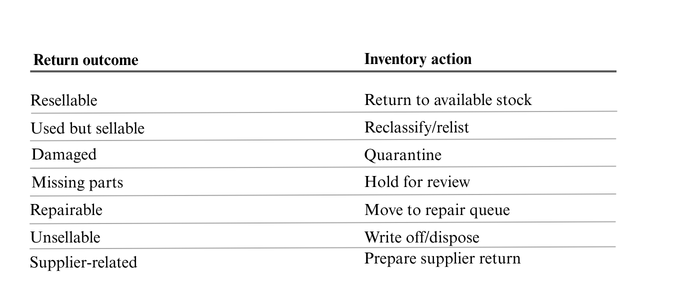
The exact categories can vary by business.
The important thing is that every return has a destination.
8. The Real Cost of a Return Is Bigger Than the Refund
Sellers often calculate the cost of a return like this:
Sale − Refund = Loss
But operationally, the calculation can be much larger.
A single return may involve:
Return shipping
Customer communication
Refund processing
Inspection time
Repackaging
Inventory adjustment
Potential loss in product value
Relisting work
Additional support time
Potential second sale disruption
The refund is only one part of the cost.
This is why a high return rate isn't the only concern.
A poorly controlled return process can make every return more expensive to manage.
9. Your Returns Area Should Not Become a Black Hole
If you physically handle inventory, create a defined location for returned items.
Not:
“Put returns over there.”
Instead, create clear states such as:
RETURN RECEIVED
↓
AWAITING INSPECTION
↓
INSPECTED
↓
RESTOCK
RELIST
REPAIR
SUPPLIER RETURN
WRITE-OFF
This makes the status visible.
Anyone looking at the returns area should be able to understand:
What arrived?
What still needs inspection?
What has already been refunded?
What can be resold?
What is waiting for a decision?
Visibility reduces unnecessary checking.
10. Build a Return Workflow Before Peak Season
If your eBay store is entering the holiday selling period, don't wait until returns increase to design the process.
Build the workflow now.
A simple version can look like this:
Step 1 — Return request received
Record:
- Order number
- Item
- Buyer
- Return reason
- Date opened
- Required action
Step 2 — Return tracked
Monitor:
- Return label
- Tracking
- Expected arrival
- Delivery confirmation
Step 3 — Return received
Record:
- Date received
- Package condition
- Item received
- Order matched
Step 4 — Inspect
Check:
- Product condition
- Accessories
- Packaging
- Serial number where applicable
- Signs of use
- Damage
- Completeness
Step 5 — Make a disposition decision
Choose:
Restock / Relist / Repair / Supplier Return / Write-Off
Step 6 — Process refund
Complete the required refund action within the applicable timeframe.
Step 7 — Update inventory
Make sure the inventory record reflects the item's actual status.
Step 8 — Close the loop
Record the reason and outcome.
This final step matters.
Because returns are also data about your operation.
11. Returns Can Tell You Where Your Operation Is Breaking
Don't only count returns.
Study them.
If multiple buyers return the same product because the size is unclear, the problem may be the listing.
If buyers repeatedly say the item doesn't match expectations, investigate the description, images, or item specifics.
If damaged returns are increasing, investigate packaging.
If returned products frequently come back incomplete, improve outbound documentation or packing verification.
If inspections are consistently delayed, the problem may be staffing or workflow capacity.
A return should therefore answer two questions:
“How do we resolve this return?”
and
“Why did this return happen?”
The first protects the transaction.
The second improves the operation.
12. Create a Return Dashboard, Not Just a Returns Folder
You don't need complicated software to gain visibility.
Even a simple tracker can monitor:
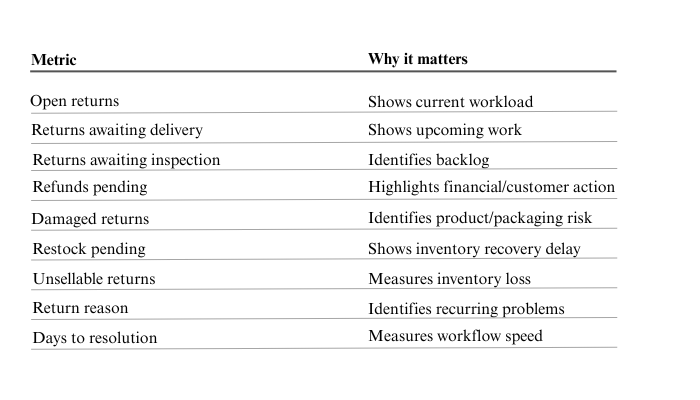
The goal isn't to create another spreadsheet.
The goal is to answer:
“What is happening to our returns right now?”
The 10–30 Orders-a-Day Breaking Point
At very low order volume, sellers can often manage returns from memory.
They remember the package.
They remember the buyer.
They remember what happened.
But as volume increases, memory becomes unreliable.
At 10 orders a day, a few returns may feel manageable.
At 30 orders a day, the operation is producing a much larger stream of transactions—and the return workload can start competing with new-order fulfillment.
That's when sellers often discover that their problem isn't simply:
“We have too many returns.”
It is:
“We don't have a system for what happens after the return arrives.”
That is a very different problem.
A Simple eBay Returns Management Checklist
Before the holiday rush gets heavier, ask:
Return intake
- Do we know when a return is delivered?
- Who owns the next action?
- Is the return matched to the correct order?
Inspection
- Do we have a standard inspection checklist?
- Are damaged or incomplete items quarantined?
- Do we document condition differences?
Refunds
- Are pending refunds visible?
- Do we know which returns require immediate attention?
- Are refund decisions consistent?
Inventory
- Is every returned item given a disposition?
- Can returned inventory accidentally be restocked?
- Are inventory records updated promptly?
Reporting
- Are we tracking return reasons?
- Are repeat return patterns reviewed?
- Can we see how long returns remain unresolved?
If you answered “not consistently” to several of these questions, your return process probably depends too heavily on memory.
And memory doesn't scale.
The Return Arrived. The Work Didn't End.
A return is not the opposite of a sale.
It is another operational workflow.
The seller has to move the item from:
Buyer → Return → Inspection → Decision → Refund → Inventory → Resolution
Every stage needs an owner.
Every decision needs a rule.
Every unresolved return needs visibility.
Because the real operational risk isn't simply having returns.
It's having returns that nobody knows what to do with next.
As the holiday season approaches, sellers are preparing for more orders, faster fulfillment, and higher customer expectations. eBay itself advises sellers to prepare for peak season in advance.
But preparing for peak season shouldn't stop at outbound fulfillment.
Prepare for the reverse flow too.
Because the sale may end when the package reaches the buyer.
The operational work may begin again when it comes back.
Build Control Into Your Return Process
If your store is growing beyond the point where returns can be managed from memory, a documented workflow can help you control:
- Return intake
- Inspection
- Refund timing
- Damaged items
- Inventory reintegration
- Restocking decisions
- Exceptions
- Return reporting
The goal isn't to eliminate every return.
The goal is to make every return predictable to process.
That is what operational control looks like.
Related Reading
Why eBay Sellers Keep Making the Same Listing Mistakes
Repeated listing errors often point to a quality-control problem inside the workflow.
Why eBay Sellers Lose Money on Orders They Successfully Fulfill
A completed order can still contain hidden operational costs.
Why eBay Shipping Exceptions Become Expensive When Nobody Owns Them
An unresolved exception can become a customer-service and profitability problem.
Why eBay Sellers Struggle After Reaching 30 Orders Per DayMore orders expose weaknesses that manual processes can hide at lower volume.
 About the Author
I work with Shopify and eBay sellers to identify and stabilize operational systems before fulfillment pressure turns into customer complaints, refunds, and margin loss.
My focus is helping stores handling 10–30 orders per day build resilient workflows that scale without creating hidden operational stress.
👉 Download the free fulfillment audit: eBay Seller Compliance Risk Audit
📢 Share This
Found this useful? Share it with other operators: