


How to Sell Clipart in 2026 (Everything You Need to Know)
Last updated: March 27, 2026
Do you want to sell clip art online? Perhaps you love creating little graphics for your own projects, and you’re wondering about monetizing these. Or maybe you’re an artist looking for a great money-making project, and selling clipart is something you want to try. You might be hoping for some passive income … or just wanting a great excuse to create more art! In this guide, we’re going to take a look at exactly what you need to know to sell clip art. Note: Some people write “clipart,” and others prefer “clip art”. We’ll use both terms in this guide. Quick find links to things we’ll cover:- What is Clipart?
- What is Clipart Used For?
- Can I sell clip art?
- What Program Should I Use to Make Clipart?
- Tips for Selling Clipart For Profit
- How to Make Clip Art to Sell
- How to Sell Clipart Online
- Popular Clipart Ideas (and Digital Art Ideas) to Sell
What is Clipart?
Clipart, or clip art, is a type of digital art that uses pre-made images that can work in many different contexts. Clip art images aren’t photos (though they could potentially be based on a photo). Instead, they’re usually line drawings, simple graphics, or cartoon-style images.
What is Clipart Used For?
Clipart is used in all sorts of contexts, both as digital art and as printed art. Some common uses include:- Personal projects, such as a family Christmas letter.
- Community groups, perhaps on a poster for a local event.
- By teachers and educators, for worksheets and display boards.
- By students, for class projects and homework.
- For small businesses, perhaps in ads and on menus.
- For internal communications in larger businesses, such as a work-party invitation.
- By entrepreneurs who sell stickers or t-shirts
- By crafters who use them in scrapbooking or bullet journals
- By web developers and website owners, for blog graphics and website design
- By marketers, for social media posts
- By graphic designers, for flyers, posters, invitations, and other assets
- For small businesses, perhaps in presentations, newsletters, ads, and on menus.
- For internal communications in larger businesses, such as a work-party invitation.
Can I Sell Clip Art?
Yes, you can sell clip art. This is a great passive income idea as your product can be continuously purchased by a growing number of customers without any extra effort on your end. Be sure to follow copyright rules to avoid getting into legal issues. Do not use any other artist’s artwork in your clipart without their official permission. Other than that, you’re good to go!How to Sell Clipart Online
1. Pick a niche
In a later section, you’ll find a list of clip art ideas you can choose from as your niche. If you choose a niche that’s more evergreen, like school or business-related, you’ll likely have recurring income from teachers and business people who use your clip art to add to their projects. If you choose a niche that’s seasonal, like weddings or maternity, you likely won’t have repeat buyers after that chapter of their life has ended. That doesn’t mean those niches aren’t profitable, but it’s something to think about.2. Decide what to sell
Bundles are a great way to earn a higher profit from your clip art. They also make customers feel like they’re scoring a better deal on their purchase. Customers often buy clipart bundles to create multiple pieces of content with a single purchase.3. Create the clipart
Once you’ve decided what kind of clipart you want to make, it’s time to start creating clip art. You can use design tools like Photoshop or Illustrator. However, some people have even designed clipart in Canva. If you’re reselling someone else’s clipart, make sure you’ve purchased a commercial license.4. Pick the platform you want to sell on
To make it really easy to sell your clipart online, we recommend using Payhip, which offers many useful features, including instant file delivery, a website builder, the ability to include multiple files per order, and more. Payhip also charges only a 5% transaction fee per order, so there’s no upfront fee or subscription on its free plan.4. Upload your clipart to sell
On Payhip, you can upload your clip art as a digital product. You can add these individually to create multiple store listings for all your clip art. Payhip also offers a Bundle option that lets you add multiple products to a bundle you can sell on your store. After you’ve uploaded your clip art, you can write a product description to persuade people to buy your clip art. You can also add up to nine images on the product page.5. Start selling your clipart
You can start selling clipart on social media, through Payhip marketplace, or organically through search. You can find more marketing ideas later in this article to help you get started.Sell Clip Art with Payhip
Join over 130,000 sellers who have launched their online businesses with Payhip
1. Create Your Clipart
First, make your artwork using your graphic design software of choice. Save a high-resolution copy, along with versions that can be easily used on the web (.jpg or .png).2. Add a New Product in Payhip and Upload Your Clipart
Tip: Need a Payhip account? Go ahead and register: it’s free. In your Payhip account, click the Products tab, then “Add new product.” Next, select “Digital Product,” and Payhip will give you a form to add your product details. Use the “Upload product file” button to upload your clip art. You could add each image individually, but it’s easier for you and your customers to use a .zip file of multiple images. You’ll also need to fill out a title and other details for your product.

3. Set a Price for Your Clipart
It can be tricky to know what to charge when selling digital products. You might want to look for other similar sets of clipart to see what they’re selling for. A set of clipart costs $3 to $30. Note that prices will vary depending on whether or not a commercial license is included (allowing people to sell products that use the clipart).4. Upload at Least One Image of Your Clipart Set
Payhip lets you include up to 9 images for your product. Add at least 1 image that shows a sample of your clipart (show off your best items here). The individual clipart pieces will likely be too small for people to copy and use for free, but you can watermark your image if you want.5. Promote Your Clipart Collections
Once you’ve created your amazing storefront and products, it’s time to start driving traffic to your store. Take advantage of the rise in social media to convert your followers into customers. Showcase your clip art’s use cases across different settings to reach a wider audience. Take advantage of Payhip’s Marketing tools, such as email marketing integration, affiliate, referrals, coupon codes, and more, to set up a solid Marketing strategy for your business.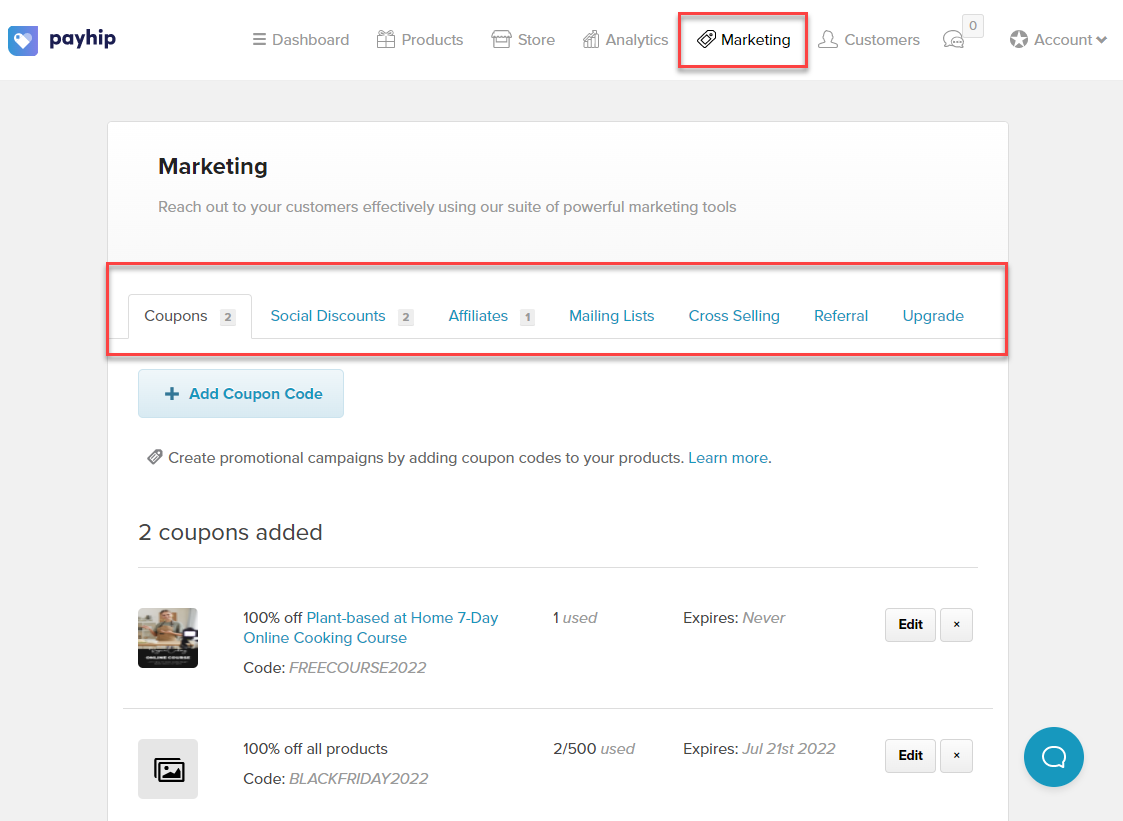 Tip: Another option to sell your clipart is to use an online marketplace, such as Payhip Marketplace. This marketplace offers access to a large audience for digital clip art, watercolor clip art, and other types of clip art.
However, it’s hard to make your clip art stand out in busy online marketplaces, no matter how unique your style is, because there are so many other individual artists and artist shops.
Payhip is a more profitable option compared to Etsy or Creative Market.
Tip: Another option to sell your clipart is to use an online marketplace, such as Payhip Marketplace. This marketplace offers access to a large audience for digital clip art, watercolor clip art, and other types of clip art.
However, it’s hard to make your clip art stand out in busy online marketplaces, no matter how unique your style is, because there are so many other individual artists and artist shops.
Payhip is a more profitable option compared to Etsy or Creative Market.
How to Price Your Clip Art
1. Set a typical price for clip art
The average clip art costs between $3 and $30. The higher price end is mostly associated with bundled products. You can choose to set both individual and bundled versions of your clipart. The most profitable way to sell clip art is to create small packs and mega packs of clip art assets. The bundle pricing strategy allows you to earn more as a seller while making customers feel like they’ve secured a deal with so much clip art in one bundle.2. Set anchored pricing
The best-performing sellers don’t set a flat rate for all their products. They might set a price for a mega bundle much higher than the average sale price in their store, so that the cheaper products seem like a better deal. You don’t want to underprice your products in this strategy. You’ll want to create a baseline price for the clip art you actually want to sell, while having a more expensive option to make that key product look more attractive. For example, if you know one product sells more than anything else, you would create another, more expensive product to make your best seller more appealing to buyers.3. Volume generates more sales
As long as your clipart looks attractive enough to buy, it’s crucial to remember that to sell clipart and make money from it, you’ll need to have a lot of products to sell. Sellers who create one amazing product to sell will not make as much money as those who create hundreds of products to sell. Volume matters.4. Set commercial license prices
In addition to the price for selling your clip art, you can charge a fee for commercial use. If someone is using your clip art for personal use, like a birthday party invitation for their child, they wouldn’t pay for a commercial license. However, if a wedding vendor is using your clip art to add it to favors they sell to brides, you would be able to upsell an additional commercial license to them. You can clearly state on your product page that your clip art is for personal use only and that a commercial license is required for commercial use.What Program Should I Use to Make Clipart?
To make your own clipart, you’ll need software such as Adobe Illustrator that lets you create and manipulate illustrations. (If you’re a photographer, then creating stock photography might be a better fit for you.)Tips for Selling Clipart For Profit
1. Create Multiple Cliparts in A Set
You’ll want to create multiple different pieces to put together in a cohesive set, as people are unlikely to buy a single piece of clip art. The more items you have in the set, the higher the perceived value will be to customers. You may want to develop a consistent theme or style. Think about your audience: clip art aimed at elementary school teachers might be quite different from clipart designed for use by businesses.2. Set Clear Licensing Guidelines
Consider providing specific usage rights guidelines to ensure your customers use your clip art legally. Most clip art is sold with a limited license that allows customers to use the image for personal usage. However, you can opt to charge additional fees for commercial licenses.How to Make Clip Art to Sell
There are two main ways to create clip art to sell. One that involves your design skills and another that requires you to work with someone who has some design skills.1. Draw Your Own Clipart
If you have some creative juice and design skills, you can choose to create your own clipart. The exact process of creating clip art will depend on the software you’re using to create your art. In brief, these are the basic steps:- Choose a photo or item to use as your initial inspiration.
- Create it from simple shapes or freeform curves and lines in your graphic design software.
- Add colors to your image. You could potentially create several different versions of a piece of clip art in different colors.
- Include details such as facial expressions, buttons on objects, and so on.
- Save your clip art in a high-quality format, such as a bitmap or vector digital file.
- Create other formats for use on the web: .jpg or .png will normally work best.
2. Hire Clipart Artists
If you don’t have any design skills or design ideas, that doesn’t mean that you can’t start your own clipart business! You can work with designers/artists on Upwork and Fiverr to design images to your liking. Be sure to have proper agreements in place to purchase the rights to those images created by those artists. Avoid any licensing issues by setting clear written expectations with your hired artists.How to Market Your Clipart
1. Publish clip art bundles on Pinterest
Once you’re ready to start selling clip art, you can publish your clip art bundles on Pinterest. The best approach for posting your bundles on Pinterest is to add the exact keyword for what you’re selling. For example, “Heart clip art images” will perform best on Pinterest, as people will know exactly what they’re getting. If you get too creative with your title ideas, you might not achieve the visibility you want. Keyword optimization is the name of the game for ranking on Pinterest.2. Create process videos on social media
On platforms like Instagram and TikTok, rather than posting pictures of your clipart, show the process of making clipart. People love watching tutorials and seeing how things are made. Create videos that demonstrate your process for creating clip art. While some will become your competitors, many people would rather buy it from you than build it themselves. Make sure your link in bio is easy to access your product pages. For YouTube, you can add a link directly to your description for people to buy.3. SEO optimize your website
To sell clipart, you’ll want to optimize your website for search. Adding exact keywords for your product names instead of branded product names will give you more visibility in search engines. For example, “tree clip art” (SEO) vs “Into the Woods clip art” (branded). On Payhip, you can even write blog posts to help you rank organically for related clip art keywords. Remember to keep the intent the same: only include relevant products for your article’s topic, rather than adding everything you sell to gain visibility. Intent matters.4. Send emails to your products
If you want to sell clip art in high volume, you can email your products. You can build an email list on Payhip to grow an audience that will buy your clip art. When customers order from you, they can opt in to receive emails. You’ll need to comply with GDPR for email in the EU. Email is typically the most profitable way to generate sales. You don’t want to promote your products in every email. However, if you promote your products in every email, you should space out your emails to avoid increasing the number of unsubscribes.Popular Clipart Ideas and Digital Art Ideas to Sell
Just knowing how to make clipart to sell may not help you much if you’re struggling for inspiration! Here are some popular clip art and digital art ideas to create clipart in your own unique style.Music
You can sell clip art of various musical instruments and music symbols, such as guitars, violins, pianos, treble clef, and more. These clip art pieces would be perfect for music teachers creating printables and music worksheets for their students, or for musicians creating flyers for their bands.
Food
There are endless food items you can turn into cliparts to sell, from sushi, tacos, burritos, ramen bowls, fries, and burgers, to name a few! These images are great for companies that are working in the food industry. Some use cases include menu design, restaurant website design, restaurant brochures, and more.
Valentines Day
The Valentine’s Day clip art to sell includes hearts, flowers (particularly roses), chocolates, cute animals, Cupid, and all things red and pink. Greeting card makers, online retailers, teachers, product designers, and event planners are all potential customers who would buy clip art in this category.
Christmas
Creating clip art of snowmen, Christmas trees, Christmas lights, gingerbread houses, Christmas wreaths, stockings, reindeer, snowflakes, holly, gifts, snow globes, baubles, candy canes, bells, and more can make you money. You can sell clip art to small business owners, crafters and DIY makers, graphic designers, marketers, and event planners.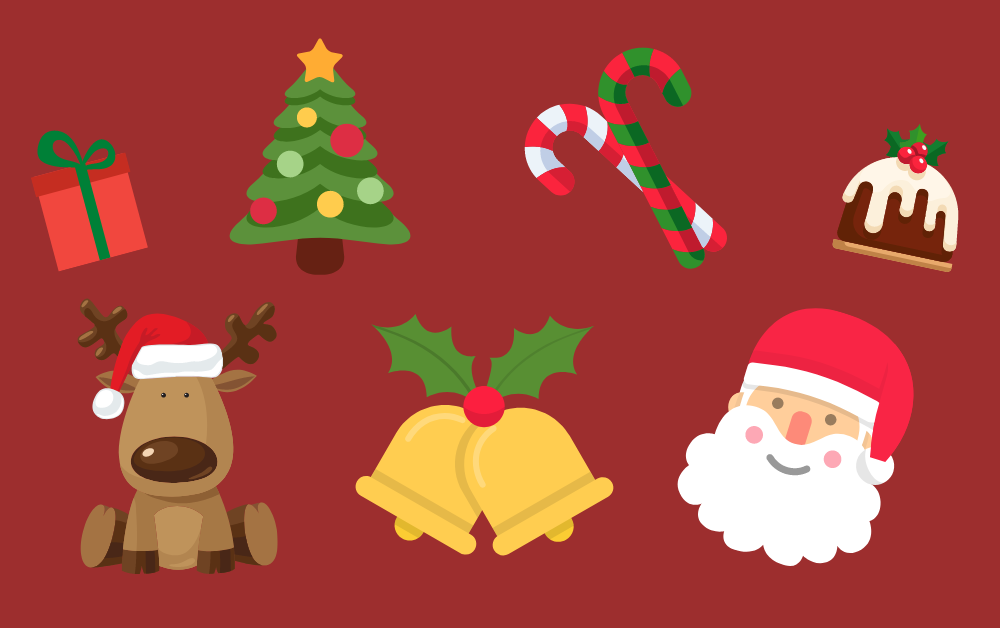
Back to School
To sell clip art for schools, create images of school supplies, such as backpacks, pens, pencils, notebooks, and more. These images are great as clipart, as they are widely used in educational settings for worksheets, printables, presentations, planners, and more. Teachers and homeschooling educators would be the target audience for this clip art.
Birthdays
The words “Happy Birthday”, cakes, balloons, candles, gifts, party poppers, cupcakes, and party hats would all make a good collection of clip art to sell. Graphic designers, party planners, card makers, crafters, and invitation makers would all be the primary customers of this clip art.
Easter
You can also sell clipart of eEggs, bunnies, “Happy Easter”, chocolate, Easter baskets, flowers, butterflies, chicks, and also Christian symbolism, such as the cross. The primary customers for these clip art files would be card makers, teachers, graphic designers, and others.Emojis
You could create a range of clip art featuring different faces, following the theme of popular emojis (e.g., a crying-laughing emoji or a thumbs-up emoji). The ideal customers for these would be product designers, graphic designers, marketers, content creators, and teachers.Beach
Selling clipart of popsicles, ice cream, buckets and spades, boats, sunshades, cocktails, inflatables, swimwear, flipflops, deck chairs, dolphins, beach balls, surfboards, mermaids, starfish, turtles, and more is ideal for a beach-themed clip art collection. Travel agencies, product designers, party planners, invitation makers, and DIY crafters would most likely buy this kind of clip art.People
Selling clip art of people in business meetings, classrooms, teachers and students, grandparents and grandkids, sporting groups, different professions that are easily recognizable by uniform, accessories, or context (e.g., doctors, bus drivers). Those making slide decks, teachers, scrapbookers, and children’s authors might be the target audience of these types of clip art.Sports
Selling clip art related to sports, such as balls, rackets, hockey sticks, medals, trophies, basketball hoops, goals, gloves, bikes, weights, and more, is a good option for clip art sellers. Sports teams, invitation and flyer makers, teachers, and more would likely be the main customers of these products.Weddings
The wedding niche is a profitable choice for creating clip art of brides, grooms, wedding cars, confetti, rings, champagne flutes, bouquets, doves, ribbons, and anything that could work for wedding invitations and decor. You can sell clip art to DIY brides, wedding planners, wedding businesses, invitation makers, and more.Small business brand kits
Sell clip art for small business brand kits. You can create clip art for slide decks and sell asset packs to help people create professional-looking slides with graphics. You can also sell clip art for use in logos or branding documents. The ideal customer for this would be business owners, online retailers, or marketers.Canva templates with clipart assets
You can also sell clip art assets for Canva templates. You can sell both clip art and Canva templates on Payhip. If you want to double your revenue, you can create templates with your clip art already added in. You can also upsell your clip art bundles with each template sale, where people can find bonus assets not already included. Those with Canva subscriptions would be your target audience.Clipart numbers and/or letters
These can be useful in lots of different contexts. If you create numbers, you’ll need 1-9 plus a 0. You might also want to include simple mathematical symbols if your images are aimed at teachers.FAQ
How Do You Sell Clip Art on Etsy?
Before you sell on Etsy, you should know there are many fees associated with the platform. You need to pay transaction fees in addition to listing fees, which hurt your overall margins. The best platform to sell clip art is Payhip, where you’ll pay only a 5% transaction fee, no listing fees, and no monthly subscription on the free plan. This gives you a leg up as you build your business, where you can promote on Pinterest for free and keep more of your revenue.Can You Legally Use Clipart?
You can’t legally use other people’s clip art for your own artwork, unless you have permission (either personally from the creator/owner of the rights, or through purchasing a commercial license that allows you to modify and resell the art). When it comes to clip art you’ve purchased, you can normally legally use it for personal use, such as craft projects. You may be able to use it for blog posts and ads, so long as you’re not selling products using it. Some clip art collections are licensed for commercial use – e.g., you could print the clip art on a t-shirt and sell it. Check the usage rights in your license agreement to be sure. Most clip art publishers offer commercial licenses for a certain number of products, e.g., 500. Beyond that, you’ll need to pay an extra cost.Can I Make Money Selling Clip Art?
Yes, you can make money selling clip art. Building a business can be a lot of work. The secret to generating sales is to create many products and do the hard work of marketing them. Marketing your clip art isn’t something you do just once. You need to consistently put your products out there so people can find out about them. Being active on social media makes it easy for people to find your work.

Payhip
Join over 130,000 creators who have launched their businesses selling digital products, online courses, memberships, coaching, and physical products.
Get started for free today
Comments
Leave a Comment